 EN
EN BR
BR DE
DE ES
ES FR
FR RU
RU ID
ID TR
TR IT
IT JP
JP SA
SA VN
VN TH
TH KR
KR
VPN Ports Explained: Numbers, Protocols, and Port Forwarding

 Key takeaways
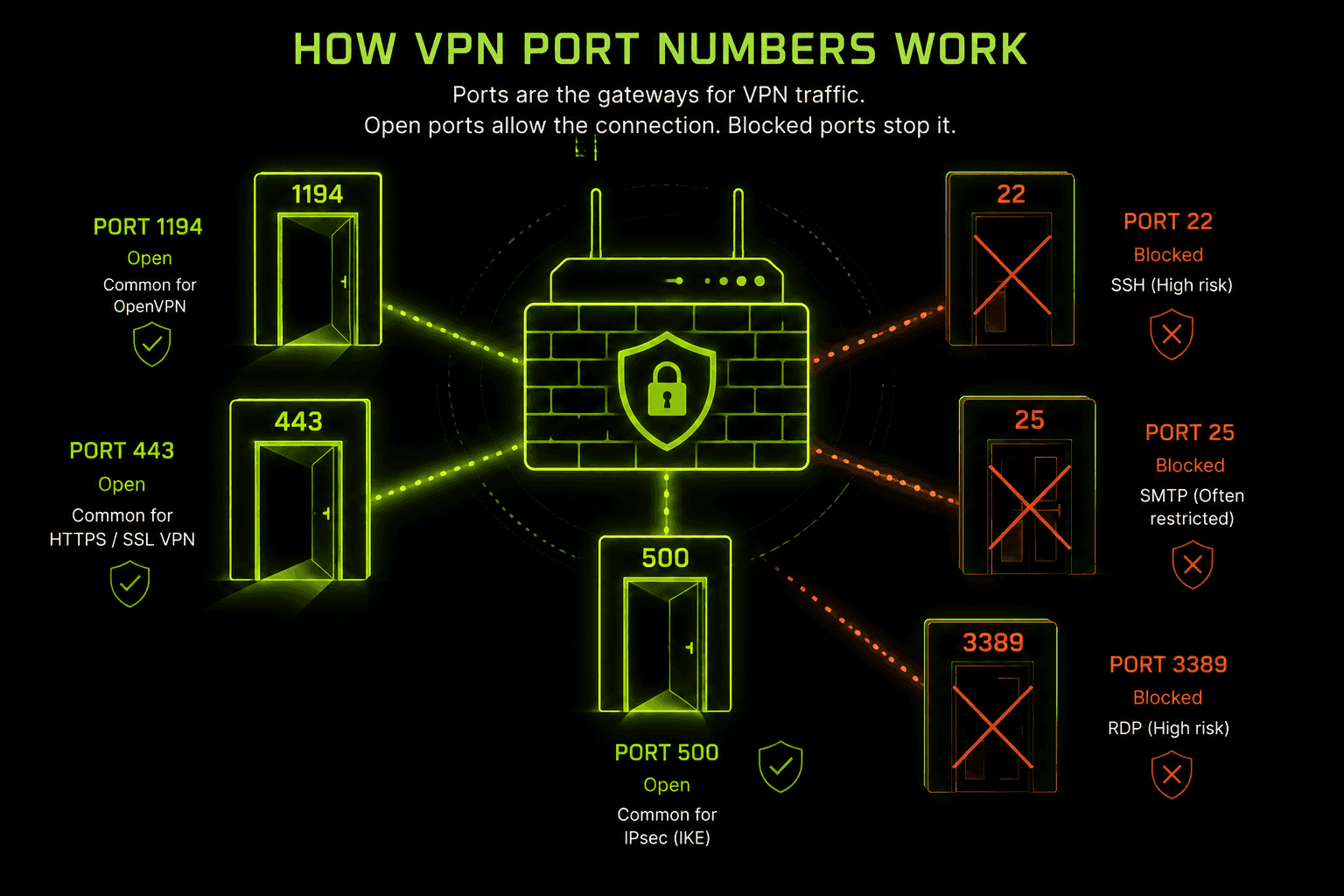
- A vpn port number is just the doorway your VPN protocol uses to send encrypted traffic — OpenVPN typically uses UDP 1194 or TCP 443, WireGuard uses UDP 51820, and IPsec/IKEv2 use UDP 500 and 4500.
- Port forwarding vpn setups are a separate feature from protocol ports — forwarding opens a specific incoming port so an outside device can reach something on your network, while the protocol port is what carries your encrypted tunnel itself.
- TCP 443 is the hardest VPN port for firewalls to block because it looks identical to normal HTTPS traffic, which is why it's often the fallback option on restrictive networks.
- Some older ports (like those tied to PPTP) are considered legacy and best avoided, not because the port number itself is insecure, but because the protocol behind it has known weaknesses.
- Most people never need to manually pick a vpn port number — apps like Guru VPN choose one automatically, though switching manually can help on networks that block a specific port.
If your VPN connection has ever failed on one network but worked fine on another, the reason often comes down to a vpn port being blocked somewhere along the way. A port is essentially a numbered channel — one of 65,536 possible doorways a device uses to send and receive specific kinds of traffic — and every VPN protocol, whether it's OpenVPN, IKEv2, or WireGuard, is built to use a particular one by default. Understanding what port vpn traffic actually rides on, and how that's different from port forwarding, clears up most of the confusion people run into when a connection won't cooperate. This guide walks through the common port numbers by protocol, what port forwarding actually does, which ports are worth avoiding, and how Guru VPN and similar apps handle all of this so you rarely have to think about it yourself.
Key Takeaways
- A vpn port number is just the doorway your VPN protocol uses to send encrypted traffic — OpenVPN typically uses UDP 1194 or TCP 443, WireGuard uses UDP 51820, and IPsec/IKEv2 use UDP 500 and 4500.
- Port forwarding vpn setups are a separate feature from protocol ports — forwarding opens a specific incoming port so an outside device can reach something on your network, while the protocol port is what carries your encrypted tunnel itself.
- TCP 443 is the hardest VPN port for firewalls to block because it looks identical to normal HTTPS traffic, which is why it's often the fallback option on restrictive networks.
- Some older ports (like those tied to PPTP) are considered legacy and best avoided, not because the port number itself is insecure, but because the protocol behind it has known weaknesses.
- Most people never need to manually pick a vpn port number — apps like Guru VPN choose one automatically, though switching manually can help on networks that block a specific port.
What Is a VPN Port?
A port is a numbered endpoint — somewhere between 0 and 65535 — that lets a device sort incoming and outgoing traffic by which application it belongs to, the same way a building uses apartment numbers to route mail to the right door even though everything arrives at one street address. A vpn port works the same way: it's the specific number your VPN protocol uses to package and send its encrypted traffic, separate from the ports your browser, email client, or games are using at the same time. When people ask what port does vpn use, or more casually what port vpn software runs on, they're really asking which of these numbered channels a given protocol has been built to default to.
Every device has the same 65,536 available ports, but by convention certain ranges are reserved for certain jobs — web traffic typically rides on port 80 or 443, email on 25 or 587, and each VPN protocol has settled on its own default vpn port over years of practical use. None of these assignments are hardcoded into how the internet works; a network administrator could technically run any service on any port. What matters in practice is that firewalls, routers, and ISPs have learned to recognize these conventional ports, which is exactly why the specific port vpn number you use can affect whether a connection gets through cleanly or gets flagged and throttled.
How VPN Ports Work
Once you connect, your VPN app wraps your actual internet traffic inside an encrypted tunnel and sends it out through its designated port to a VPN server, which unwraps it and forwards the request to its real destination on your behalf. The reply follows the same path in reverse. From the outside, a firewall or ISP doesn't see your original traffic at all — it sees an encrypted stream moving through a specific port, and that's the only thing it has to make judgments about, since it can't inspect what's actually inside.
This is also why the choice of port can matter more than people expect: two connections carrying identical encrypted data can be treated completely differently depending on which port they're using, because some networks block, throttle, or deprioritize traffic based purely on the port number, regardless of what's actually inside the packet.
Common VPN Ports by Protocol
Different VPN protocols default to different ports, and knowing the vpn port numbers each one uses helps explain why switching protocols in your app sometimes fixes a connection that wouldn't work otherwise.
| Protocol | Transport | Default Port(s) | Notes |
|---|---|---|---|
WireGuard | UDP | 51820 | Fast, modern, less commonly blocked than older ports |
OpenVPN | UDP | 1194 | Default for speed and lower latency |
OpenVPN | TCP | 443 | Fallback that mimics HTTPS traffic |
IKEv2 / IPsec | UDP | 500, 4500 | An ipsec vpn port pair — 500 for key exchange, 4500 for NAT traversal |
SSL VPN | TCP | 443 | An ssl vpn port shared with standard web traffic |
PPTP | TCP | 1723 | A pptp vpn port; considered legacy and best avoided |
L2TP/IPsec | UDP | 500, 4500, 1701 | Combines IPsec's ports with L2TP's own tunnel port |
Two of these ports deserve a closer look because they show up so often in troubleshooting. UDP 1194 is the traditional default vpn port for OpenVPN and generally the fastest option, but it's also well known enough that some restrictive networks specifically watch for and block it. TCP 443 solves that problem by riding the exact same port as regular encrypted web browsing, making the traffic far harder to distinguish and block — which is why it's the go-to fallback for both OpenVPN and SSL VPN connections on networks that filter aggressively.
What Is VPN Port Forwarding?
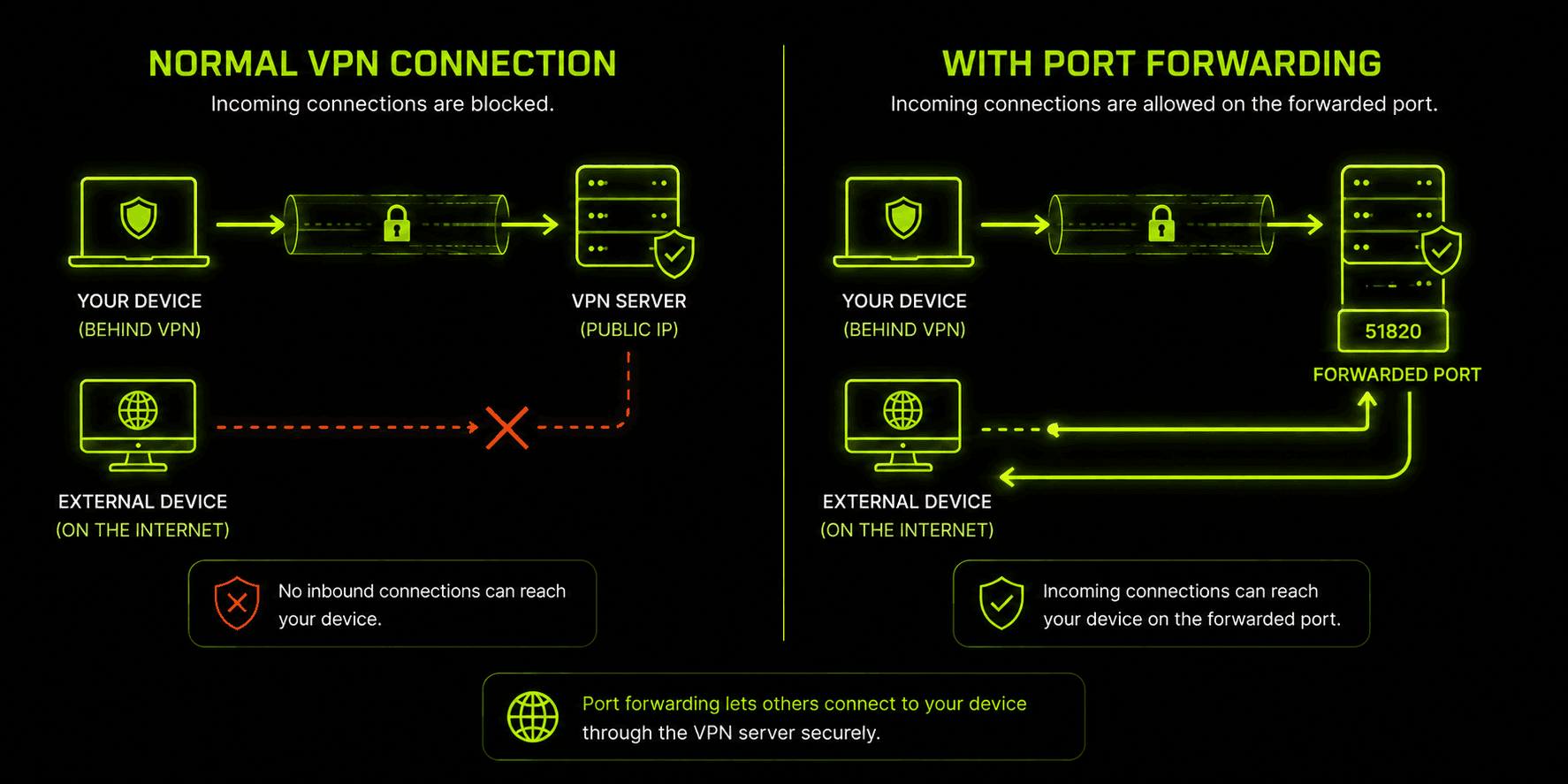
It's easy to confuse "which port does my VPN use" with "port forwarding," but they're two different things solving two different problems. The protocol port (1194, 443, 51820, and so on) is what carries your encrypted tunnel to the VPN server. Vpn port forwarding, by contrast, is a feature that carves out one designated port on the provider's server and routes it straight through to your device, so something on the outside — a torrent peer, a game server, a remote-access tool — can initiate a connection back to you even though your real IP address is hidden behind the VPN.
Without port forwarding vpn connections, your device can freely reach out to the internet, but the internet generally can't reach back in to start a new connection — which is exactly the point of hiding behind a VPN in the first place, but it becomes a limitation for specific use cases like seeding torrents efficiently, hosting a small game server, or accessing a device on your home network remotely. A vpn with port forwarding solves this by assigning you a dedicated incoming port (often alongside a static or dedicated IP) that stays reachable from outside while the rest of your traffic remains hidden and encrypted.
Setting up port forwarding with vpn apps that support it usually means opening a specific port in the app's settings, then configuring whatever software needs it — a torrent client or game server — to use that exact same port number. It's a narrower, more advanced feature than basic VPN connectivity, and not every provider offers it, since opening any incoming port is a deliberate security trade-off that most everyday VPN use doesn't need.
Which VPN Ports Should You Avoid?
Not every open port is a good idea, though the reasoning is more nuanced than "some numbers are dangerous." A handful of long-standing, unencrypted legacy ports are worth avoiding entirely for anything sensitive: port 21 (FTP), port 23 (Telnet), and plain port 80 (unencrypted HTTP) all predate modern encryption standards and transmit data in the clear, so relying on them defeats the purpose of running a VPN in the first place.
Among the actual VPN protocol ports, PPTP's TCP 1723 is the one most worth steering away from — not because port 1723 is inherently flawed, but because the PPTP protocol behind it has known cryptographic weaknesses that have made it obsolete for anything requiring real security. The safer, current-generation ports — WireGuard's 51820, OpenVPN's 1194 and 443, and IKEv2's 500 and 4500 — don't carry that same baggage, since the protocols behind them are actively maintained and free of the vulnerabilities that sank PPTP years ago.
The broader point worth remembering: a port number by itself isn't secure or insecure. Security comes from the encryption protocol running through that port, not the number. Choosing a well-supported, modern protocol matters far more than which specific port it happens to use.
Why Ports Matter for Firewalls, NAT, and Blocking
Firewalls and network administrators don't usually inspect what's inside encrypted VPN traffic — they can't, that's the point of encryption — so they fall back on judging connections by metadata they can see, and the port number is the most visible piece of that. A corporate network, school, or government-level censor that wants to restrict VPN use will often simply block the well-known default ports rather than trying to detect encryption patterns directly.
This creates a rough hierarchy of how likely different ports are to get blocked. UDP 1194, being the most recognizable default for OpenVPN, is also the most commonly targeted for blocking on restrictive networks. WireGuard's UDP 51820 is comparatively newer and less universally recognized, so it's currently blocked less often, though that's shifting as WireGuard adoption grows. TCP 443 sits at the safest end of this spectrum by a wide margin, since blocking it outright would also block ordinary HTTPS browsing for everyone on the network — an outcome most networks aren't willing to accept just to stop VPN traffic.
NAT (Network Address Translation) adds another layer to this. Since most home and mobile networks share one public IP address across many devices, NAT relies on port numbers to figure out which internal device a piece of returning traffic belongs to. This is part of why port forwarding vpn setups can behave inconsistently on certain networks — if you're behind carrier-grade NAT (common on mobile data and some ISPs), there may be no way to forward a port at all, regardless of what your VPN provider supports on their end.
How to Change or Troubleshoot Your VPN Port
Most VPN apps, including Guru VPN, select a working port and protocol automatically, so manually changing anything is rarely necessary. But a few symptoms point specifically to a port-related problem worth addressing directly:
Connection won't establish at all, especially on public Wi-Fi or a work/school network. This usually means the network is actively blocking your VPN's default port. Switching the app's protocol setting from UDP to TCP, or specifically to a TCP 443 option if your app offers one, resolves this in most cases since that port is far harder for a network to block without also breaking normal browsing.
Connection works but is unusually slow. This can happen when a network doesn't block a UDP port outright but throttles or deprioritizes it. Trying WireGuard's UDP 51820 if your app supports it, or comparing speeds between UDP and TCP modes, usually clarifies whether the port itself is the bottleneck.
Port forwarding isn't working even though it's enabled in the app. Double check that the forwarded port number matches exactly in both the VPN app's settings and whatever software is meant to use it (a torrent client, for example), since a mismatch here is the most common cause. If it still doesn't work, carrier-grade NAT on your underlying internet connection may be blocking it at a level the VPN app can't control.
A specific service or game won't connect even though general browsing works fine. That service may need its own dedicated port forwarded rather than relying on the VPN's default configuration — check whether the software documents a specific port vpn users need to open for it. In cases like this, you'll need to port forward vpn traffic specifically for that service's port number, on top of whatever port your VPN protocol itself is already using.
For most everyday browsing, streaming, and general privacy use, none of this troubleshooting is ever necessary — the value of automatic port and protocol selection is that it quietly picks whichever combination works best for the network you're on.
Why Choose Guru VPN
Getting the port and protocol details right shouldn't be something you have to think about, and Guru VPN is built around that idea — the app automatically selects a protocol and port combination suited to your network, switching to a stealthier TCP 443-style connection on restrictive networks without requiring any manual configuration.
For anyone who does want more control, checking the available server locations is a good way to see which regions might offer better performance for a given use case, and comparing what's included at each tier on the pricing page helps clarify which plan fits before committing.
Frequently Asked Questions
It depends on the protocol. OpenVPN typically uses UDP 1194 or TCP 443, WireGuard uses UDP 51820, and IKEv2/IPsec use UDP 500 and 4500. Most apps select the right one automatically based on your network.
There isn't a single universal default — each protocol has its own. UDP 1194 is the most common default for OpenVPN specifically, while TCP 443 is the most widely supported fallback across nearly every protocol and provider.
Yes. Switching between the ports and protocols your app offers doesn't reduce security, since encryption strength comes from the protocol itself, not the port number. Changing ports is a normal troubleshooting step, not a security trade-off.
No. Port forwarding is an optional, advanced feature needed only for specific use cases like torrenting or hosting a server. Standard browsing, streaming, and general privacy protection work fully without it.
This is almost always a port-blocking issue. Some networks specifically block common VPN ports like UDP 1194. Switching your app's protocol to a TCP 443-based option usually resolves it, since that port is much harder for a network to block.
Conclusion
VPN ports aren't something most people need to think about day to day, but understanding the basics — which protocols use which ports, how port forwarding differs from the protocol port itself, and why certain ports get blocked while others sail through — makes troubleshooting a stuck connection far less mysterious. Guru VPN handles the port and protocol selection automatically in the background, so the underlying numbers stay relevant mainly for the moments when you want to understand what's actually happening, or need to work around a particularly restrictive network.