 EN
EN BR
BR DE
DE ES
ES FR
FR RU
RU ID
ID TR
TR IT
IT JP
JP SA
SA VN
VN TH
TH KR
KR
What Is an IPsec VPN? How It Works, IPsec vs. SSL VPN, and When to Use It

 Key takeaways
- Understand what an IPsec VPN actually is, and how IPsec relates to VPNs more broadly.
- Learn how an IPsec VPN tunnel is built — including the AH and ESP protocols and the IKE key exchange.
- See the real differences in the ipsec vpn vs ssl vpn comparison, and when each makes more sense.
- Find out which ports an IPsec VPN needs, and why that matters for firewalls and NAT.
- Get a clear picture of IPsec VPN clients, site-to-site setups, and how these connections get monitored.
IPsec is one of those terms that shows up constantly in networking documentation and router settings, but rarely gets explained in plain language. If you've ever asked what is an IPsec VPN while setting up a corporate connection or comparing VPN protocols, the short answer is this: IPsec isn't a VPN service itself — it's a suite of protocols that VPNs use to encrypt and authenticate traffic at the network level, working underneath whatever app or client you're actually using.
That distinction — ipsec vs vpn — matters more than it sounds. A VPN is the broader concept of a private, encrypted connection over a public network. IPsec is one specific, widely used way of building that connection, alongside alternatives like SSL/TLS-based VPNs or newer protocols like WireGuard.
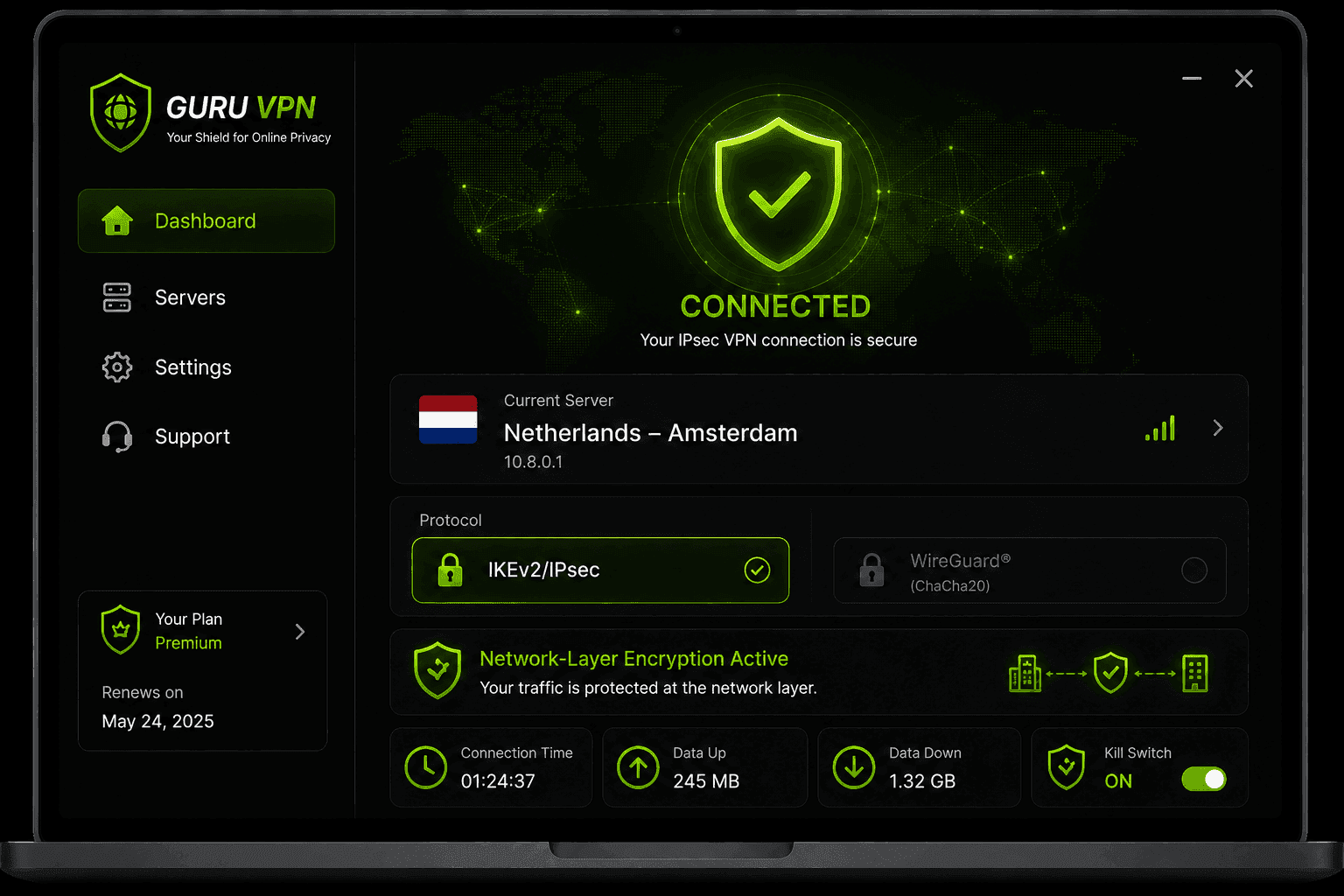
Modern providers like Guru VPN support IPsec-based connections alongside faster modern protocols, so you can choose whichever fits your device and network best. This guide breaks down how an IPsec VPN tunnel actually works, how it compares to SSL VPN, and when it's still the right tool for the job.
Key Takeaways
- Understand what an IPsec VPN actually is, and how IPsec relates to VPNs more broadly.
- Learn how an IPsec VPN tunnel is built — including the AH and ESP protocols and the IKE key exchange.
- See the real differences in the ipsec vpn vs ssl vpn comparison, and when each makes more sense.
- Find out which ports an IPsec VPN needs, and why that matters for firewalls and NAT.
- Get a clear picture of IPsec VPN clients, site-to-site setups, and how these connections get monitored.
What Is an IPsec VPN, Technically?
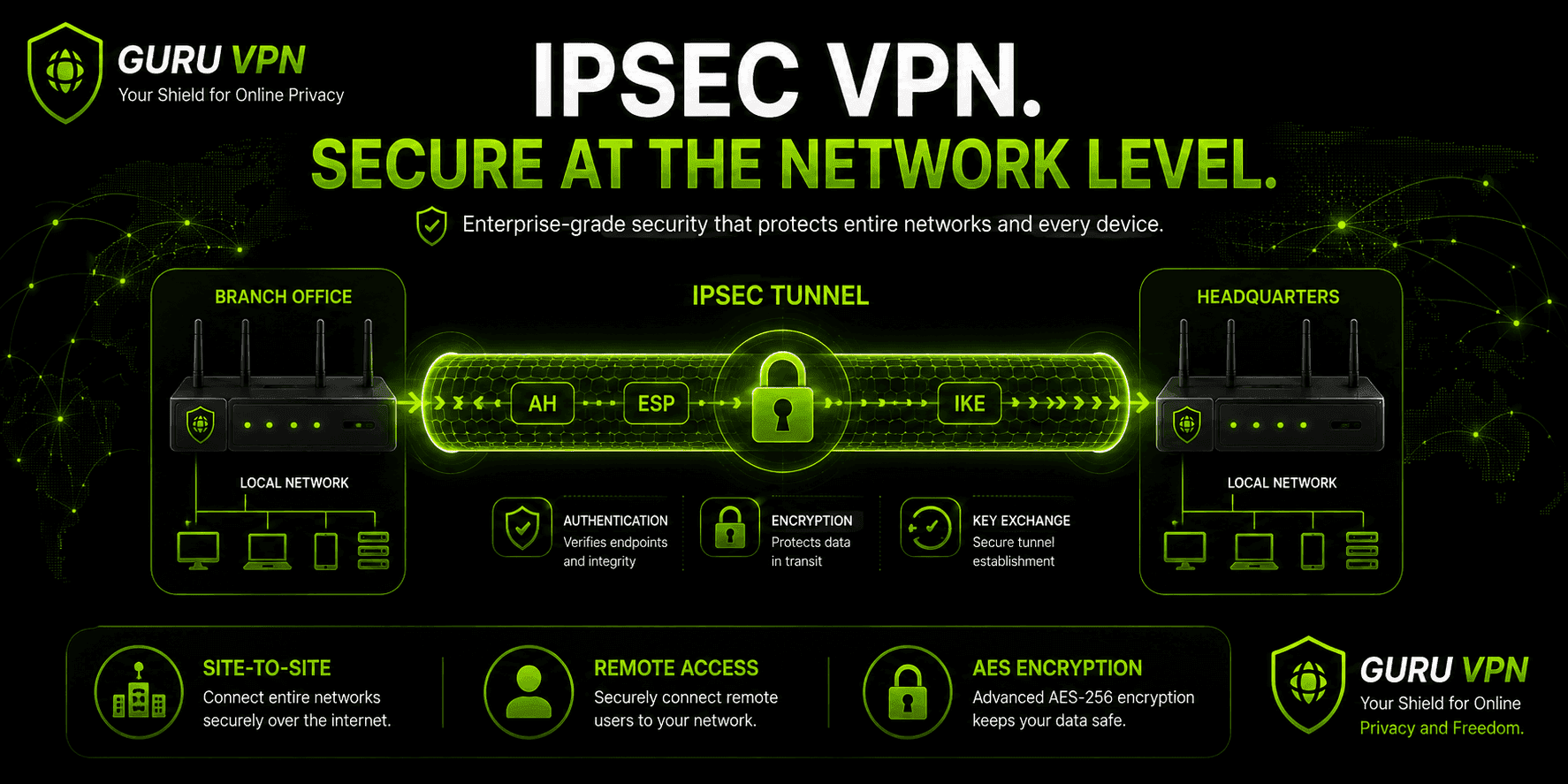
An IPsec VPN is built from three cooperating protocols, each handling a different part of the job:
Authentication Header (AH) verifies that a packet genuinely came from the source it claims to and hasn't been tampered with in transit — but it doesn't encrypt anything.
Encapsulating Security Payload (ESP) does the actual encryption, scrambling the payload (and, in some configurations, the header too) so it's unreadable to anyone intercepting it. ESP is by far the more commonly deployed of the two, usually alongside its own authentication.
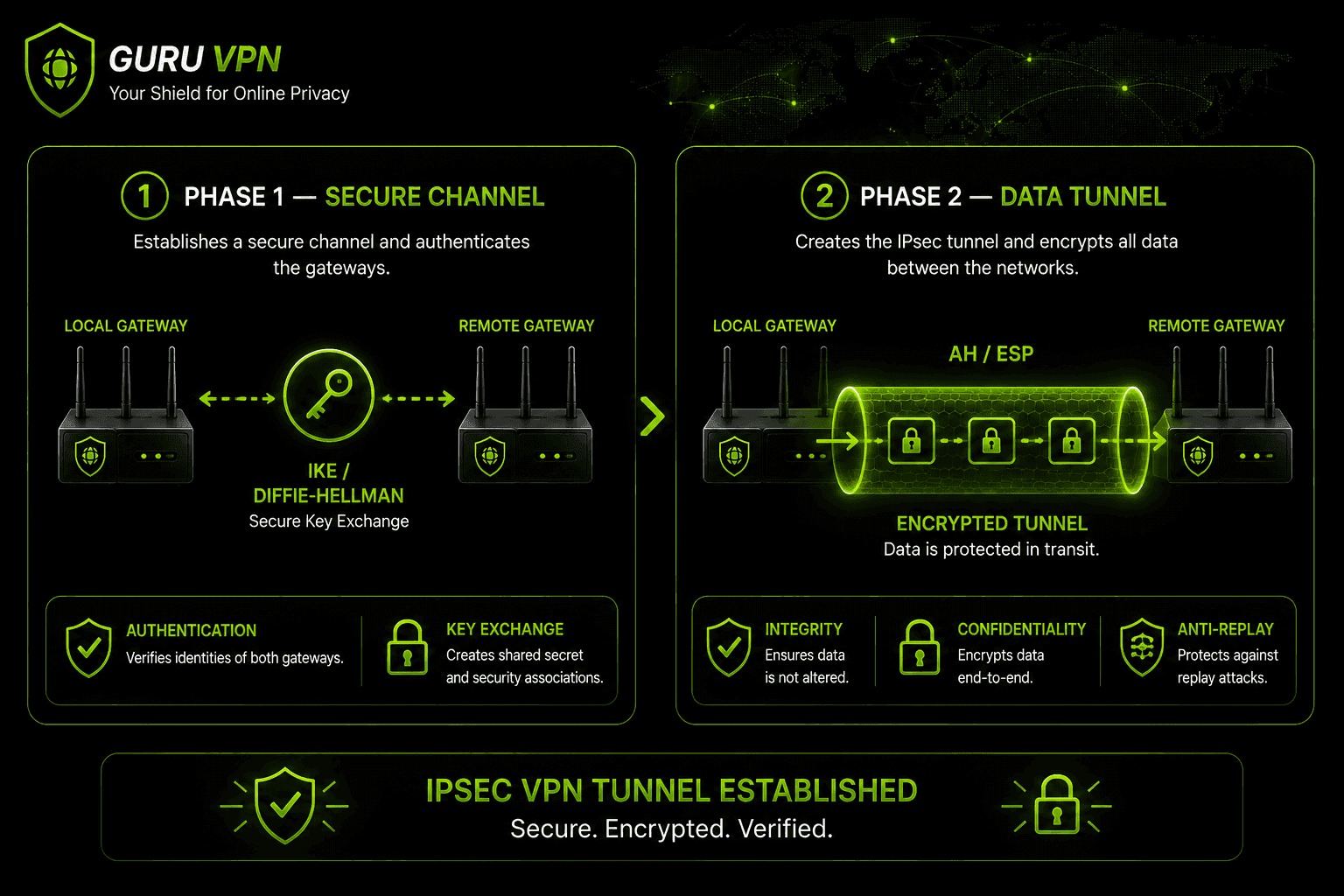
Internet Key Exchange (IKE) handles the negotiation: two devices use it to agree on encryption algorithms, authenticate each other, and securely establish the shared keys that AH and ESP will use. Most modern IPsec VPN deployments use IKEv2, which improved on the original IKEv1 with faster negotiation and better handling of mobile devices switching networks.
Put simply, when people talk about a vpn ipsec connection, they're describing a setup where IKE negotiates the secure channel, and AH/ESP then protect the actual data flowing through it.
How Does an IPsec VPN Tunnel Work?
An IPsec VPN tunnel can operate in one of two modes, and the difference matters for how much of your traffic actually gets hidden:
Tunnel mode encrypts the entire original IP packet — including its header — and wraps it inside a new packet with a fresh header for routing. This is the mode used in nearly all site-to-site and remote-access VPNs, since it lets a gateway or client encrypt traffic on behalf of an entire device or network without every application needing to know it's happening.
Transport mode protects just the payload itself, while the original addressing information stays untouched and readable by anything routing the packet along the way. It's used far less often in consumer contexts, mainly for direct host-to-host communication where both ends are already trusted and visible to each other.
Establishing the tunnel itself happens in two phases. Phase 1 sets up a secure management channel: the two devices negotiate encryption and authentication methods, perform a Diffie-Hellman key exchange, and authenticate each other using a pre-shared key or certificate. Phase 2 then negotiates the actual parameters of the IPsec tunnel — which protocol (AH or ESP), which encryption algorithm, and how long the connection stays valid — all protected inside the channel Phase 1 just created.
IKEv1 vs. IKEv2: What Actually Changed
IKEv1 and IKEv2 aren't just version numbers — the newer standard fixed several practical problems with the original. IKEv1 requires more back-and-forth message exchanges to complete Phase 1 negotiation (as many as nine messages in main mode), while IKEv2 collapses that down to four, meaning noticeably faster tunnel setup. IKEv2 also added MOBIKE support, which lets a tunnel survive a network change — switching from Wi-Fi to cellular, for instance — without renegotiating from scratch, something IKEv1 handles poorly if at all. IKEv2 further supports EAP (Extensible Authentication Protocol), making it easier to integrate with existing enterprise authentication systems, and includes built-in NAT traversal detection rather than needing it bolted on separately. IKEv1 still shows up in older enterprise hardware that hasn't been upgraded, but nearly every modern IPsec VPN deployment — including consumer apps — defaults to IKEv2 today.
Has IPsec Ever Been Compromised?
IPsec's security history isn't spotless, though the real issues are more nuanced than "IPsec is broken." Leaked documents from around 2013 raised concerns that intelligence agencies had worked to weaken certain IPsec deployments or target weak Diffie-Hellman group configurations — not by breaking the underlying cryptography itself, but by exploiting outdated, small key sizes or default configurations that were never hardened. Older pre-shared-key setups using weak or reused keys have also been a documented weak point, since a compromised pre-shared key exposes the initial authentication regardless of how strong the encryption afterward is. None of this means a properly configured, modern IPsec setup — IKEv2, strong Diffie-Hellman groups, certificate-based authentication instead of weak pre-shared keys — is insecure today. As with most protocols, the real-world risk lives in configuration choices and key management, not in the protocol's core design.
IPsec VPN Ports: What You Need to Know
An IPsec VPN port setup is one of the more practical things to understand if you're ever troubleshooting a connection or configuring a firewall. IKE negotiation happens over UDP port 500. Once a device detects that it's behind NAT — which is extremely common on home and office networks — the connection automatically shifts to UDP port 4500 instead, using NAT-T (NAT Traversal) to keep working even though IPsec wasn't originally designed with NAT in mind. Beyond these two ports, ESP itself uses IP protocol 50 directly, which is why some strict firewalls that only understand TCP and UDP can end up blocking IPsec traffic entirely unless NAT-T is properly enabled.
If you're ever debugging why an IPsec VPN won't connect on a particular network, checking whether UDP 500 and UDP 4500 are open is usually the first and most useful step.
There's a second, less obvious connectivity issue worth knowing about: wrapping an entire original packet inside a new one in tunnel mode adds overhead, which can push a packet's total size past the network's Maximum Transmission Unit (MTU) — commonly 1500 bytes on most networks. When that happens, packets either get fragmented into smaller pieces, adding latency, or dropped entirely if a router along the way has fragmentation disabled. This is a common, if unglamorous, cause of an IPsec VPN that connects successfully but then experiences slow load times or dropped connections specifically on larger transfers. Lowering the MSS (Maximum Segment Size) on the gateway — effectively telling TCP connections to negotiate smaller packets from the start — is the standard fix network administrators reach for when this shows up.
IPsec VPN vs. SSL VPN: What's the Difference?
The ipsec vpn vs ssl vpn comparison comes down to one core distinction: which layer of the network each one operates on.
IPsec works at the network layer (OSI Layer 3), which means it protects all traffic leaving a device or gateway — every app, every connection — without needing to know anything about what's actually running. SSL VPN, by contrast, works at the application layer (OSI Layer 7), typically securing traffic through a browser or a specific client, which makes it easier to deploy without installing dedicated software but narrower in what it actually covers.
| Feature | IPsec VPN | SSL VPN |
|---|---|---|
Network layer | Layer 3 (Network) | Layer 7 (Application) |
Coverage | All device/network traffic | Browser or specific app only |
Client requirement | Usually needs a dedicated client | Often browser-based, no install |
Performance | Generally faster (UDP-based) | Slightly more overhead (TCP-based) |
Best for | Site-to-site, full-device remote access | Quick remote access, BYOD scenarios |
Some documentation frames this as an ssl vpn vs ipsec question rather than the reverse, but the underlying trade-offs stay the same regardless of which term comes first. Neither one is universally "better" — an ipsec vs ssl vpn decision usually comes down to the use case. Site-to-site connections between offices, or remote access that needs to cover an entire device's traffic, lean toward IPsec. Quick, browser-based access for contractors or personal devices leans toward SSL VPN.
IPsec VPN vs. OpenVPN
Where SSL VPN is more of a category, OpenVPN is a specific, widely used protocol worth comparing directly. In an ipsec vpn vs openvpn matchup, IPsec tends to have a performance edge since it runs over UDP natively and is often implemented in hardware on routers and firewalls, making it very efficient for site-to-site links. OpenVPN, built on TLS, is generally considered easier to configure across restrictive networks (it can run over port 443, blending in with normal HTTPS traffic) and benefits from being open-source and extensively audited. For most everyday consumer VPN use, the practical difference is smaller than the comparison charts suggest — both are considered secure when properly implemented, and modern apps increasingly default to newer options like WireGuard over either one.
IPsec VPN vs. WireGuard
WireGuard is the newest major entrant into this comparison, and it approaches the problem very differently than IPsec does. Where IPsec is a suite of multiple protocols (AH, ESP, IKE) with decades of accumulated configuration options, WireGuard was built from scratch with a deliberately minimal codebase — often cited at under 4,000 lines of code, compared to the tens of thousands that make up a typical IPsec implementation. That smaller footprint makes WireGuard easier to audit for security flaws and, in most real-world testing, noticeably faster, particularly on mobile devices reconnecting after a network change.
IPsec still holds an edge in one area: broad compatibility with existing enterprise hardware, since decades of routers, firewalls, and VPN concentrators already support it natively without additional software. WireGuard, by contrast, needs more explicit vendor support to run on specialized network appliances, though this gap is closing quickly as hardware makers add native support. For a modern consumer VPN choosing a default protocol, WireGuard is increasingly the pick for speed and simplicity, while IPsec remains the more conservative choice for legacy site-to-site deployments that already depend on it.
IPsec VPN Clients: Site-to-Site vs. Remote Access
An IPsec VPN client generally falls into one of two setups. Site-to-site configurations connect two networks — say, a company's headquarters and a branch office — through IPsec running between gateway devices, with no individual client software needed on end-user machines at all. Remote access configurations are what most individual users interact with: a dedicated IPsec VPN client app installed on a laptop or phone, authenticating the device and establishing its own tunnel back to a central network or VPN server.
Older IPsec VPN clients had a reputation for clunky setup — manually entering server addresses, pre-shared keys, and IKE parameters. Modern implementations, including consumer apps like Guru VPN, handle this configuration automatically, so choosing IPsec (or IKEv2/IPsec, its common pairing) is usually just a protocol toggle rather than a manual setup process.
On the enterprise side, some of the most widely deployed IPsec VPN clients include strongSwan (open-source, common on Linux and increasingly bundled directly into router firmware), Cisco AnyConnect (which now defaults to SSL/TLS for many deployments but retains IPsec/IKEv2 support), and the native IPsec/IKEv2 clients built directly into Windows, macOS, iOS, and Android. That last option is worth knowing about specifically — it's why many corporate IPsec VPNs don't require installing anything at all beyond entering server details into the operating system's own built-in VPN settings.
Monitoring and Managing an IPsec VPN
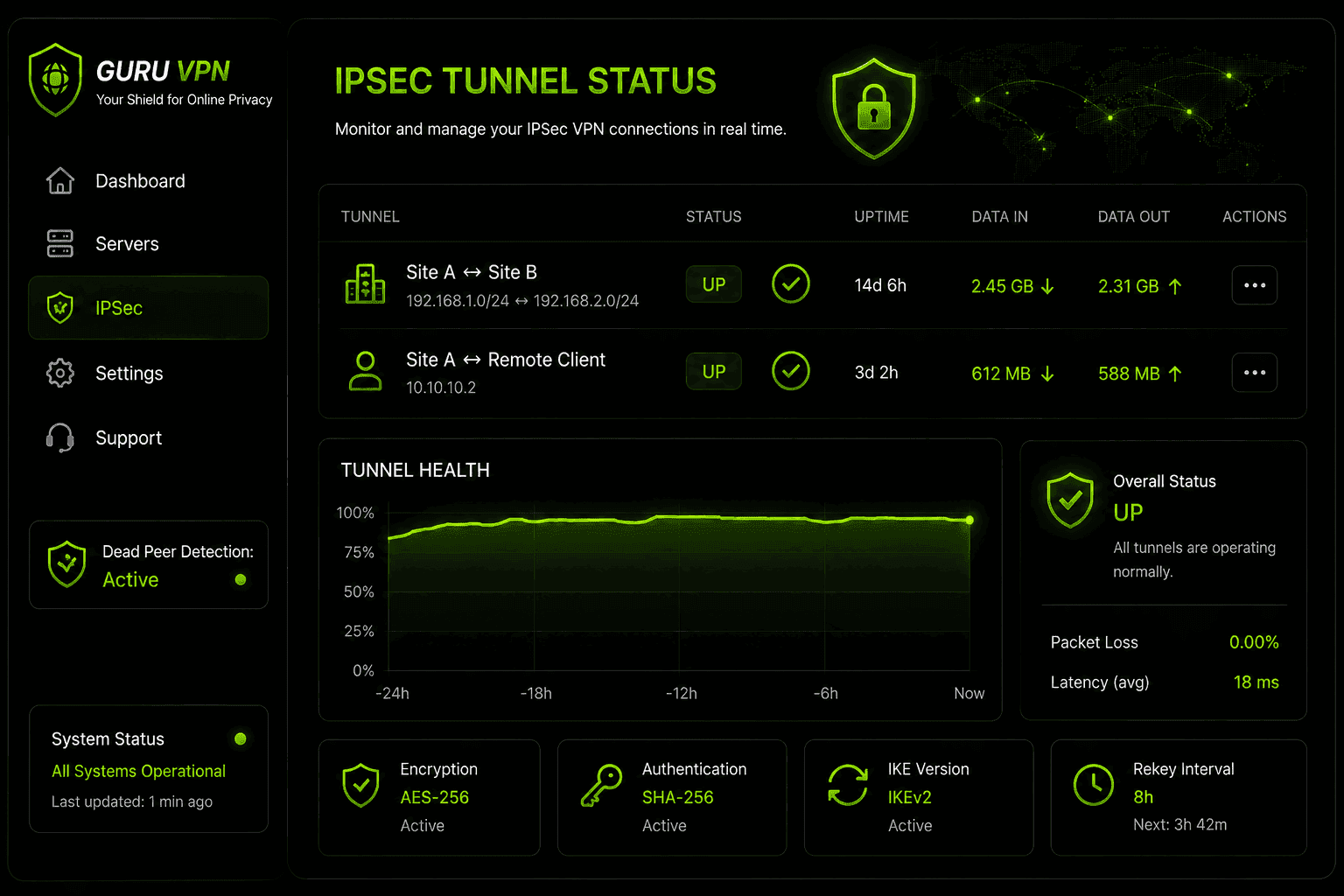
For anything beyond a single personal connection, IPsec VPN monitoring becomes an ongoing operational task rather than a one-time setup step. Network teams typically watch for tunnel status (up/down), rekey events as Phase 1 and Phase 2 security associations expire and renew, and Dead Peer Detection (DPD) failures, which flag a tunnel that's technically still configured but no longer actually passing traffic. Centralized dashboards — common in business-focused IPsec VPN platforms — add logging, alerting, and sometimes multi-factor authentication and DNS filtering on top of the base protocol, since IPsec itself has no built-in visibility layer of its own.
Why Choose Guru VPN for IPsec and Beyond
Not every provider gives you a real choice of protocol, but Guru VPN supports IPsec-based connections (via IKEv2/IPsec) alongside modern options like WireGuard, so you're not locked into one approach regardless of your device or network.
| Feature | Benefit |
|---|---|
IKEv2/IPsec support | Strong, network-layer encryption when you need it |
WireGuard® option | Faster performance for everyday use |
Automatic NAT traversal | Connects reliably even behind restrictive routers |
Strict no-logs policy | Privacy regardless of which protocol you choose |
Cross-platform apps | Consistent setup on desktop and mobile |
If you're deciding between protocols, it's worth comparing the current lineup of Guru VPN plans and the available server locations — the right protocol paired with a nearby, well-run server matters more for real-world performance than any single spec on its own.
Frequently Asked Questions
It's a VPN built using the IPsec protocol suite — IKE for key exchange, and AH/ESP for authenticating and encrypting traffic — which secures data at the network layer rather than within a single app or browser.
It means a virtual private network that relies on the IPsec framework to build its encrypted tunnel, as opposed to SSL/TLS-based or newer protocols like WireGuard.
IPsec generally suits site-to-site connections and remote access that needs to cover a whole device's traffic. SSL VPN suits quick, browser-based access where installing a dedicated client isn't practical.
It's a VPN that uses the IPsec protocol suite to lock down traffic at the network level — think of it as the security layer working quietly underneath the connection, rather than something you interact with directly.
SSL VPN often gets employees connected faster with less IT setup, since it can run through a browser. IPsec typically offers better performance and covers more than just browser traffic, at the cost of needing a client installed.
UDP port 500 for the initial IKE negotiation, and UDP port 4500 once NAT is detected. ESP traffic itself uses IP protocol 50 directly.
For remote access, yes — a client authenticates your device and establishes the tunnel. Site-to-site IPsec VPNs, by contrast, run between gateway devices with no client software needed on individual computers.
Both are considered secure when properly implemented. IPsec often has a performance edge on supported hardware; OpenVPN tends to be easier to push through restrictive networks and benefits from being open-source.
Yes, through IKEv2/IPsec, alongside modern alternatives like WireGuard, so you can pick whichever fits your situation.
Conclusion: A Protocol Worth Understanding, Even If You Never Configure It
An IPsec VPN isn't something most people need to set up by hand anymore, but understanding what's happening underneath — the AH/ESP encryption, the IKE handshake, the tunnel vs. transport distinction — makes it much easier to judge when it's the right tool versus when a lighter, faster protocol will do the job just as well. For site-to-site connections and full-device remote access, IPsec remains a proven, network-level standard. For everyday personal use, the choice increasingly comes down to whatever your VPN app defaults to, as long as it's implemented correctly.