 EN
EN BR
BR DE
DE ES
ES FR
FR RU
RU ID
ID TR
TR IT
IT JP
JP SA
SA VN
VN TH
TH KR
KR
VPN Tunnel Explained: What It Is and How It Works

 Key takeaways
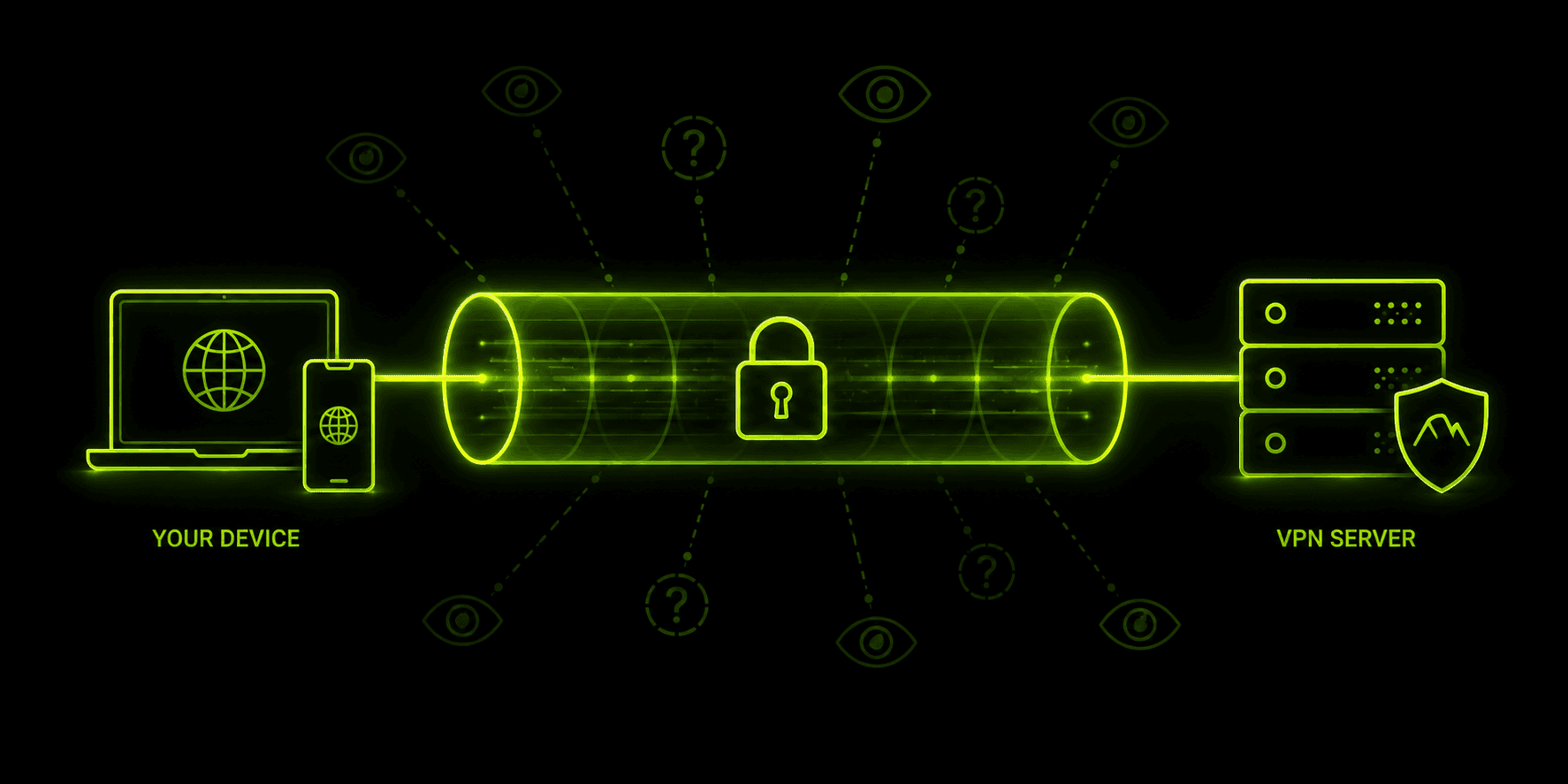
- A VPN tunnel is the encrypted, private connection between your device and a VPN server — it's the mechanism that makes a VPN's protection actually work, not just a marketing term.
- Tunneling combines two things: encapsulation (wrapping your data packets) and encryption (scrambling their contents so they're unreadable in transit).
- Full tunnel VPN routes all of your device's traffic through encryption; split tunnel VPN routes only some of it, letting the rest reach the internet directly.
- IPsec VPN tunnels are one of the most common tunnel types, using tunnel mode to protect entire packets between networks or devices.
- Protocol choice (OpenVPN, WireGuard, IKEv2/IPsec, and older options like PPTP) directly affects how secure and how fast a given VPN tunnel actually is.
Every time you connect to a VPN, the app talks about creating a "secure tunnel" for your traffic — but that phrase hides a fair amount of actual engineering. If you've ever wondered what is a vpn tunnel in concrete terms, rather than as marketing shorthand, the short version is this: it's an encrypted, private pathway that carries your data across the public internet in a form nobody else along the way can read. Understanding the vpn tunnel meaning behind that pathway — how it's built, what protocols carry it, and where full-tunnel and split-tunnel setups diverge — makes it much easier to judge whether a given VPN, including Guru VPN, is actually protecting what you think it's protecting.
Key Takeaways
- A VPN tunnel is the encrypted, private connection between your device and a VPN server — it's the mechanism that makes a VPN's protection actually work, not just a marketing term.
- Tunneling combines two things: encapsulation (wrapping your data packets) and encryption (scrambling their contents so they're unreadable in transit).
- Full tunnel VPN routes all of your device's traffic through encryption; split tunnel VPN routes only some of it, letting the rest reach the internet directly.
- IPsec VPN tunnels are one of the most common tunnel types, using tunnel mode to protect entire packets between networks or devices.
- Protocol choice (OpenVPN, WireGuard, IKEv2/IPsec, and older options like PPTP) directly affects how secure and how fast a given VPN tunnel actually is.
- Guru VPN builds its connections around this same encrypted-tunnel foundation, so the privacy protection is active by default rather than something you have to configure yourself.
What Is a VPN Tunnel?
Strip away the marketing language, and a VPN tunnel is a logical, encrypted connection running on top of the ordinary public internet. Your data still travels across the same routers, ISPs, and networks it always would — but instead of going out in a form anyone along that path could read, it's wrapped inside an encrypted layer that makes it look like meaningless noise to anyone except your device and the VPN server on the other end.
That distinction matters because it separates two related but different ideas. A VPN is the broader service — the app, the network of servers, the whole system built to protect your traffic. The tunnel is the specific mechanism inside that service doing the actual work: taking your outgoing data, encapsulating it, encrypting it, and routing it through a private vpn tunnel that only your device and the server can decode. Not every tunnel VPN protocol implements that process identically, which is exactly why protocol choice ends up mattering as much as the concept itself — a topic we'll get to shortly.
How Does VPN Tunnel Work?
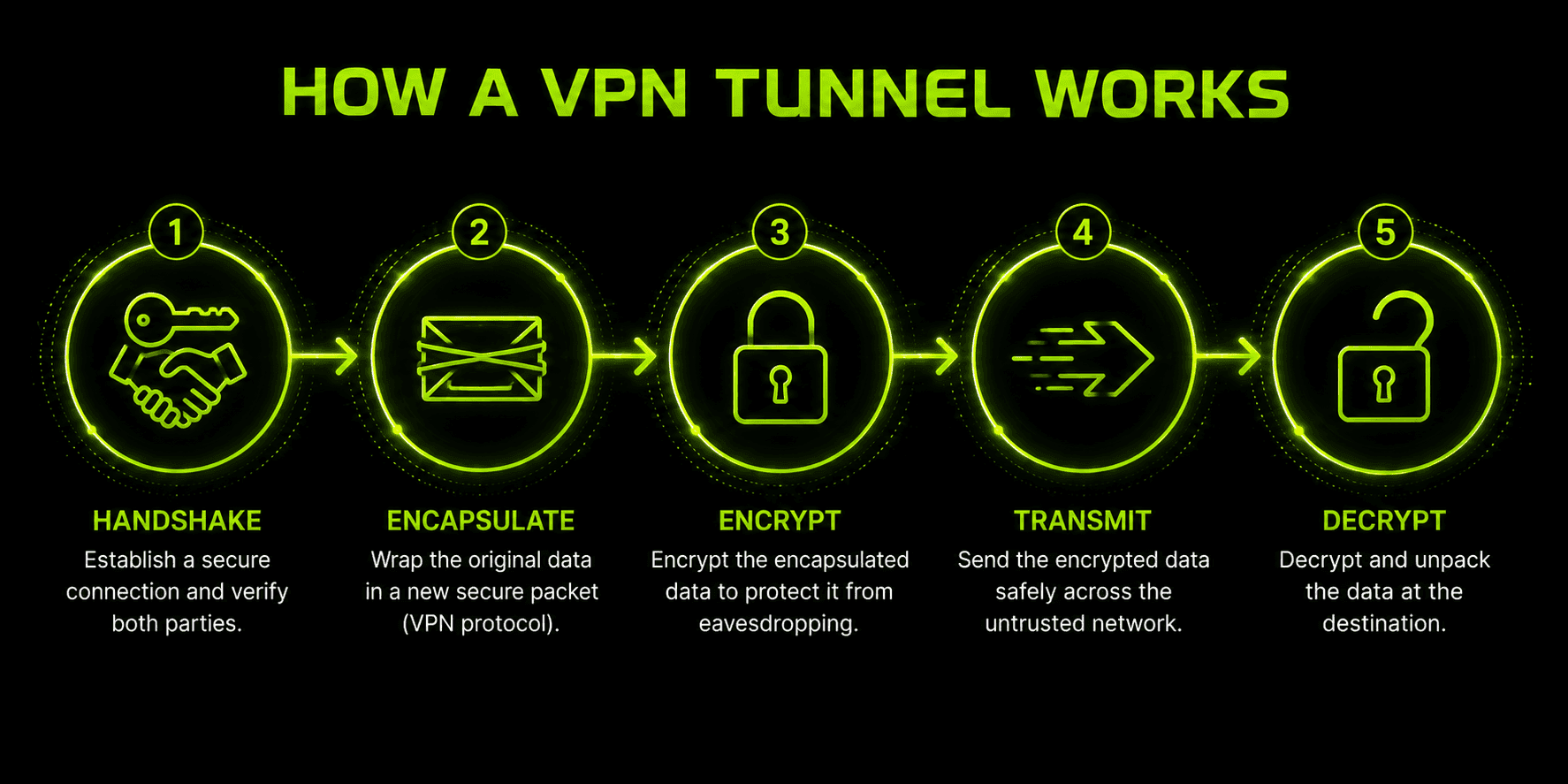
The process behind an encrypted vpn tunnel follows roughly the same sequence regardless of which app or protocol you're using:
- Authentication and handshake — your device and the VPN server verify each other's identity and agree on encryption parameters, exchanging the session keys that will be used to scramble and unscramble data for the rest of the session.
- Encapsulation — each outgoing data packet gets wrapped inside another packet, separating your traffic from everything else moving across the network and giving the tunneling protocol a consistent structure to work with.
- Encryption — the contents of that wrapped packet are scrambled using the negotiated encryption algorithm, so even if someone intercepts it mid-transit, what they capture is unreadable without the session key.
- Transmission and decryption — the encrypted, encapsulated packet travels across the public internet to the VPN server, which decrypts it, forwards the original request onward, and repeats the same encryption process in reverse for the response heading back to you.
- Teardown — when you disconnect, the tunnel closes and the session keys are discarded, so a new handshake and a fresh set of keys are required the next time you connect.
Encapsulation and encryption are doing two different jobs here, even though they happen almost simultaneously. Encapsulation is what makes the traffic identifiable as tunnel traffic in the first place — it gives your data a consistent "envelope" to travel in. Encryption is what makes the contents of that envelope unreadable. A tunnel without encryption would still separate your traffic, but anyone capturing it could read the contents directly; that's effectively what older, unencrypted tunneling protocols like plain PPTP configurations risk, which is part of why protocol choice has such a direct impact on how much protection you're actually getting.
VPN Tunnel Protocols Compared
Everything above describes tunneling in general terms, but the specific protocol carrying that tunnel makes a real difference in both security and speed. Here's how the protocols you'll actually encounter in a VPN app compare:
| Protocol | Security | Speed | Notes |
|---|---|---|---|
WireGuard | Very high | Very fast | Minimal codebase (~4,000 lines), the modern default for most VPN apps |
OpenVPN | Very high | Moderate | Open-source, thoroughly audited, flexible but more complex to configure |
IKEv2/IPsec | High | Fast | Reconnects quickly after switching networks, strong mobile support |
L2TP/IPsec | Moderate | Moderate | Double encapsulation adds overhead; largely superseded by IKEv2 |
SSTP | High | Moderate | Windows-focused, can disguise traffic as regular HTTPS |
PPTP | Weak | Very fast | Outdated with known vulnerabilities; avoid for anything sensitive |
WireGuard's rise comes down to a tradeoff most competing protocols didn't manage as well: a codebase small enough to audit thoroughly, paired with encryption choices (ChaCha20 and Curve25519) picked specifically for speed on mobile hardware. OpenVPN remains the choice when maximum configurability and a long audit history matter more than raw speed, while PPTP persists mostly in legacy systems that haven't been updated — its presence on a protocol list today is a caution sign more than a recommendation. The tunneling concept stays identical across all six rows in this table; what changes is how efficiently and how safely each protocol actually carries it out.
Full Tunnel VPN vs. Split Tunnel VPN
Not every VPN connection routes all of your traffic the same way, and the difference between full tunnel vpn and split tunnel vpn setups changes both your security and your day-to-day experience.
A full tunnel VPN routes every bit of traffic leaving your device through the encrypted tunnel — browsing, apps, background processes, all of it. Nothing reaches the internet without first passing through encryption and the VPN server. This is the more protective option: there's no gap where traffic slips out unencrypted, which is why it's the default behavior for most consumer VPN apps.
A split tunnel VPN, by contrast, lets you choose which traffic goes through the encrypted tunnel and which traffic reaches the internet directly, bypassing the VPN entirely. Some implementations split by app (a streaming app goes direct while your browser stays tunneled), others by destination (specific websites or IP ranges are excluded from the tunnel).
| Feature | Full Tunnel VPN | Split Tunnel VPN |
|---|---|---|
Traffic coverage | 100% of device traffic encrypted | Only selected traffic encrypted |
Security | Stronger — no unprotected gap | Weaker — excluded traffic is exposed |
Speed/bandwidth | Slightly higher overhead | Faster for traffic outside the tunnel |
Local network access | Can block LAN devices (printers, etc.) | Easier access to local network resources |
Best for | Public Wi-Fi, sensitive browsing, privacy-first use | Streaming, gaming, or apps that don't need protection |
Neither option is universally "correct" — it depends on what you're trying to protect and how much you're willing to trade for convenience. What matters is knowing which one you're actually using, since a split tunnel VPN configured without a clear sense of what's excluded can leave more traffic exposed than you'd expect.
IPsec VPN Tunnel: Tunnel Mode vs. Transport Mode
IPsec is one of the most widely deployed tunneling standards, and an ipsec vpn tunnel behaves a little differently depending on which of its two modes is in use.
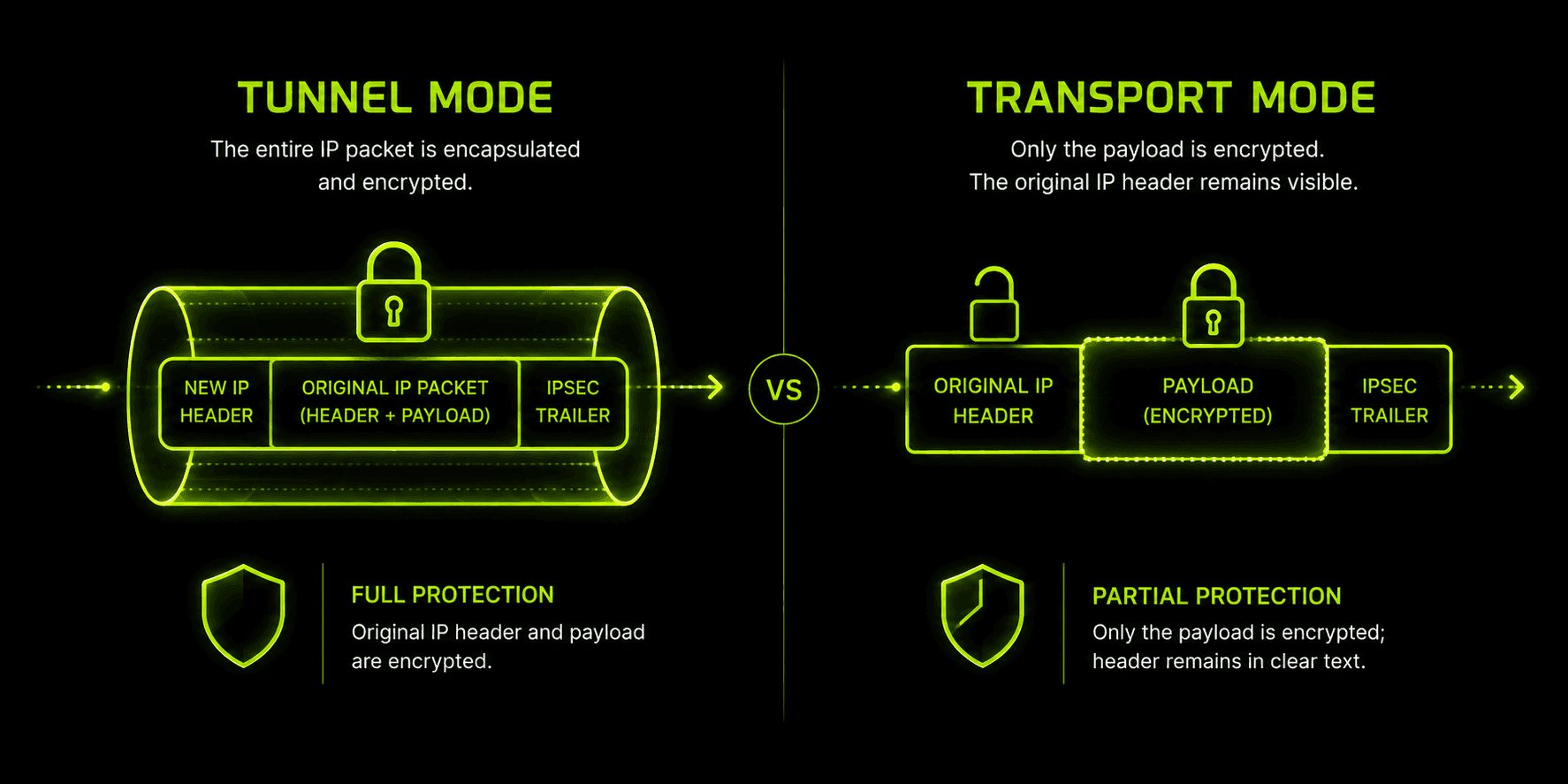
Tunnel mode encrypts the entire original IP packet — headers included — and wraps it inside a new packet with its own header for routing across the internet. This is the mode used for most site-to-site and remote-access VPN connections, because it fully conceals the original source and destination information, not just the payload.
Transport mode only encrypts the payload of the packet, leaving the original addressing information visible to anything routing it along the way. It's used far less often in consumer contexts and shows up mainly in scenarios where both endpoints are already on a trusted, controlled network and only the data itself needs protection.
IPsec accomplishes this through two component protocols working together: AH (Authentication Header), which verifies the packet hasn't been tampered with, and ESP (Encapsulating Security Payload), which handles the actual encryption of the data. Most real-world IPsec VPN tunnels rely on ESP for confidentiality, often paired with AH-style integrity checking built into the same negotiation process. Because tunnel mode wraps and encrypts the entire original packet, it adds more processing overhead than a lighter-weight protocol like WireGuard — a tradeoff for the more thorough protection it provides, especially on business networks linking multiple office locations together.
Site-to-Site vs. Remote-Access VPN Tunnels
Everything covered so far describes a remote-access tunnel — the kind an individual VPN app builds between your device and a server, on demand, whenever you connect. Businesses also rely on a second deployment model: a site-to-site tunnel, which permanently connects two entire networks rather than a single device to a server. A company with a headquarters and a branch office, for instance, might run an always-on site-to-site tunnel between the two locations' network gateways, so any device on either network can reach resources on the other as if they shared the same local network — with no individual VPN app or login required on each computer.
The tunneling mechanics are largely the same either way — encapsulation, encryption, a negotiated handshake, often built on IPsec in tunnel mode specifically because it protects entire packets between networks rather than just one device's traffic. What differs is the deployment: a site-to-site tunnel is configured once at the network level and stays connected continuously, while a remote-access tunnel like the one a consumer VPN app builds is initiated by an individual user, on demand, from a single device, and torn down when that person disconnects. If you've only ever used a personal VPN app, the tunnel you're familiar with is the remote-access kind — site-to-site tunnels are the less visible half of the same underlying technology, running quietly between offices rather than between a person and a server.
What a Private, Encrypted VPN Tunnel Actually Protects You From
It's worth being concrete about what this protection buys you, since "encryption" can sound abstract until you name the specific things it stops.
ISP monitoring and throttling. Without a tunnel, your internet provider can see every site you visit and, in some cases, slow down specific types of traffic they detect. A private vpn tunnel hides the destination and content of your traffic from your ISP entirely.
Public Wi-Fi interception. Coffee shop and airport networks are a common target for attackers running man-in-the-middle attacks, capturing unencrypted traffic from anyone sharing the network. A properly working tunnel makes that captured traffic useless without the session key.
IP address exposure. Without a tunnel, every site you visit sees your real IP address, which can reveal your approximate location and be used to track you across sessions. The VPN server's IP address replaces yours for the outside world.
Data tampering. Some tunneling protocols include integrity checks (like IPsec's AH component) that detect whether a packet was altered in transit, not just whether it was read.
None of this makes a VPN tunnel a magic shield — modern encryption is effectively unbreakable by brute force, but a tunnel can't protect you from a compromised device, a phishing link you click while connected, or metadata visible at the VPN provider itself. It closes off a specific, well-defined set of risks tied to how your data crosses the network, which is exactly the problem it was built to solve.
How to Verify Your VPN Tunnel Is Actually Working
Trusting that a tunnel is protecting your traffic isn't the same as confirming it. A few quick checks are worth running, especially after installing a new VPN app or changing settings:
- Check your IP address before and after connecting. Visit any "what's my IP" page before connecting to your VPN, note the address, then check again once connected. If the address hasn't changed, your traffic isn't actually routing through the tunnel.
- Run a DNS leak test. A dedicated DNS leak test site checks whether your DNS queries are going through the VPN's servers or leaking out to your regular ISP's servers instead — a gap that can expose your browsing activity even when your IP address itself is hidden.
- Use basic network-monitoring tools if you want to go further. Software that shows your device's active network connections can confirm which interface your traffic is actually using, for a more direct check than an IP lookup alone provides.
None of these checks take more than a couple of minutes, and running them once after setup is worth the reassurance that the tunnel you're relying on is actually doing its job, rather than assuming it from a "Connected" label alone.
Why Choose Guru VPN
Everything above describes what a tunnel needs to do; what varies between providers is how consistently that happens in practice. Guru VPN builds every connection around this same encrypted-tunnel foundation — the encapsulation, the handshake, the encryption — running by default rather than as a setting you need to dig through menus to enable.
Beyond the tunnel mechanics themselves, the practical side of a VPN matters just as much: how many server locations you can actually reach, and what a plan costs relative to how often you use it. You can check the current lineup of available locations on the server list, and compare what's included at each tier on the pricing page before settling on the plan that matches how you actually connect day to day.
Frequently Asked Questions
It's the encrypted, private connection your device uses to send and receive data through a VPN server — think of it as a locked passageway that carries your traffic across the public internet without anyone else being able to read it along the way.
Not exactly. The VPN is the overall service — the app, the servers, the account you're paying for. The tunnel is just the piece of that service handling the encrypted transport of your data, packet by packet.
Some overhead is normal, since encrypting and decrypting data takes processing time, but modern protocols like WireGuard keep that impact small enough that most users won't notice it during everyday browsing.
Breaking modern encryption directly is considered impractical with current technology. Real-world risks come from outdated protocols, misconfigured servers, or compromised devices — not from the tunneling and encryption process itself when implemented correctly.
The quickest check is comparing your IP address before and after connecting — it should change once the tunnel is active. For a more thorough check, a DNS leak test confirms your DNS queries are routing through the VPN rather than leaking out to your regular network.
Conclusion
A VPN tunnel isn't just marketing language — it's the actual mechanism doing the work every time a VPN app claims to protect your traffic: encapsulating your data, encrypting it, and carrying it across the public internet in a form nobody else can read. Whether that tunnel covers all of your traffic or just part of it, and whether it's built on IPsec, OpenVPN, or WireGuard, the underlying job stays the same. Guru VPN keeps that job running quietly in the background of every connection, so the protection is there by default rather than something you have to think about.