 EN
EN BR
BR DE
DE ES
ES FR
FR RU
RU ID
ID TR
TR IT
IT JP
JP SA
SA VN
VN TH
TH KR
KR
How VPN Works: A Step-by-Step Breakdown of What Happens When You Connect

 Key takeaways
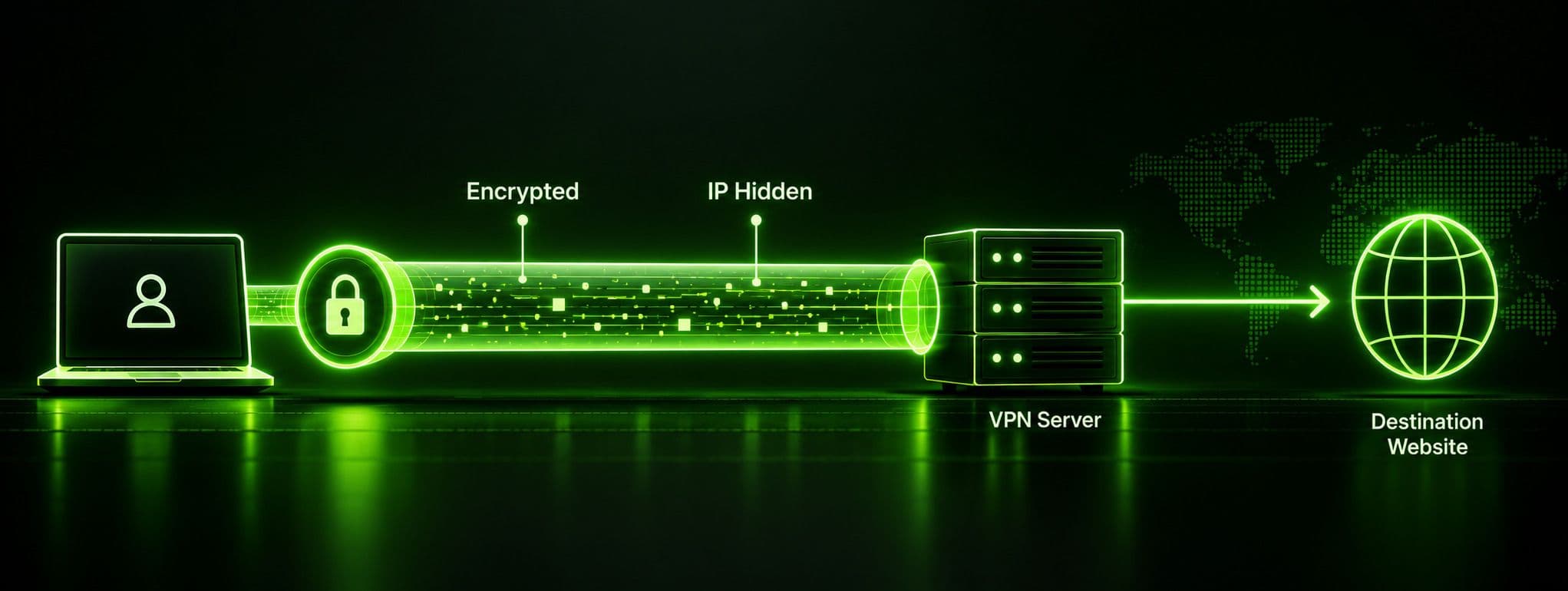
- A VPN works by creating an encrypted tunnel between your device and a VPN server, then routing your traffic through that server instead of sending it directly to the destination.
- The VPN server replaces your device's real IP address with its own before forwarding your requests — this is the core mechanism behind hiding your location and identity.
- Two layers of encryption are involved: a fast symmetric cipher (AES) encrypts your actual data, while an asymmetric key-exchange method (like Diffie-Hellman) securely negotiates the encryption keys in the first place.
- Your operating system doesn't automatically know to use a VPN — the app creates a virtual network adapter and rewrites your routing tables so your traffic gets redirected into the tunnel instead of going straight to your ISP.
- The specific tunneling protocol (OpenVPN, IKEv2, WireGuard, and others) determines how that encrypted tunnel is built and how fast or firewall-resistant the connection ends up being.
Understanding how vpn works doesn't require a networking degree, but it does help to walk through what actually happens between the moment you tap "connect" and the moment your traffic shows up somewhere else on the internet. Most explanations of vpn how it works stop at "it encrypts your traffic" and leave it there, which is true but skips the more interesting mechanics — how a vpn works step by step, why your device even knows to send traffic through the tunnel in the first place, and what's actually happening during that half-second handshake before your connection status turns green. Whether you type it as vpn how works or phrase it the more natural way, the underlying process is identical. This guide walks through the full sequence: connection setup, authentication, tunnel establishment, encryption, and how Guru VPNand similar apps handle all of it automatically in the background.
What Is a VPN, Briefly
A VPN (virtual private network) is software that routes your internet traffic through a server it controls, encrypting that traffic along the way so nobody between you and the server — your ISP, someone on the same public Wi-Fi, a network administrator — can read what you're sending or receiving. The "private network" part refers to the fact that, functionally, your device behaves as if it's on the VPN provider's own network rather than the open internet, at least for as long as the tunnel is active.
That's the concept in one paragraph. The more useful question — and the one this guide actually answers — is how does a vpn works underneath that description: what specific steps happen, in what order, and what technical pieces make each step possible.
How VPN Works Step by Step
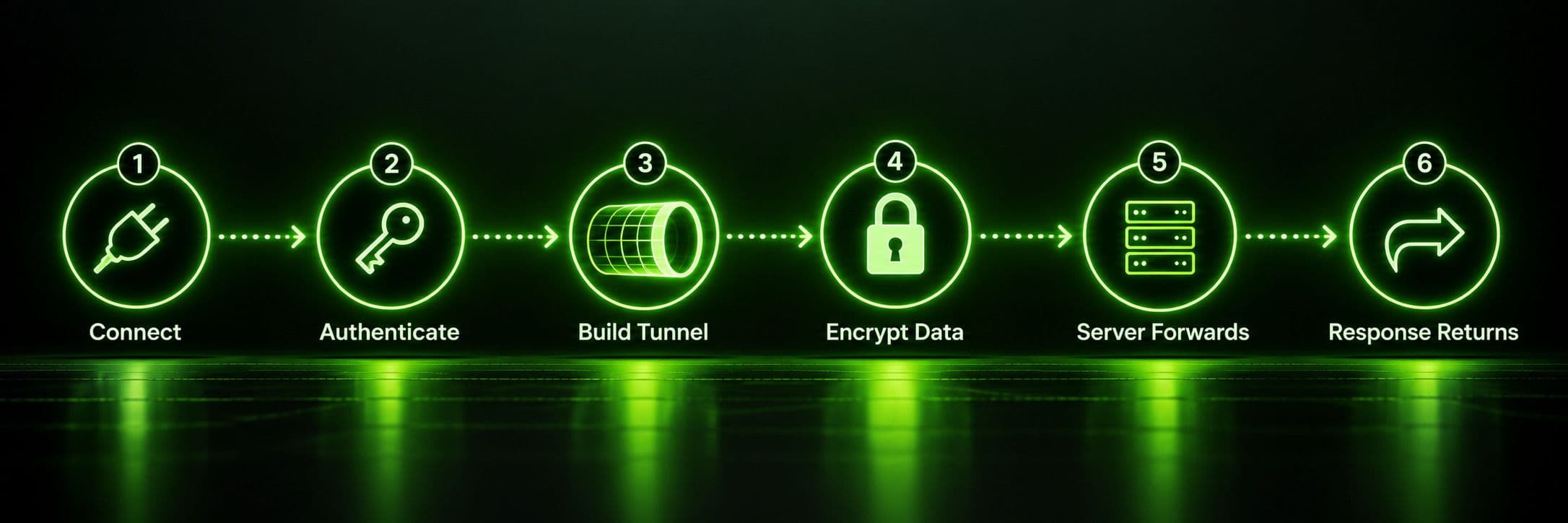
Here's how vpn works step by step, from the moment you open the app to the moment your traffic reaches its destination and comes back.
Step 1: Connecting and Choosing a Server
When you open a VPN app and hit connect, the app first contacts the provider's infrastructure to pick a server — either one you've manually selected or, in apps like Guru VPN, the fastest available option chosen automatically. This initial exchange also confirms the server is online and ready to accept a new connection before anything else happens.
Step 2: Authentication
Before a tunnel is built, the client and server verify each other. Your app proves who you are, usually via an account credential, a certificate, or a pre-shared key baked into the app, while the server proves it's a legitimate endpoint belonging to the provider rather than an impostor. This mutual check happens before any of your actual browsing traffic is involved — it's purely about establishing trust between the two ends.
Step 3: Establishing the Encrypted Tunnel
Once authenticated, the client and server negotiate how they're going to talk securely. They agree on a VPN protocol and cipher suite, then perform a key exchange — commonly using a method like Diffie-Hellman — that lets both sides arrive at the same shared secret key without ever transmitting that key directly over the network. This is the moment the actual encrypted tunnel comes into existence, and it's also where a concept called Perfect Forward Secrecy often comes in: because the shared key is generated fresh for this session, even if a future session's key were somehow compromised, past sessions would stay unreadable.
Step 4: Encrypting and Sending Your Data
With the tunnel established, your device starts wrapping outgoing traffic in two layers: first it encrypts the actual data using a fast symmetric cipher (almost always AES), then it encapsulates that encrypted payload inside a new outer packet addressed to the VPN server. This encapsulation step is what makes a VPN a "tunnel" in the literal sense — your original packet is riding inside another packet, invisible to anything inspecting traffic along the way.
Step 5: The Server Decrypts, Masks Your IP, and Forwards the Request
When your encrypted, encapsulated packet reaches the VPN server, the server strips away the outer encapsulation layer, decrypts the inner data, and finds your original request — a webpage load, an app request, whatever you were actually trying to do. It then forwards that request onward to its real destination, but with one crucial change: the request now shows the VPN server's IP address as the source, not yours. From this point forward in the transaction, the destination site only ever sees the server.
Step 6: The Response Makes the Return Trip
The destination site's response comes back to the VPN server, which encrypts and encapsulates it the same way, sends it back through the tunnel, and your device decrypts it on arrival. To you, this whole six-step round trip is invisible — it happens in milliseconds and just looks like a normal page load, just routed through an extra hop.
How VPN Encryption Works
Encryption is doing most of the actual security work in the process above, and it happens in two distinct layers that serve different purposes.
Symmetric encryption (AES) handles the bulk of your actual data. Symmetric means the same key both encrypts and decrypts the traffic, and it's used here because it's extremely fast — fast enough to encrypt a continuous stream of browsing traffic without noticeably slowing down your connection. AES-256, the most common standard among VPN providers, is considered effectively unbreakable by brute force with current computing power.
Asymmetric encryption, using a method like RSA or Diffie-Hellman, solves a different problem: how do two parties agree on a shared symmetric key in the first place, over a network that might be monitored, without ever sending that key in a form an eavesdropper could capture and reuse? Asymmetric methods use paired public and private keys to let both sides mathematically arrive at the same shared secret independently, without that secret ever crossing the network in a usable form. This is the mechanism behind the key exchange in Step 3 above, and it's why VPN protocols can establish a fresh, secure symmetric key for every single session rather than reusing one indefinitely.
Put together, this is why explaining vpn and how it works as "it just encrypts stuff" undersells what's happening: the encryption itself (AES) and the process of securely agreeing on encryption keys (Diffie-Hellman/RSA) are two separate problems, solved by two different techniques, working together.
How the VPN Tunnel Actually Works
The tunnel itself is built according to a specific protocol, and the protocol your app uses determines exactly how encapsulation, key exchange, and data transfer are handled under the hood.
| Protocol | Encryption | Speed | Notes |
|---|---|---|---|
WireGuard | ChaCha20 | Very fast | Modern, lean codebase, increasingly the default choice |
OpenVPN | AES-256 | Fast | Open-source, widely trusted, works over UDP or TCP |
IKEv2/IPsec | AES-256 | Fast | Handles network switching well (e.g., Wi-Fi to mobile data) |
L2TP/IPsec | AES-256 | Slower | Double encapsulation adds overhead; considered legacy |
PPTP | Weak (MPPE) | Fast | Outdated and insecure; avoided by modern providers |
WireGuard and OpenVPN are the two protocols most consumer VPN apps default to today, precisely because they balance strong encryption with minimal speed loss. Older protocols like L2TP/IPsec and especially PPTP are being phased out across the industry — PPTP in particular has known vulnerabilities that make it unsuitable for anything requiring real security, even though it's technically still functional.
How VPN Works Across Devices and Networks
The core mechanics — authentication, key exchange, encryption, encapsulation — stay the same no matter what device you're on, but a few details around keeping the connection stable differ based on hardware and network conditions.
On desktop operating systems, Windows, macOS, and Linux each expose native networking APIs that let a VPN app register its virtual tunnel interface directly and integrate with system-level features like firewall rules and DNS resolution. On mobile devices, the more common challenge is network switching: a phone moving from home Wi-Fi to cellular data mid-session needs the tunnel to survive that transition without dropping and fully renegotiating from scratch. This is a major reason IKEv2 became popular for mobile VPN apps in the first place — it maintains an internal association that can reestablish quickly after the device's IP address changes, and WireGuard has since matched or exceeded that resilience with a simpler design.
Public Wi-Fi is where the practical value of all this becomes most obvious: a shared hotspot at a coffee shop or airport is one of the easiest places for someone nearby to intercept unencrypted traffic, and an active VPN tunnel makes that interception pointless regardless of how open or poorly secured the network itself is. At the other end of the spectrum, some households install a VPN directly at the router level, which tunnels every connected device's traffic at once — including smart TVs, consoles, and other gadgets that can't run a VPN app individually.
What Keeps a VPN Connection Alive and Trustworthy
Most explanations of how does vpn works stop at the initial handshake and encryption, but a connection that stays open for hours needs a few more mechanisms running quietly in the background to stay both alive and trustworthy.
Keepalive messages are small packets exchanged periodically between your device and the server purely to confirm the tunnel is still active. Without them, a connection sitting idle for too long could time out and drop without either side noticing until you tried to load something.
Sequence numbers are attached to each packet moving through the tunnel so the receiving end can detect if a packet has been duplicated, delayed, or replayed by an attacker trying to reuse captured traffic. Checksums serve a related but distinct purpose — a small value calculated from a packet's contents that lets the receiving side confirm the data hasn't been tampered with or corrupted in transit. Between the two, a VPN connection isn't just encrypted; it's actively monitored for signs of interference for as long as it stays open.
When you disconnect, the session doesn't just vanish — the client and server perform a cleanup step, releasing the IP address that was assigned to you back into the pool for the next user, and in most commercial VPN services, logging basic session metadata (connection time, server used) for operational and abuse-prevention purposes, separate from the no-logs policies providers apply to your actual browsing activity.
How Your Device Knows to Send Traffic Through the VPN
This is the part most explanations skip entirely, and it's worth understanding because it answers the practical question of how vpn app works at the operating-system level rather than just conceptually.
When you connect, the VPN app creates a virtual network adapter on your device — a software-based network interface (often called a TUN or TAP interface) that behaves like a physical network card as far as your operating system is concerned. The app then modifies your device's routing table, the internal list your OS consults to decide where outgoing traffic should go, so that most or all of your traffic gets directed to this virtual adapter instead of your normal Wi-Fi or cellular connection. The virtual adapter hands that traffic off to the VPN app, which encrypts and encapsulates it as described above before it ever reaches your real network hardware.
This is also the mechanism behind split tunneling, a feature in apps like Guru VPN that lets you choose which apps' traffic goes through the virtual adapter (and therefore the VPN) and which apps bypass it and use your normal connection directly. Because the redirection happens at the routing-table level, the app has fine-grained control over exactly which traffic gets tunneled.
How to Verify Your VPN Connection Is Actually Working
Trusting the "Connected" indicator in your app is usually fine, but a quick verification is worth doing the first time, or any time something seems off:
- Look up your IP address once disconnected, then again once connected. Search "what is my IP" or use any IP-lookup page. Once the tunnel is active, the address and reported location shown should match your VPN server rather than your actual one.
- Run a DNS leak test. Some misconfigurations route DNS lookups outside the encrypted tunnel even while your regular traffic is protected, quietly revealing which sites you're visiting to your ISP. A DNS leak test tool will flag this immediately if it's happening.
- Check for WebRTC leaks in your browser. Certain browser features can expose your real IP address even through an active VPN connection, independent of how vpn connection works at the network level. Dedicated WebRTC leak-test pages catch this in seconds.
- Confirm the kill switch works, if you rely on one. Briefly disconnect from the internet while connected to the VPN and confirm your apps lose connectivity entirely rather than silently falling back to your unprotected connection.
None of this is necessary for every session — it's a one-time sanity check worth running after installing a new app or switching providers, not a routine you need to repeat daily.
Why Choose Guru VPN
All of the mechanics above happen automatically in Guru VPN — protocol selection, key exchange, encryption, and routing-table changes all take place in the background the moment you tap connect, so understanding how works vpn under the hood is optional, not required, to stay protected.
Checking the available server locations is worth doing if a specific region matters to you, and comparing what each tier includes on the pricing page helps clarify which plan fits before you commit.
Frequently Asked Questions
It encrypts your internet traffic and routes it through a server it controls, which forwards your requests using its own IP address instead of yours. This hides both what you're sending and where it's actually coming from.
The underlying steps — authentication, tunnel establishment, encryption — are the same. The difference is mostly in how each operating system implements the virtual network adapter and how gracefully it handles switching between Wi-Fi and mobile data mid-connection, which is one reason IKEv2 is popular on phones.
Some slowdown is normal, since your traffic takes an extra hop and gets encrypted and decrypted along the way. Modern protocols like WireGuard minimize this to the point where it's barely noticeable on a good connection.
Most apps show this in their connection or advanced settings, often letting you switch manually between options like WireGuard, OpenVPN, and IKEv2 if one isn't working well on your current network.
No. A VPN hides your traffic and IP address from your ISP and anyone else on the network path, but it doesn't stop websites from tracking you through cookies, account logins, or browser fingerprinting once you're logged in or being tracked through other means.
Conclusion
Once you break it down, how vpn works stops being a black box: your device authenticates with a server, both sides negotiate an encryption key without ever exposing it, your traffic gets wrapped in encryption and sent through a tunnel, and the server forwards it under its own IP address before relaying the response back the same way. None of this requires your attention in practice — Guru VPN and apps like it handle every step automatically — but knowing what's actually happening under the hood makes it a lot easier to trust the "Connected" label, and to troubleshoot intelligently on the rare occasion something doesn't work as expected.