 EN
EN BR
BR DE
DE ES
ES FR
FR RU
RU ID
ID TR
TR IT
IT JP
JP SA
SA VN
VN TH
TH KR
KR
VPN Split Tunneling: What It Is, How It Works, and When to Use It

 Key takeaways
- Understand what split tunneling is and how it differs from a standard, full-tunnel VPN connection.
- Learn the main types of VPN split tunneling, including app-based, URL-based, and inverse configurations.
- See the real benefits — from saving bandwidth to accessing local devices while still connected to a VPN.
- Review the security risks and platform limitations before deciding whether to enable it.
- Find out which everyday situations make a VPN with split tunneling genuinely worth using.
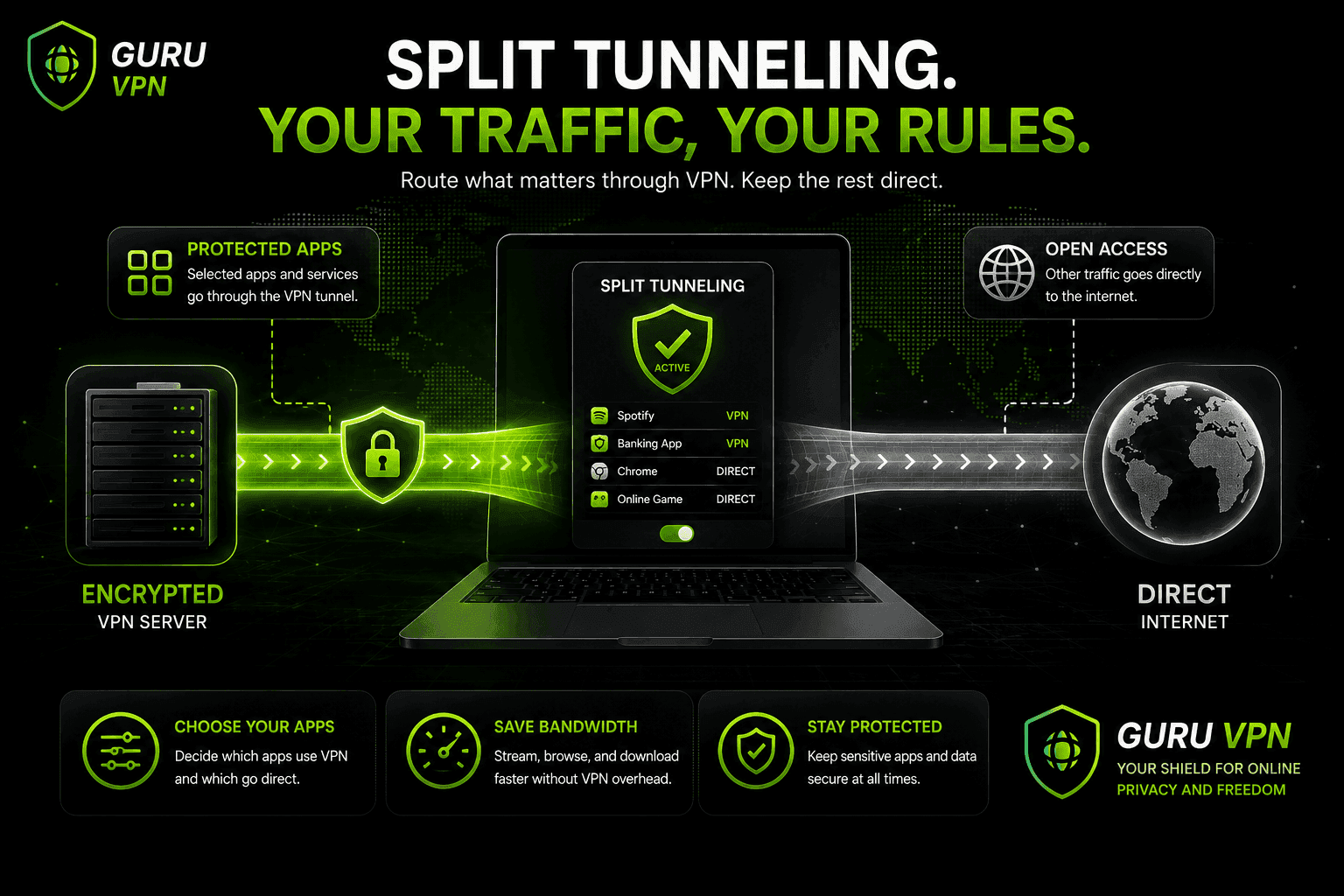
If you've come across the term split tunneling VPN while browsing your VPN app's settings, you're not alone — it's one of the more misunderstood features in modern VPN software. In simple terms, split tunneling lets you choose which of your internet traffic travels through an encrypted VPN connection and which traffic goes directly to the internet. Instead of an all-or-nothing approach, you decide, app by app or even site by site, what gets protected.
Many people searching for what is a VPN split tunneling are trying to solve a very specific problem: they want the privacy and security of a VPN for some activities, but they don't want to sacrifice speed, access to local devices, or region-specific content for everything else. Split tunneling exists to solve exactly that trade-off.
Modern VPN apps like Guru VPN build this kind of flexibility directly into their desktop and mobile clients, so you don't need advanced networking knowledge to set it up. In this guide, we'll explain what split tunneling actually does, the different types available, when it makes sense to use it, and the security trade-offs worth knowing about before you turn it on.
Key Takeaways
- Understand what split tunneling is and how it differs from a standard, full-tunnel VPN connection.
- Learn the main types of VPN split tunneling, including app-based, URL-based, and inverse configurations.
- See the real benefits — from saving bandwidth to accessing local devices while still connected to a VPN.
- Review the security risks and platform limitations before deciding whether to enable it.
- Find out which everyday situations make a VPN with split tunneling genuinely worth using.
What Is Split Tunneling?
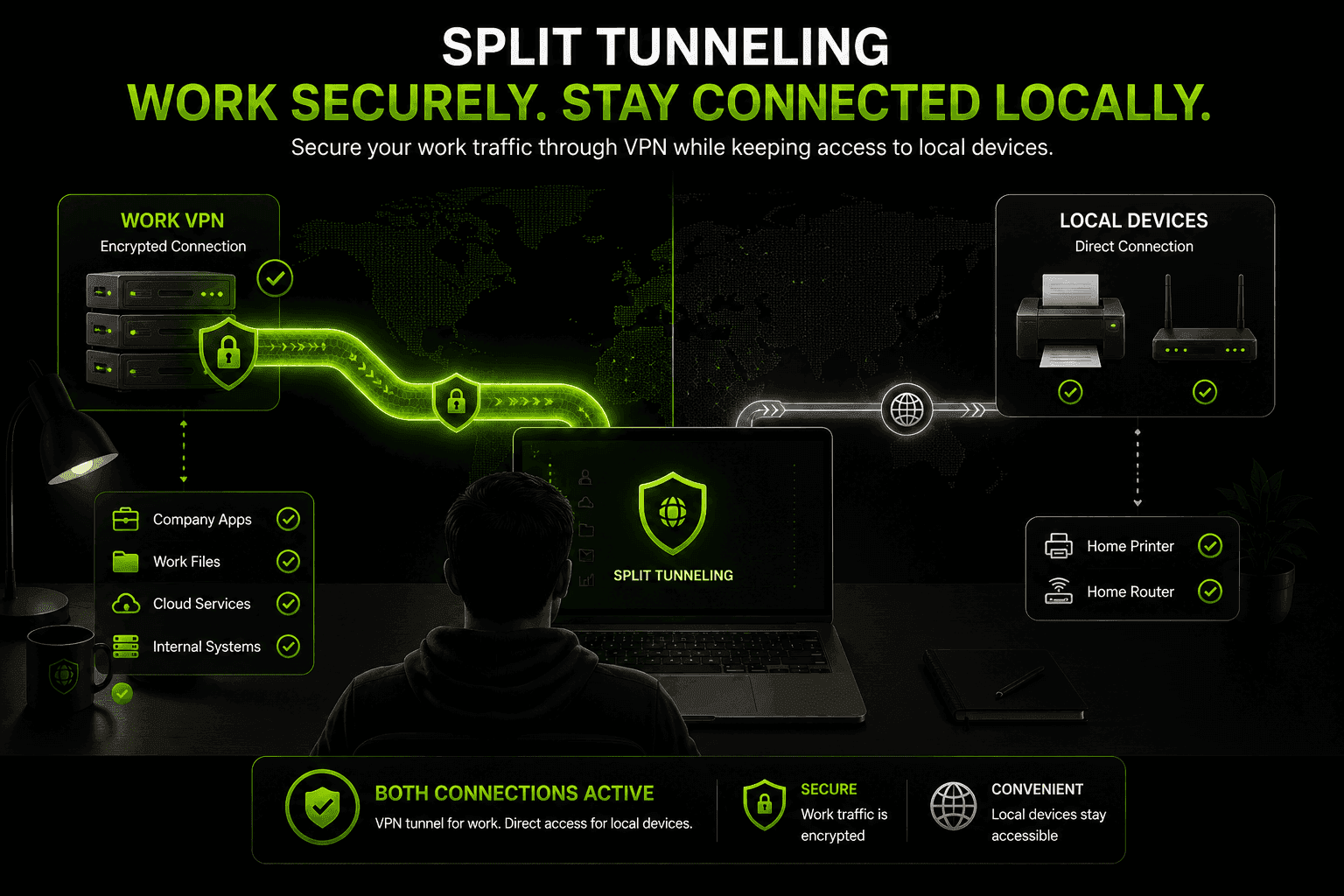
Split tunneling is a VPN feature that lets you route only part of your internet traffic through an encrypted tunnel, while the rest connects to the internet normally, without encryption. Think of it as having two roads leaving your house: one is a private, guarded road that passes through a checkpoint — your VPN server — before reaching its destination, and the other is an ordinary public road that goes there directly. You decide which road each piece of traffic takes.
By default, most VPNs use what's called full tunneling: every byte of data your device sends or receives travels through the encrypted connection, with no exceptions. Split tunneling deliberately breaks that rule, giving you more control over speed, local access, and which data actually needs protection in the first place.
Split Tunneling vs. Full Tunnel VPN
| Feature | Full Tunnel VPN | Split Tunneling VPN |
|---|---|---|
Traffic covered | 100% of traffic encrypted | Only selected apps or sites encrypted |
Speed | Can slow down under heavy load | Faster for traffic outside the tunnel |
Local network access | Often blocked while connected | Available for excluded traffic |
Security | Maximum, uniform protection | Protects only what you choose |
Best for | Sensitive work, public Wi-Fi | Mixed everyday use, remote work |
How Does a Split Tunneling VPN Work?
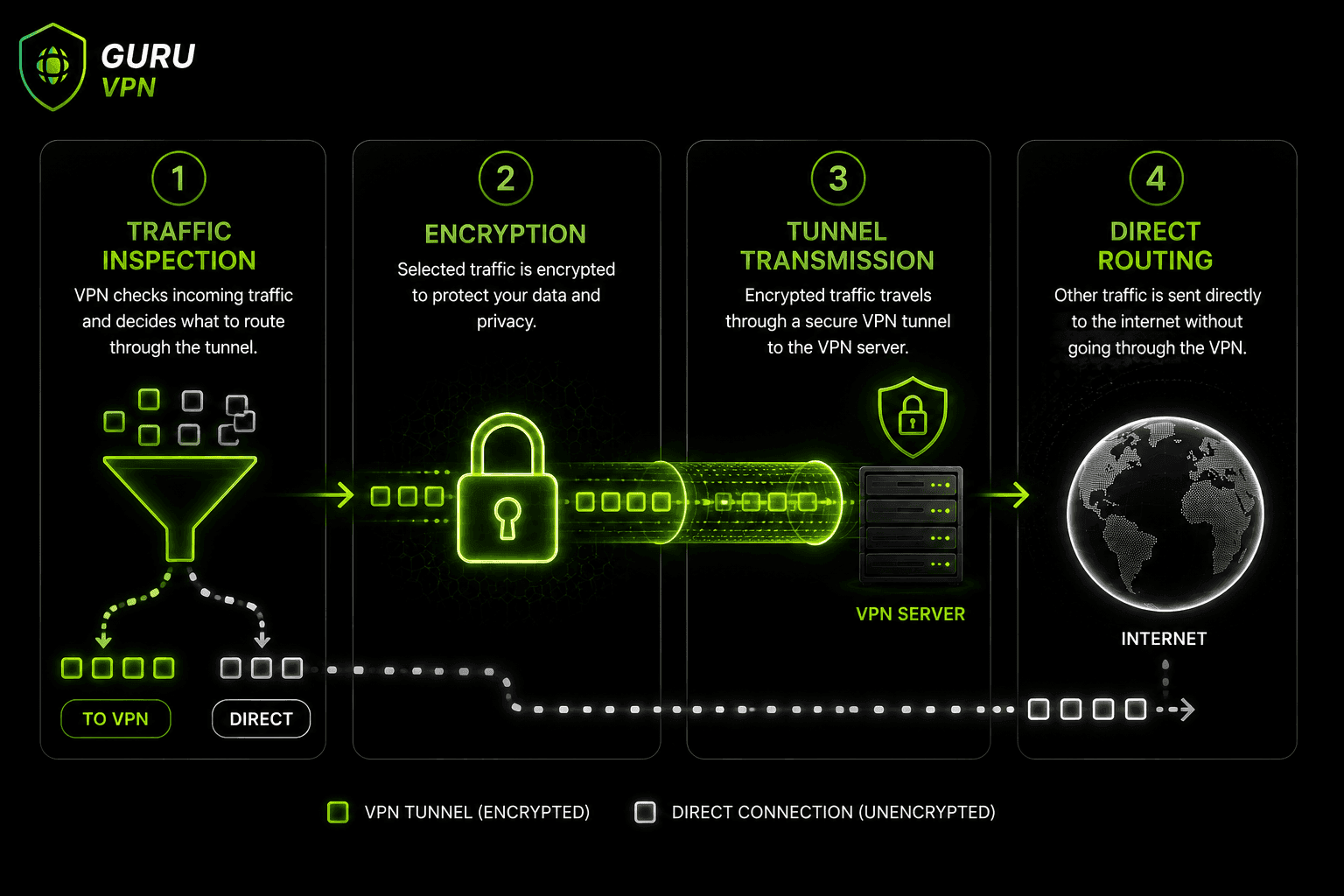
Under the hood, a split tunneling VPN relies on a set of rules that your VPN client checks before any data leaves your device:
- Traffic inspection — the VPN client checks each connection request against the app, domain, or IP-based rules you've configured.
- Encryption and encapsulation — traffic that matches a "protect this" rule gets encrypted and wrapped in a new packet header for secure transit.
- Tunnel transmission — that encrypted data travels through the VPN tunnel to the VPN server, which decrypts it and forwards it to its real destination.
- Direct routing — traffic that doesn't match any rule skips the tunnel entirely and goes straight out through your normal internet connection.
The result is two traffic lanes running side by side: one encrypted and routed through a VPN server, one open and routed normally, both active at the same time.
Types of VPN Split Tunneling
Not every implementation works the same way. The three approaches you'll run into most often are:
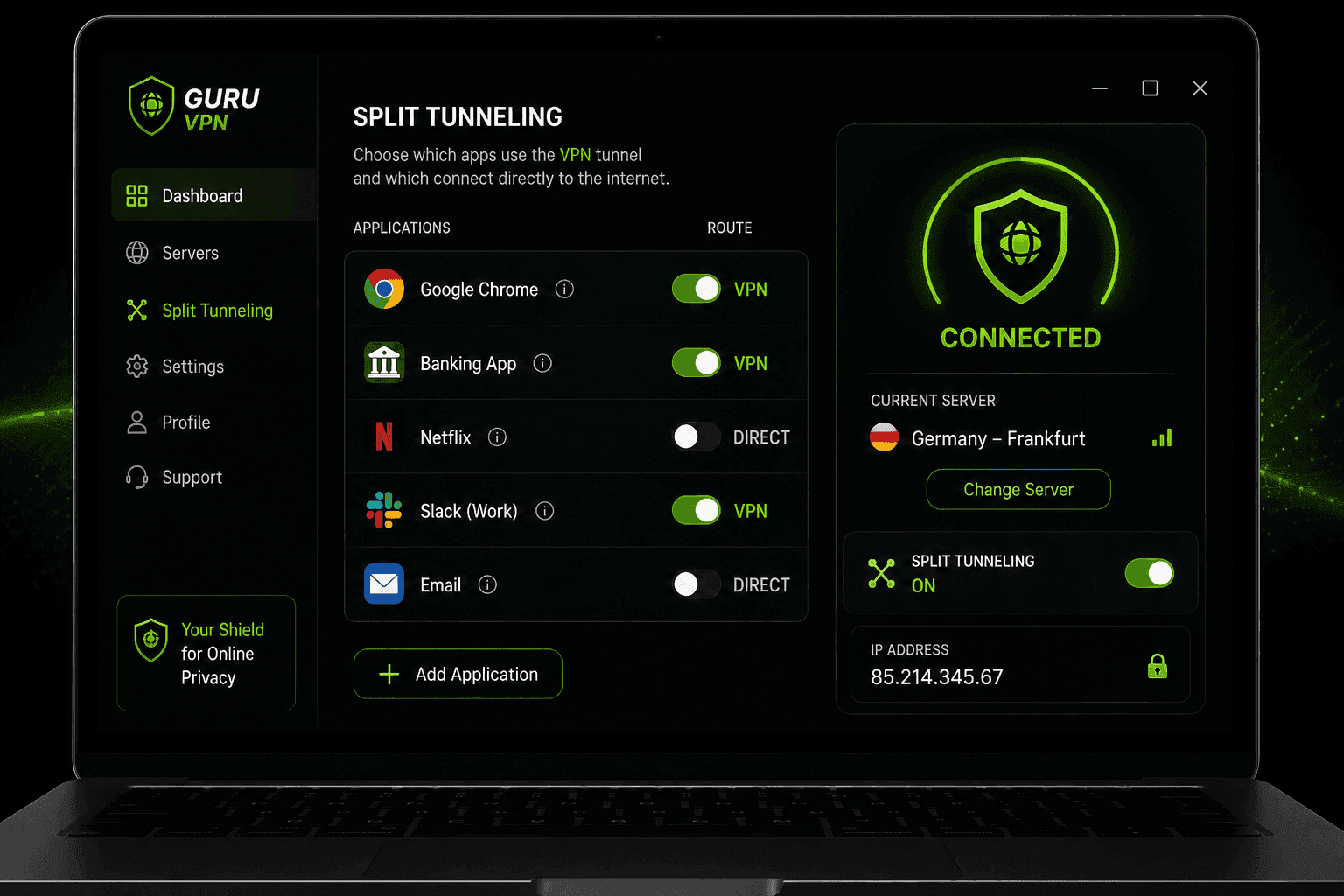
App-based split tunneling — you pick specific applications that should use the VPN tunnel (for example, a banking app or a work client), while every other app connects directly. This is the version most consumer VPN apps expose in their settings.
URL or domain-based split tunneling — instead of whole apps, you choose specific websites or domains to route through the VPN, often through a browser extension. Everything else in the browser uses your normal connection.
Inverse split tunneling — this flips the default: all traffic is encrypted through the VPN unless you specifically exclude an app or site. It's generally considered the safer starting point, since nothing bypasses protection unless you say so. Some providers document this simply as a split VPN mode, though the underlying mechanics are the same regardless of the label used.
IP-based split tunneling — rather than choosing by app or by domain, you specify individual IP addresses or IP ranges that should (or shouldn't) go through the VPN. This shows up most often in business VPN configurations, where administrators need precise control over which internal servers or external services route through the tunnel without relying on app-level rules that can behave less predictably across different devices.
| Type | How It Works | Typical Use |
|---|---|---|
App-based | Select apps to send through the VPN | Protecting a work app while browsing normally |
URL/domain-based | Select websites to route through the VPN | Securing specific sites via a browser extension |
Inverse | Encrypt everything except chosen exclusions | Safer default with limited, deliberate exceptions |
IP-based | Select specific IP addresses/ranges | Precise routing control, common in business setups |
Benefits of Using Split Tunneling
The appeal of split tunneling comes down to control. Because only part of your traffic is encrypted, the connection has less overhead overall, which can mean noticeably faster speeds for the apps and sites you've excluded — useful for large downloads, video calls, or streaming that doesn't need VPN protection.
It also solves a very common annoyance: many remote workers set up split tunneling in VPN apps specifically so they can reach a local network printer or a NAS drive at home while their work traffic still stays encrypted and routed through the company's VPN. Without split tunneling, a full-tunnel connection often blocks access to devices on your own local network.
Split tunneling additionally makes it possible to access local, region-specific content and services at the same time you're using the VPN for something else — for instance, checking a local banking site with your real IP address while streaming international content through a VPN server elsewhere. And because less traffic is encrypted, less load is placed on the VPN server itself, which can translate into a more stable connection during peak hours.
Risks and Limitations of VPN Split Tunneling
Split tunneling isn't without trade-offs, and it's worth understanding them before turning it on for everything.
Traffic that bypasses the tunnel is not protected by the VPN's encryption, which means it's visible to your internet service provider and to anyone monitoring the network you're connected to, including public Wi-Fi. If a device or app you've excluded is compromised, that traffic also bypasses whatever DNS protection or content filtering your VPN provides, giving malicious activity a way to slip past your defenses unnoticed. Misconfigured rules are another common issue — accidentally excluding the wrong app can leave sensitive data unencrypted without you realizing it.
For organizations issuing VPN access to remote employees, split tunneling introduces a risk that goes beyond an individual user's own exposure: if an employee's split-tunneled device is compromised while connected to a home or public network, that infection has a path directly into the wider internet without passing through the company's monitoring, proxy filtering, or data-loss-prevention systems — effectively invisible to corporate IT until it resurfaces on the protected side of the connection. This is a big part of why many corporate VPN policies restrict or disable split tunneling entirely for company-managed devices, even though it remains common and comparatively low-risk for individual, non-corporate use.
There are also platform limitations to keep in mind. Split tunneling is well supported on Windows and Android, more limited on macOS (particularly for WebKit-based apps like Safari), and generally unavailable on iOS because Apple's operating system restricts the level of per-app network control third-party apps are allowed to have. This is why any VPN split tunnel feature should be treated carefully and applied deliberately, rather than switched on by default for every app you use.
When Should You Use a VPN With Split Tunneling?
Using this feature tends to make the most sense in a handful of everyday situations:
Working remotely while needing access to local devices, such as a printer, smart TV, or home NAS, without disconnecting the VPN. Streaming or browsing region-specific content on your real connection while other apps stay routed through a VPN server elsewhere. Reducing bandwidth use on mobile data by excluding data-heavy apps that don't need encryption. Gaming or video calling with lower latency by keeping those apps off the encrypted tunnel while everything else stays protected. Running two networks at once — for example, a corporate VPN for work traffic and your regular home connection for personal browsing — without having to disconnect and reconnect throughout the day. Torrenting through the VPN tunnel specifically, while keeping the rest of your browsing on your normal connection, so only the torrent client's traffic is encrypted and everything else isn't slowed down by routing through a VPN server.
How to Enable Split Tunneling on Your Device
The general process is similar across most VPN apps, though the exact menu names vary:
Windows — open your VPN app's settings, find the Split Tunneling section, toggle it on, and add the apps you want to include or exclude from the tunnel.
Android — most VPN apps list installed apps under a "Split Tunneling" or "App Exclusions" menu, where you simply check the apps that should bypass the VPN.
macOS — support is more limited and often labeled "experimental" by providers, typically covering excluded apps only rather than full include/exclude flexibility.
iOS — Apple's restrictions mean this feature generally isn't available in the same way it is on Windows or Android, so don't be surprised if your VPN app's iPhone version doesn't offer it at all.
Router-level (DD-WRT, Tomato, pfSense) — if your VPN app doesn't support split tunneling natively, or you want the rule to apply to every device on your network rather than configuring each one individually, custom router firmware like DD-WRT, Tomato, or pfSense lets you set it up at the network level instead. This generally means configuring policy-based routing rules that send traffic from specific devices or IP addresses through a VPN client running on the router itself, while everything else uses your normal connection. It takes more technical setup than a simple in-app toggle, but it's the only practical way to apply split tunneling to devices — a smart TV, a game console, a smart speaker — that can't run a VPN app on their own.
Before making any VPN split adjustments, always check which platforms your provider actually supports it on — a feature that works perfectly on your laptop may simply not exist on your phone.
Troubleshooting VPN Split Tunneling Issues
Even a correctly configured split tunnel can behave unexpectedly. A few common issues and what usually fixes them:
An excluded app still seems to route through the VPN. Some apps push traffic through background processes or a shared system service that a simple per-app rule doesn't catch — try excluding the specific process actually handling the network connection, or check whether the app relies on a browser engine that needs to be excluded separately.
Split tunneling stops working after an app or OS update. VPN clients sometimes lose their exclusion rules after a major update to the operating system or to the excluded app itself. Reopening your split tunneling settings and re-adding the affected app usually resolves it.
A tunneled app can't reach the internet at all. This is often a DNS conflict — the app may be trying to resolve addresses through your VPN's DNS servers while its actual traffic is routed outside the tunnel, or the reverse. Toggling split tunneling off and back on, or restarting the VPN app, typically clears it.
Local network access still doesn't work despite excluding the relevant app. Some routers and VPN clients need local network traffic itself explicitly excluded, not just the app trying to reach it — check whether your VPN app has a separate "allow LAN access" or "local network" toggle alongside your app-based rules.
Split Tunnel vs Full Tunnel: Which Should You Choose?
If you're unsure whether a split tunnel VPN setup fits your needs, a reasonable rule of thumb is to start with full tunneling for anything involving sensitive data — banking, healthcare, work systems, or public Wi-Fi — and only gradually exclude the specific apps or sites you trust and understand. Full tunneling remains the safer default; split tunneling is a deliberate trade of some protection for convenience and speed, and it works best when you know exactly what you're excluding and why.
Best Practices for Safer Split Tunneling
A few habits go a long way toward keeping split tunneling safe rather than risky. Keep sensitive apps — banking, email, work tools — routed through the VPN rather than excluded from it. Review your excluded app list periodically, since apps you added months ago may no longer need to bypass the tunnel. Avoid enabling split tunneling on public or untrusted Wi-Fi networks unless you're confident about what each excluded app is sending. And choose a VPN provider that pairs split tunneling with strong baseline protections, like a kill switch and DNS leak protection, so a misconfiguration doesn't turn into a bigger exposure.
Why Choose Guru VPN for Split Tunneling
A VPN feature is only as useful as the app built around it. It combines app-based split tunneling with strong encryption, a strict no-logs policy, and a global server network, so you can fine-tune exactly which apps stay protected without giving up speed for everything else.
| Feature | Benefit |
|---|---|
App-based split tunneling | Choose exactly which apps use the VPN tunnel |
Strong encryption | Protects the traffic you do route through the VPN |
Fast global servers | Keeps excluded and tunneled traffic both running smoothly |
Strict no-logs policy | Keeps your activity private regardless of routing |
Cross-platform apps | Consistent controls across supported devices |
Unlimited bandwidth | No caps whether traffic is tunneled or direct |
Because split tunneling reduces how much traffic passes through the VPN server, having fast, reliable infrastructure behind it matters even more. You can compare the full lineup of Guru VPN plans to see which one fits your setup, and with servers in 49+ countries, it's worth browsing the available server locations to find the fastest option near you before you start excluding apps from the tunnel.
Frequently Asked Questions
It's a VPN feature that lets you route only some of your traffic through an encrypted VPN tunnel while the rest connects to the internet directly, instead of encrypting everything by default.
It's mainly used to balance privacy with convenience — keeping sensitive apps protected while letting other traffic, like local network access or bandwidth-heavy apps, bypass the tunnel for better speed.
Common everyday uses include accessing a home printer while connected to a work VPN, reducing mobile data use, and keeping video calls or gaming traffic off the encrypted tunnel for lower latency.
On Android, it typically means excluding specific apps from the VPN tunnel through your app's settings. On iPhone, support is limited or unavailable due to restrictions Apple places on third-party networking apps.
Technically, it's a routing rule set: the VPN client inspects each connection, encrypts and tunnels traffic that matches your rules, and lets everything else use your normal internet connection unmodified.
At its core, it's simply the option to protect part of your connection instead of all of it — encrypting the apps or sites you choose while everything else reaches the internet directly, without going through the VPN server at all.
A regular, full-tunnel VPN encrypts all traffic with no exceptions. A split tunnel VPN encrypts only the traffic you've chosen, leaving the rest to travel outside the tunnel.
It can be, as long as you're deliberate about what you exclude. Traffic outside the tunnel isn't protected by the VPN, so it's best to keep sensitive apps encrypted and only exclude apps you trust and understand.
Yes — app-based split tunneling is available on supported platforms, letting you choose which apps use the encrypted tunnel. Check the current Guru VPN plans for platform-specific availability.
Conclusion: Take Control of Your VPN Traffic
Split tunneling gives you a level of control that a standard, all-or-nothing VPN connection simply doesn't offer. Used carefully, it lets you protect the traffic that actually needs protection while keeping everyday browsing, local network access, and bandwidth-heavy apps running at full speed. Used carelessly, it can leave more of your data exposed than you intended — which is why understanding how it works, and choosing a VPN app that implements it clearly, matters just as much as turning the feature on.