

 BR
BR DE
DE ES
ES FR
FR RU
RU

Articles
Fake and Scam Websites: How to Spot Them and Stay Safe Online

Guru VPN experts
20.01.2026

In our article, we’ve already covered what an IP address is and touched on its different types. That foundation is important - but understanding IP addresses at a deeper level reveals how the internet actually organizes devices, routes traffic, and applies access or restrictions.
In this article, we’ll move beyond the basics and explore the different types of IP addresses, how they’re structured, and why these distinctions still matter today. Whether you’re curious about networking fundamentals or trying to understand how IPs relate to privacy tools like VPNs, this guide will help you see the bigger picture.
Think of an IP address as your device's online address when it’s on a network. It's a special number that makes sure data gets to the right place.
So, when you visit a website or send a message, IP addresses are working in the background. They tell the internet where your request started and where to send the answer back.
Now that we've got the basics down, let's check out the different kinds of IP addresses and what they do.
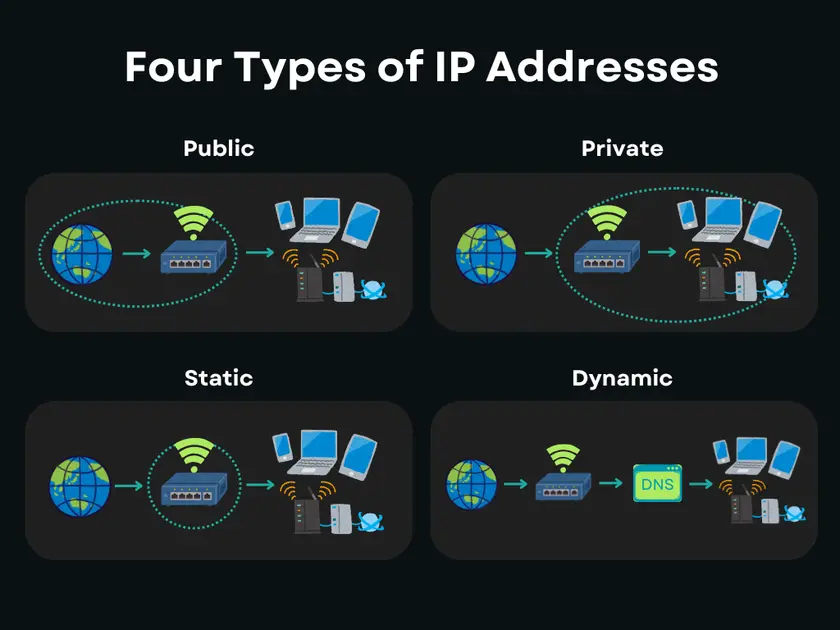
IP addresses come in two main types: public and private. They do different jobs and work on different parts of a network.
Your internet company gives you a public IP address, and it's how the internet sees you. It’s the address websites and online services use when you connect to them.
You can use public IPs to:
Usually, all the devices at home or in an office will share one public IP through a router.
A private IP address is how devices on your Wi-Fi talk to each other, like your computer communicating with your printer. Nobody outside your house can see those addresses.
The most usual private IP addresses look like this: 192.168.x.x or 10.x.x.x, or 172.16.x.x – 172.31.x.x.
Your public IP is how the internet sees you, but your private IP is how things are managed inside your own network. Knowing the difference is important for getting how routing, security, and privacy work, mainly when you start using things like VPNs.
Another key way IP addresses differ is whether they stay the same over time or change automatically. This is where static and dynamic IP addresses come into play.
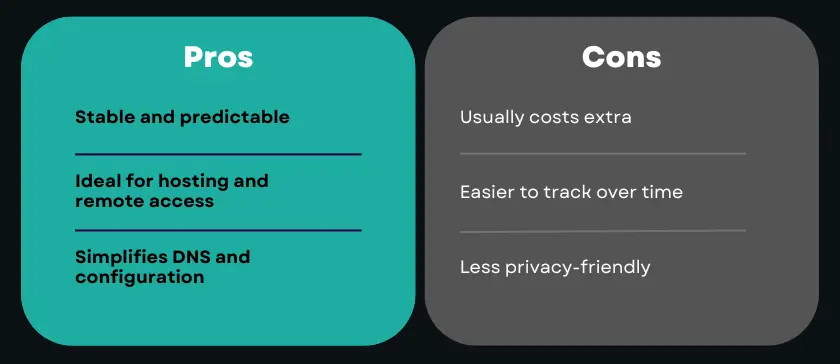
A static IP address remains constant. Once assigned, it doesn’t change unless it’s manually reconfigured.
Static IPs are commonly used for:
So, a dynamic IP address is one that changes every so often. If you're like the majority of users using the internet at home, your internet provider probably gives you a dynamic IP. They switch it up for you automatically!
It's easier for them to handle things on their end, and it means they don't have to spend as much time doing things by hand. Plus, it adds a little bit of privacy since your IP changes from time to time.
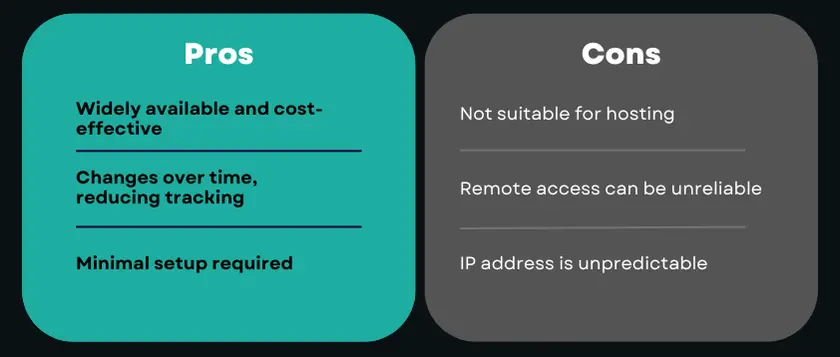
Whether an IP is static or dynamic affects stability, accessibility, and privacy. For everyday browsing, dynamic IPs are usually sufficient. For infrastructure and remote access, static IPs are often required.
IP addresses also differ by the version of the Internet Protocol they use. Today, two versions coexist: IPv4 and IPv6.
IPv4 is the original and still most widely used version of IP addressing. It uses a 32-bit format and is written as four numbers separated by dots.
Example: 192.168.1.1
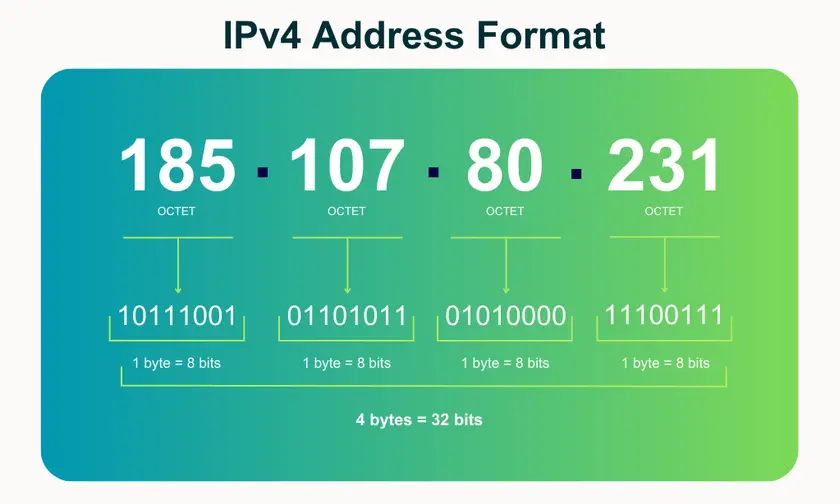
IPv4 has been the backbone of the internet for decades, but it comes with a major limitation: a finite number of available addresses.
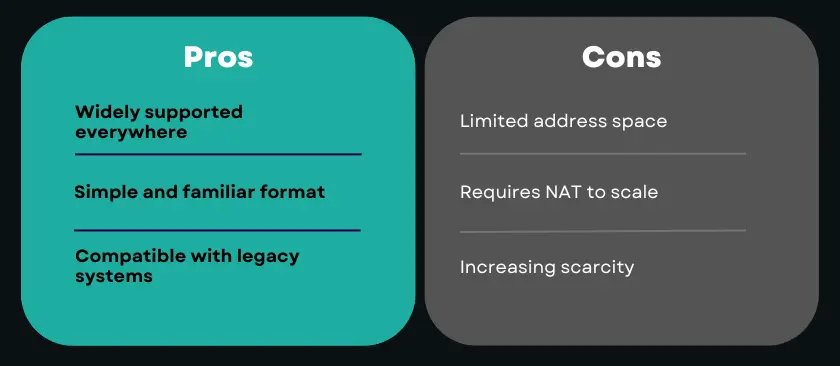
IPv6 Addresses
IPv6 was introduced to solve the address shortage problem. It uses a 128-bit format and is written in hexadecimal, allowing for an almost unlimited number of unique addresses.
Example: 2001:0db8:85a3::8a2e:0370:7334
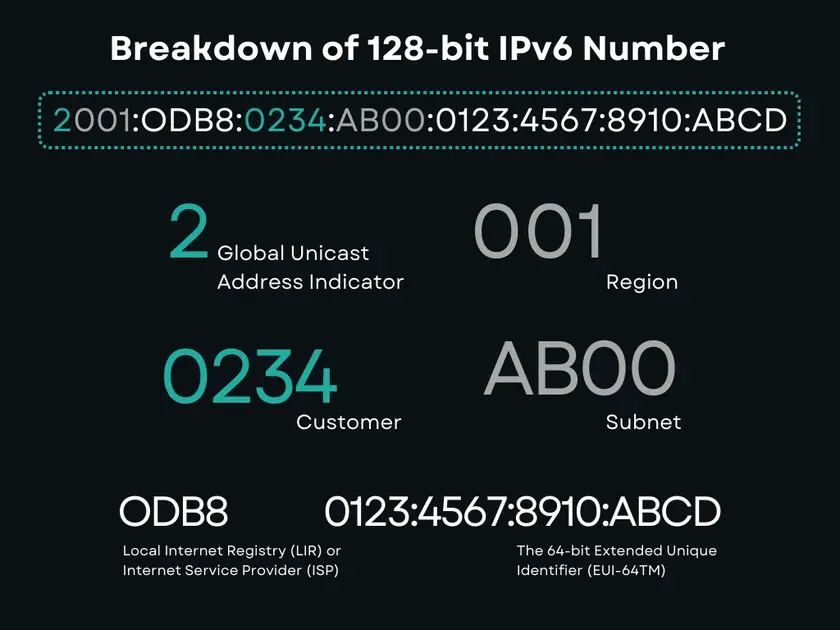
IPv6 also improves routing efficiency and reduces the need for NAT, but adoption is still ongoing.
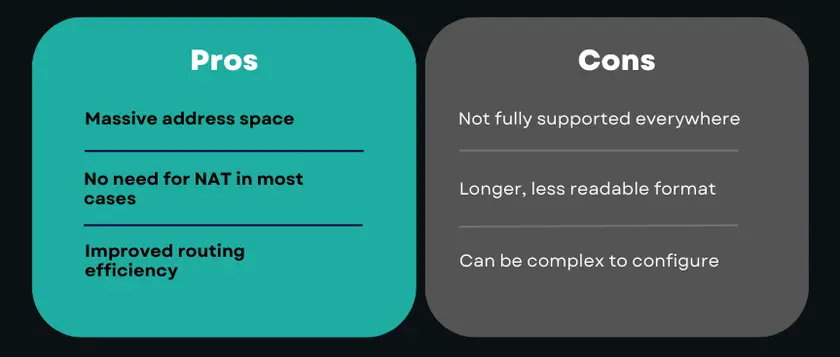
IPv4 and IPv6 currently coexist because the internet cannot transition overnight. Many networks, devices, and services still rely on IPv4, while IPv6 adoption continues to grow gradually.
Understanding both versions is important, especially when dealing with modern networks, cloud services, and privacy tools like VPNs.
Before modern IP allocation methods existed, IP addresses were divided into classes. This system, known as classful addressing, was designed to simplify routing in the early days of the internet.
Each class defined how much of the IP address identified the network and how much identified the host within that network.
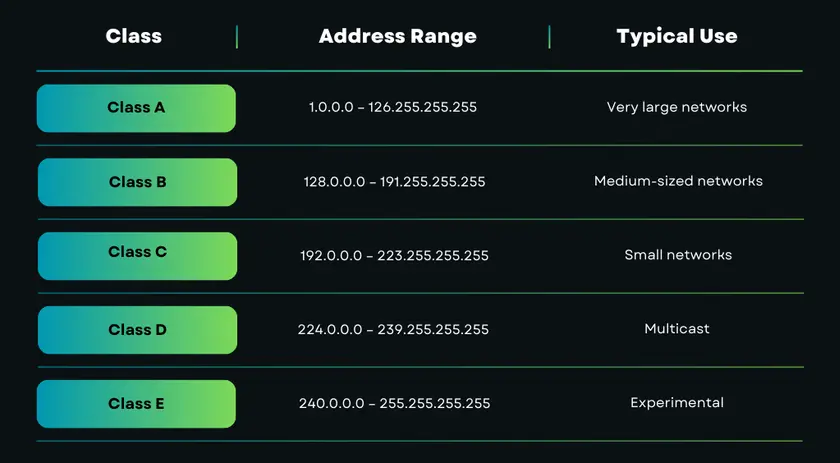
For example:
While simple, class-based addressing was inefficient. Organizations often received far more IP addresses than they actually needed, leading to massive waste of address space - especially as the internet grew rapidly.
This inefficiency is one of the main reasons IPv4 addresses became scarce.
Although classful addressing is no longer used for IP allocation today, the concept still appears in:
To solve the limitations of IP classes, a more flexible system was introduced - subnetting.
As networks grew larger, it became clear that a single network often needed to be divided into smaller, more manageable segments. This is where subnetting comes in.
Subnetting is the process of splitting a large IP network into smaller networks called subnets. Each subnet functions as its own logical network while still being part of a larger one.
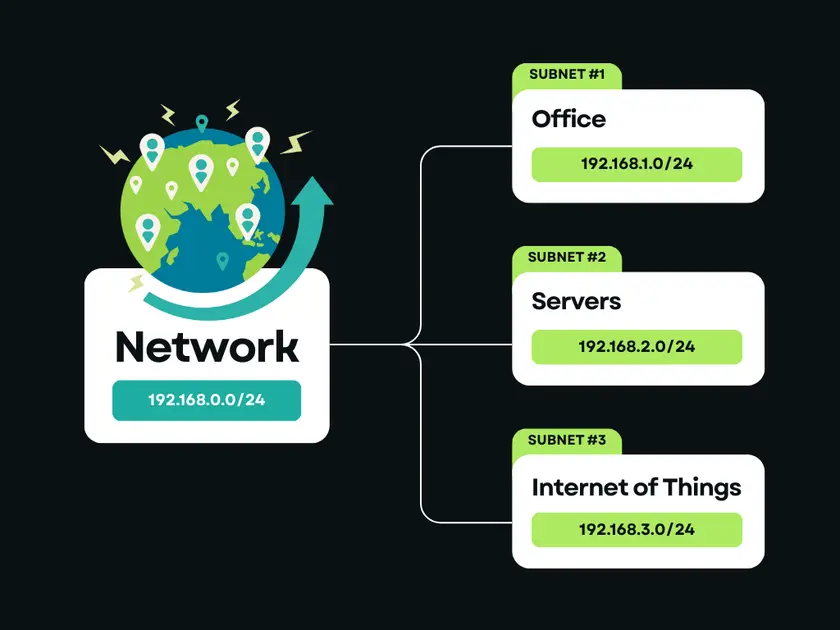
Subnetting helps to:
For example, a company might separate internal systems, guest Wi-Fi, and servers into different subnets, even though they share the same main network. For example, a network with the IP range:
192.168.1.0
Instead of placing all devices in one large group, subnetting allows this range to be divided into smaller sections, each with its own set of usable IP addresses.
You don’t need to calculate subnets manually to understand the concept - the key idea is that subnetting controls how traffic is grouped and routed inside a network. Even if you never configure subnets yourself, they play a critical role in how networks stay organized and secure.
As the internet continued to grow, both class-based addressing and rigid subnet boundaries became limiting. To solve this, CIDR (Classless Inter-Domain Routing) was introduced.
CIDR allows IP addresses to be allocated and routed without relying on fixed classes. Instead of predefined network sizes, CIDR uses flexible prefixes that define how many bits of an IP address belong to the network.
CIDR is written using a slash followed by a number, such as:
192.168.1.0/24
The number after the slash indicates how many bits identify the network portion of the address.
You may also see:
CIDR makes IP address allocation far more efficient. It allows: networks to be sized precisely to actual needs, routing tables to remain smaller and faster, and ISPs and cloud providers to manage IP space effectively.
This flexibility is one of the key reasons the internet continues to scale despite IPv4 limitations.
When you see an IP range or VPN server block listed with a /24 or /20, that’s CIDR in action. Understanding CIDR helps explain how large networks operate - and how traffic is efficiently routed across the internet.
Another important distinction between IP addresses is whether they are shared or dedicated. This difference plays a major role in privacy - and is especially relevant when talking about VPNs.
A shared IP address is used by multiple users at the same time. From the outside, all their traffic appears to come from the same IP. This is the most common type of IP address used by VPN services.
VPN providers rely on shared IPs because they:
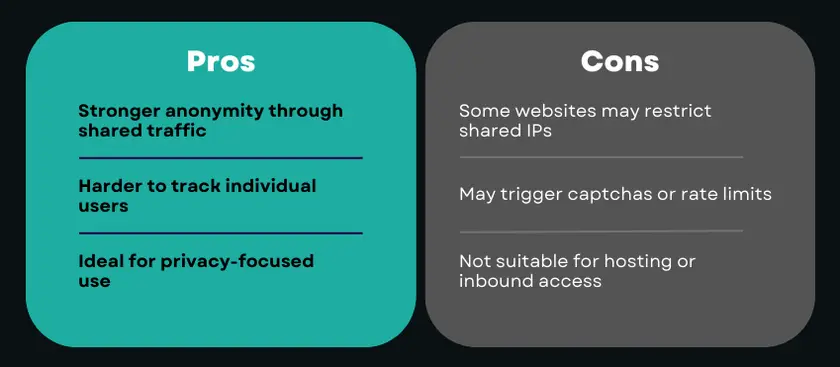
A dedicated IP address is assigned to a single user and does not change or get shared with others. Some VPN providers offer dedicated IPs as an optional feature, usually for specific use cases.
Dedicated IPs are useful when you need:
However, they offer less anonymity compared to shared IPs.
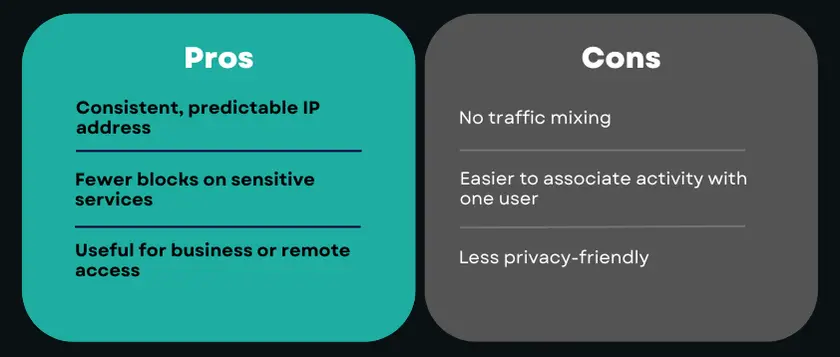
For most people using a VPN for privacy, shared IP addresses are the better choice. They align with the core goal of a VPN: reducing traceability and exposure.
Dedicated IPs are not “better” - they’re simply different, optimized for stability and access rather than anonymity.
When you connect to a VPN, you’re not just changing your public IP address - you’re entering a different network environment with its own structure, routing rules, and IP allocation logic.
Most VPN providers operate their servers in data centers. This means VPN IP addresses usually belong to data center IP ranges, allocated in blocks using CIDR notation. For example, instead of a single IP, a VPN server may operate within a range like:
203.0.113.0/24
This CIDR block defines a subnet of IP addresses that the VPN provider controls and assigns dynamically to connected users.
VPNs typically assign users IPs from shared IP pools. These pools:
CIDR makes this efficient by allowing VPN providers to:
From a privacy perspective, this structure is intentional - shared subnets make it harder to associate activity with a single user.
Modern VPNs don’t rely on IP classes (A, B, C) for allocation, but the concept still applies at a high level.
For example:
CIDR effectively replaced class-based thinking while preserving the underlying logic.
Because VPN IPs come from known subnets and data center ranges:
Well-managed VPN providers actively monitor and rotate IP ranges to reduce these issues and maintain stable connectivity.
At the same time, this subnet-based approach allows VPNs to:
When you use a VPN, your traffic:
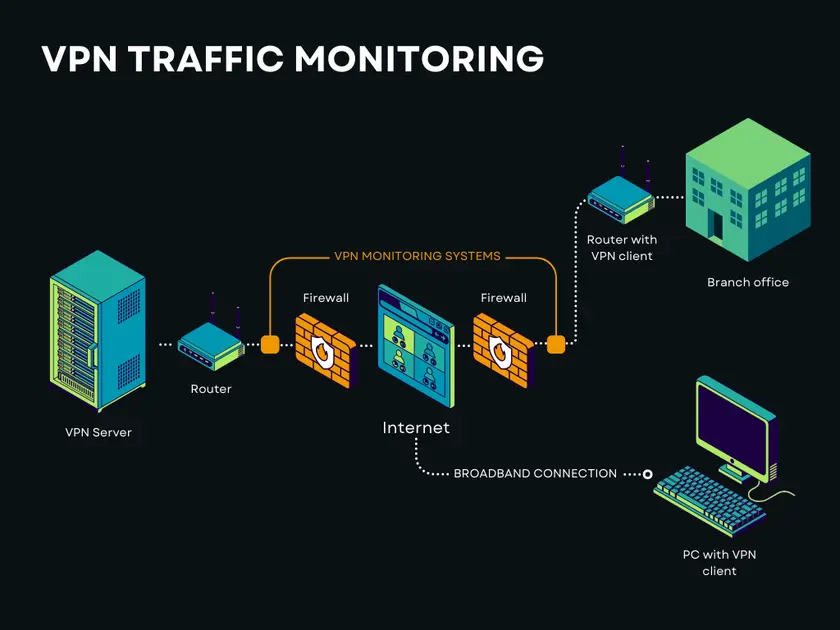
This abstraction layer is what makes VPNs effective - and why understanding IP structure adds clarity to how VPNs protect privacy.
Understanding the different types of IP addresses helps clarify how the internet routes traffic, applies restrictions, and identifies devices. Public and private IPs serve different roles, static and dynamic IPs affect stability and traceability, while shared, dedicated, residential, and data center IPs each come with their own trade-offs.
The key takeaway is simple: there is no “best” IP address for everyone. The right choice depends on what you’re trying to achieve.
In practice, managing these differences manually isn’t realistic for most users. Internet providers assign IPs automatically, network structures are hidden, and switching between IP types on demand is rarely possible without additional tools.
That’s where a VPN becomes especially useful.
Guru VPN simplifies how IP addresses work in real life by abstracting away the complexity. Instead of worrying about subnets, CIDR ranges, or IP reputation, users connect to a managed network designed with privacy and stability in mind.
With Guru VPN:
This approach allows users to benefit from shared IP anonymity, global access, and predictable behavior - without needing to understand or configure networking details themselves. With Guru VPN, that complexity stays behind the scenes, letting you focus on browsing, working, and staying private.