 EN
EN BR
BR DE
DE ES
ES FR
FR RU
RU ID
ID TR
TR IT
IT JP
JP SA
SA VN
VN TH
TH KR
KR
VPN Protocols Explained: Types, Differences, and How to Choose the Best One

 Key takeaways
- Understand what VPN protocols are and why they matter.
- Learn how different protocols affect speed, security, and connection stability.
- Compare the most common vpn protocol types and their ideal use cases.
- Discover how to choose the best vpn protocol for streaming, gaming, work, and everyday browsing.
- See how Guru VPN uses modern technologies to deliver secure and reliable connections.
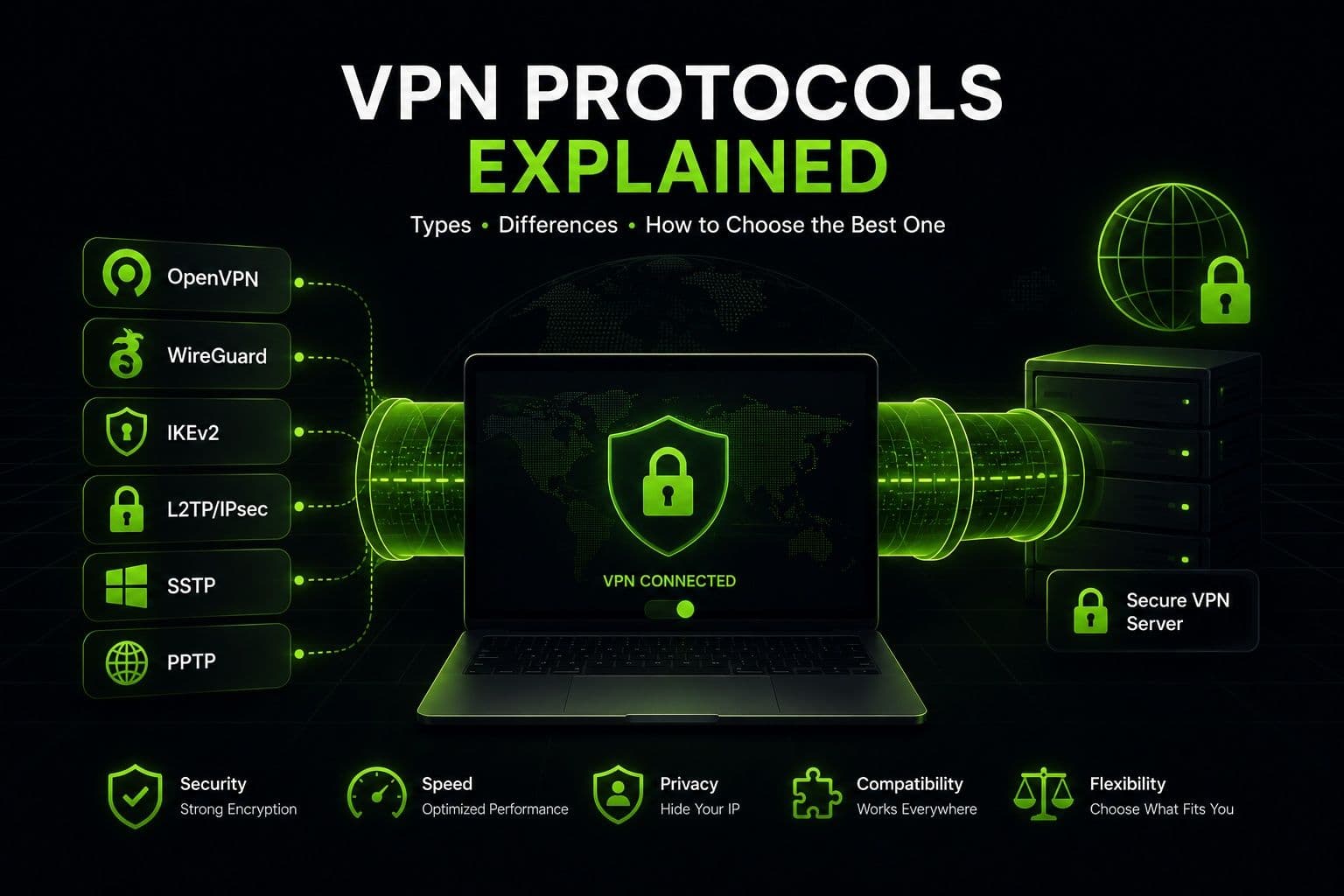
The quality of a VPN connection depends on more than just the server you choose. Behind every secure connection is a protocol that determines how your data is encrypted, transmitted, and protected. Different vpn protocols can significantly affect connection speed, security, compatibility, and overall performance, making them an important factor when selecting a VPN service.
Although the technical terms may seem intimidating at first, understanding VPN protocols is easier than it sounds. Each protocol is designed to balance speed, privacy, and reliability in different ways. Some are optimized for fast streaming and gaming, while others prioritize stronger encryption for sensitive tasks such as online banking or remote work. Modern providers like Guru VPN simplify the process by offering advanced protocols and intelligent settings that help users achieve secure, stable connections without requiring technical expertise.
In this guide, you'll discover what VPN protocols are and how they work behind the scenes to secure your internet traffic. We'll compare the most popular vpn protocol types, explain their strengths and limitations, and help you determine the best vpn protocol for different online activities, including browsing, streaming, gaming, and business use. By the end of this article, you'll understand which protocol best matches your needs and why choosing the right one can improve both your online security and overall VPN experience.
Key Takeaways
- Understand what VPN protocols are and why they matter.
- Learn how different protocols affect speed, security, and connection stability.
- Compare the most common vpn protocol types and their ideal use cases.
- Discover how to choose the best vpn protocol for streaming, gaming, work, and everyday browsing.
- See how Guru VPN uses modern technologies to deliver secure and reliable connections.
What Is a VPN Protocol and How Does It Work?
What Is a VPN Protocol?
A VPN protocol is a set of rules that determines how your device communicates with a VPN server. It defines how data is encrypted, transmitted, and verified while traveling across the internet. In simple terms, the protocol acts as the foundation of every VPN connection, ensuring that your information reaches its destination securely and efficiently.
The protocol you use has a direct impact on your overall VPN experience. Some protocols prioritize maximum security with strong encryption, while others are designed to deliver faster speeds or maintain stable connections when switching between networks. Choosing the right protocol helps balance privacy, performance, and compatibility based on your online activities.
Although most modern VPN apps automatically select the optimal protocol, understanding how they work can help you make better decisions when troubleshooting connection issues or optimizing performance for streaming, gaming, or remote work.
How VPN Protocols Work
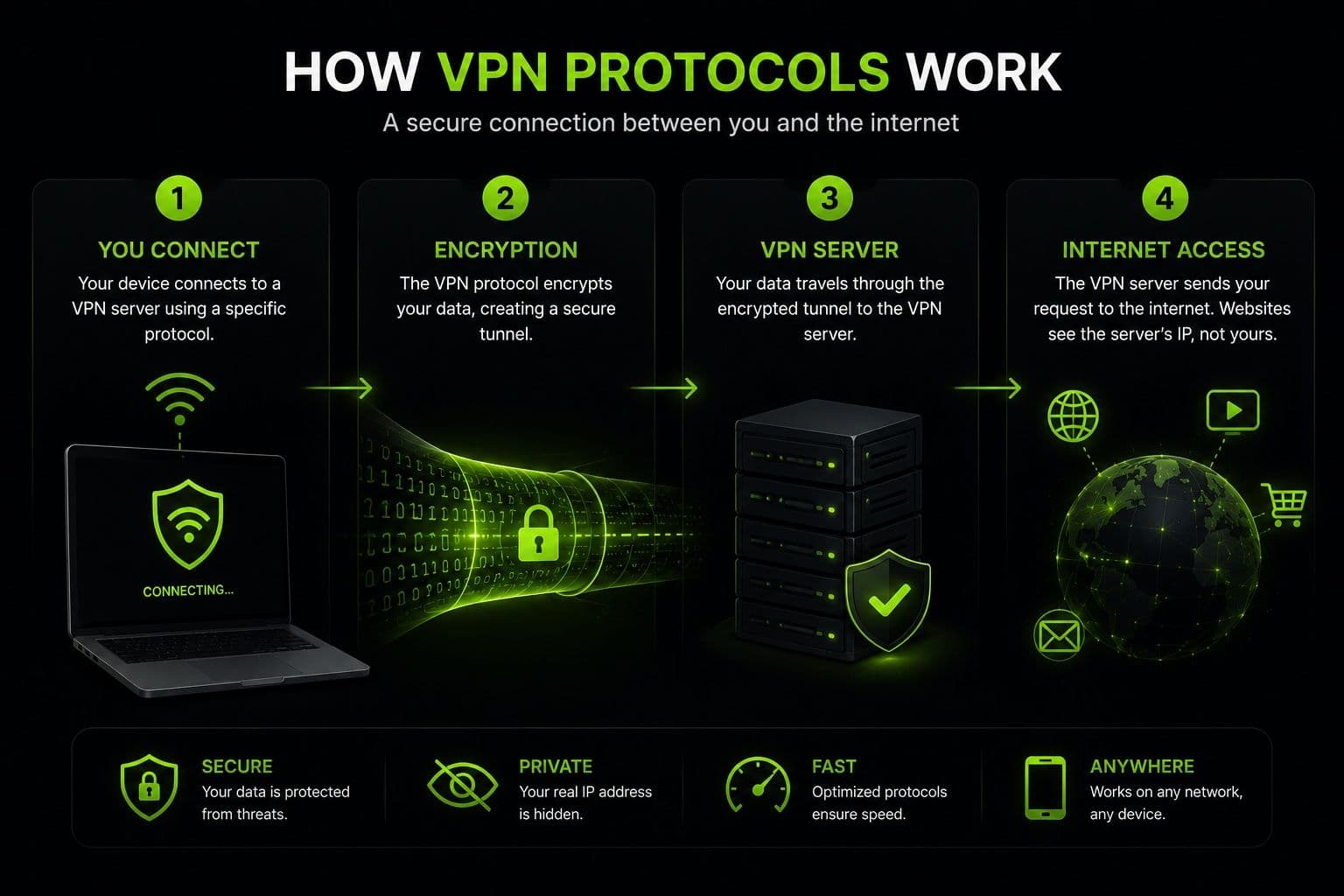
Whenever you connect to a VPN, the selected protocol establishes a secure communication channel between your device and a VPN server. The first step is authentication, where both sides verify each other's identity before exchanging any information. Once the connection is authenticated, the protocol encrypts your internet traffic so that anyone intercepting it sees unreadable data instead of your actual online activity.
After encryption is applied, your traffic travels through a secure tunnel to the VPN server, which then forwards your requests to websites and online services. Responses follow the same encrypted path back to your device, protecting your data throughout the entire session.
Different protocols also influence connection speed and stability. Lightweight protocols generally provide faster performance with lower latency, while more security-focused protocols may use additional encryption processes that slightly reduce speed in exchange for stronger protection.
| VPN Protocol Feature | How It Affects Your Connection |
|---|---|
Encryption | Protects internet traffic from interception |
Authentication | Verifies the identity of your device and the VPN server |
Secure tunnel | Keeps transmitted data private while traveling across the internet |
Speed | Determines how quickly data moves between your device and the VPN server |
Stability | Affects connection reliability and recovery after network changes |
Compatibility | Influences which devices and operating systems are supported |
Main Types of VPN Protocols Explained
WireGuard®
WireGuard® is one of the newest and most efficient VPN protocols available today. Built with a lightweight codebase, it delivers excellent performance while maintaining a high level of security. Its streamlined design reduces processing overhead, allowing faster connection speeds and lower latency than many traditional protocols.
WireGuard® is an excellent choice for streaming, online gaming, large file downloads, and everyday browsing. It also performs well on mobile devices thanks to its quick connection times and efficient battery usage.
OpenVPN
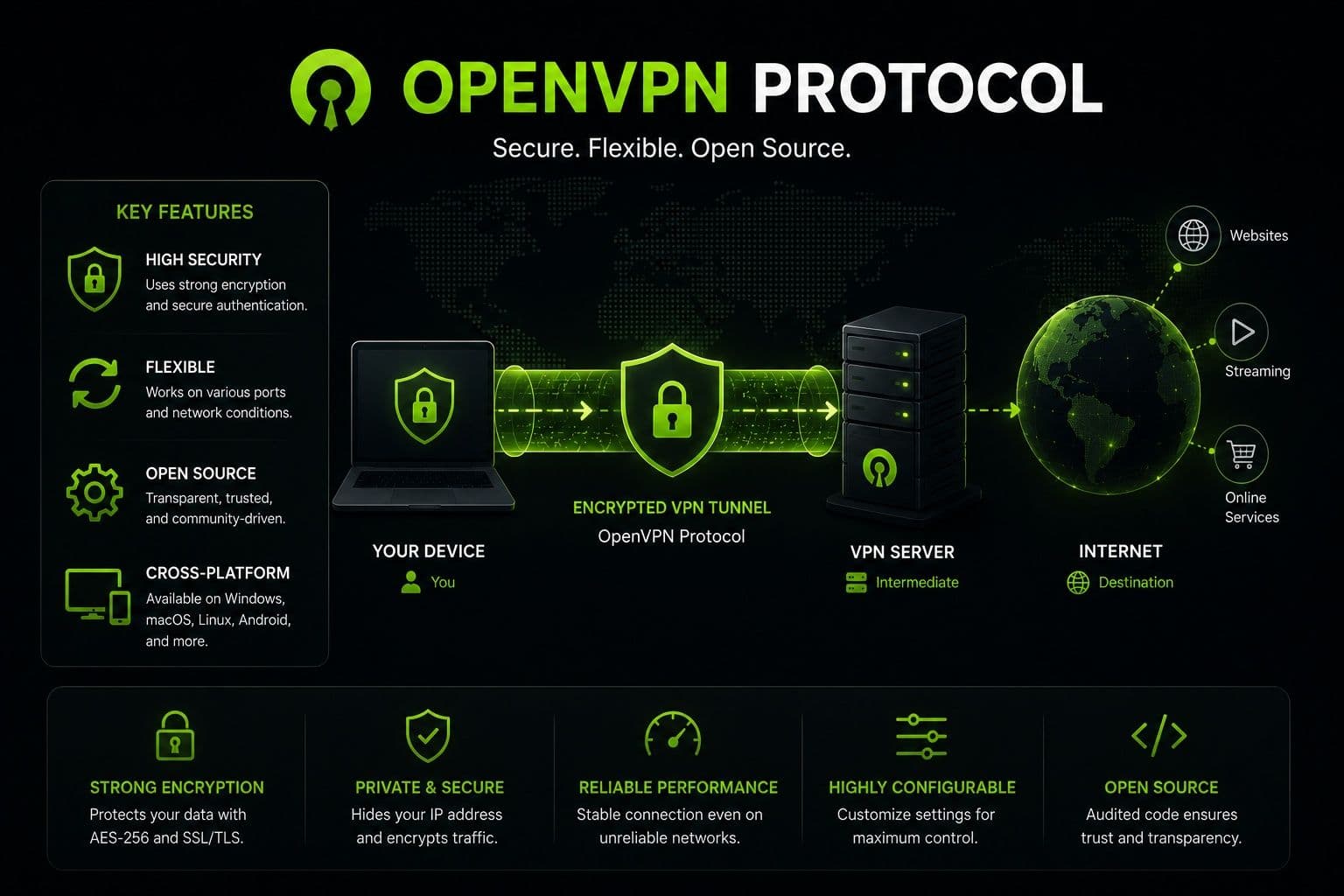
OpenVPN has been one of the industry's most trusted protocols for many years. As an open-source protocol that has undergone extensive security testing, it remains a popular option for users who prioritize privacy and reliability.
OpenVPN supports strong encryption algorithms and works across virtually every major operating system. It can operate over both UDP and TCP connections, allowing users to balance speed and reliability depending on their network conditions. While it may not always match the speed of newer protocols, it continues to offer excellent security for remote work, secure browsing, and protecting sensitive information.
IKEv2/IPSec
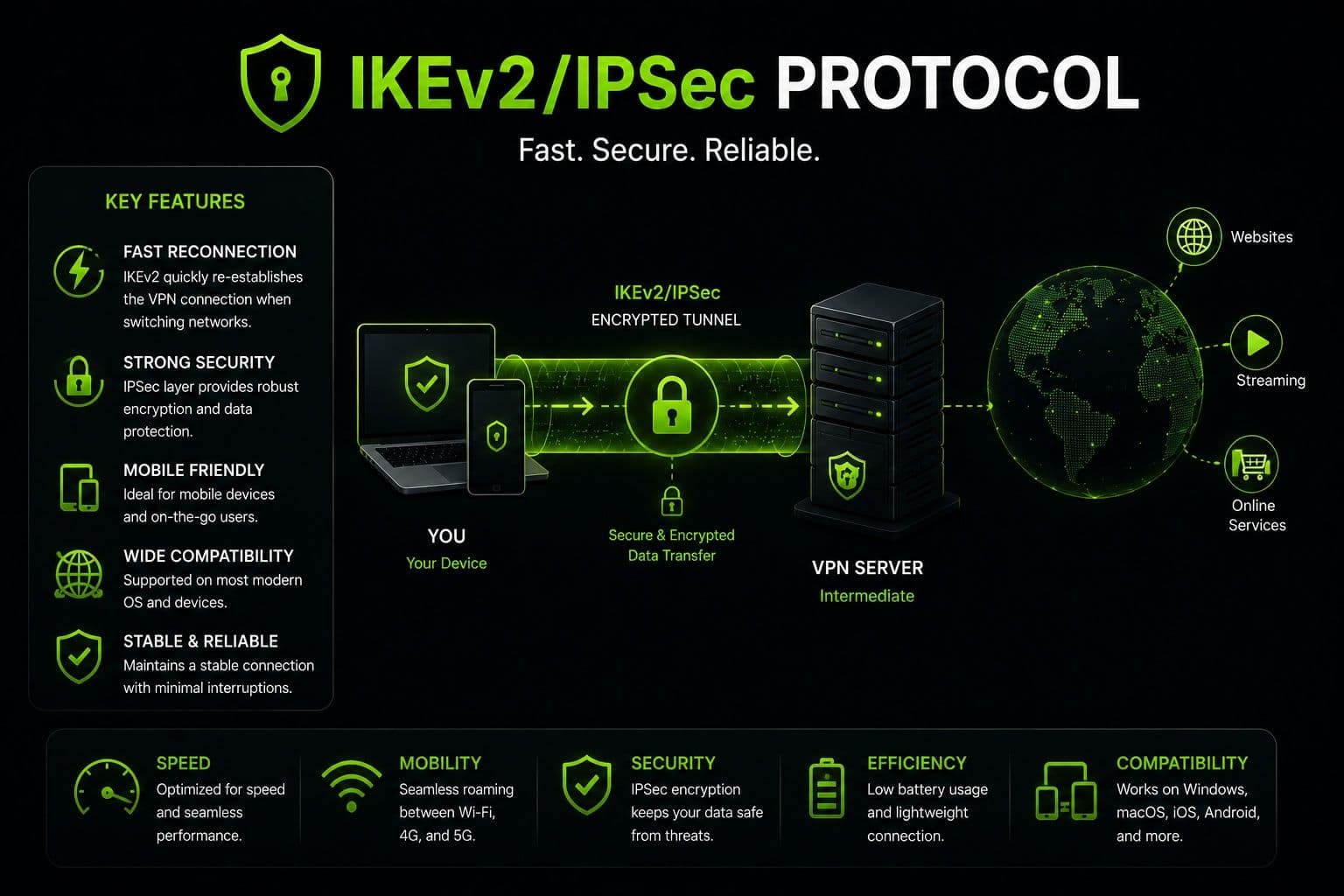
IKEv2/IPSec is known for its ability to reconnect almost instantly when a network changes. For example, if you switch from Wi-Fi to mobile data while traveling, the connection can be restored without requiring you to reconnect manually.
This makes IKEv2/IPSec particularly well suited for smartphones and tablets. It combines strong encryption with reliable performance and is widely supported by modern operating systems. Users who frequently move between different networks often benefit from its stability and fast reconnection capabilities.
Other VPN Protocol Types
Several older types of VPN protocols are still available, although they are generally used only in specific situations.
- L2TP/IPSec combines the Layer 2 Tunneling Protocol with IPSec encryption. While it provides reasonable security, it is slower than many modern alternatives due to the additional encapsulation process.
- PPTP is one of the oldest VPN protocols. Its setup is simple and performance is fast, but its outdated encryption makes it unsuitable for protecting sensitive information. Today, it is rarely recommended except for compatibility with legacy systems.
- SSTP is a Microsoft-developed protocol that integrates well with Windows devices. It offers solid security and can bypass certain network restrictions, although support on non-Windows platforms is more limited.
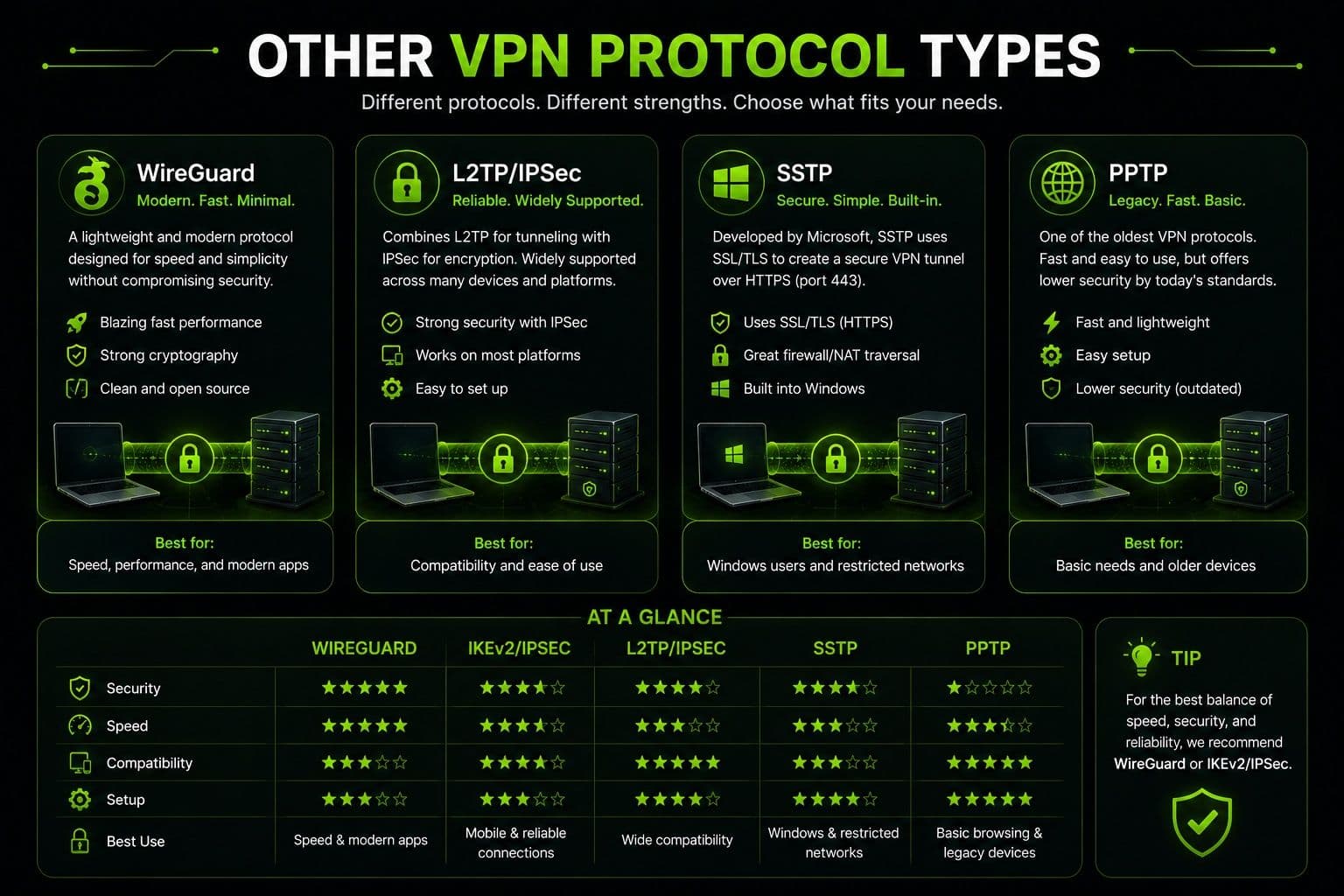
| Protocol | Speed | Security | Best For |
|---|---|---|---|
WireGuard® | Excellent | Excellent | Streaming, gaming, everyday browsing |
OpenVPN | Very Good | Excellent | Privacy, remote work, secure browsing |
IKEv2/IPSec | Excellent | Very Good | Mobile devices, travel, network switching |
L2TP/IPSec | Moderate | Good | Legacy compatibility |
PPTP | Fast | Low | Older systems only |
SSTP | Good | Very Good | Windows environments and restricted networks |
VPN Protocol Comparison: Speed, Security, and Performance
Choosing between different VPN protocols is easier when you understand how they compare in the areas that matter most. While every protocol is designed to create a secure connection, they differ in encryption, speed, reliability, and compatibility with various devices.
Security Level
Security is one of the biggest factors when comparing protocols. Modern options such as WireGuard®, OpenVPN, and IKEv2/IPSec use advanced encryption standards to protect your internet traffic from interception. They also rely on secure authentication methods to verify both the user and the VPN server before a connection is established.
Older protocols like PPTP offer much weaker encryption and are no longer considered suitable for protecting sensitive information. If privacy is your top priority, choosing a protocol with strong encryption and proven security is essential.
Connection Speed
Connection speed depends on how efficiently a protocol encrypts and transmits data. Lightweight protocols generally provide faster browsing, smoother streaming, and quicker downloads because they require fewer system resources.
WireGuard® is widely recognized for delivering excellent performance with minimal overhead, making it a popular choice for HD and 4K streaming, online gaming, and large file transfers. OpenVPN may sacrifice a small amount of speed in exchange for stronger configurability, while IKEv2/IPSec offers an excellent balance between performance and security.
Stability and Reliability
A fast protocol is only useful if it can maintain a stable connection. Some protocols recover more quickly from temporary network interruptions or when users switch between Wi-Fi and mobile data.
IKEv2/IPSec is particularly effective in these situations thanks to its rapid reconnection capabilities. WireGuard® also provides reliable performance across long-distance servers, while OpenVPN remains highly stable even on less predictable networks.
Device Compatibility
Compatibility is another important consideration. OpenVPN supports nearly every desktop, mobile operating system, and many routers, making it one of the most versatile choices available.
WireGuard® is now supported by most modern VPN providers and operating systems, while IKEv2/IPSec is especially well optimized for smartphones and tablets. Before manually selecting a protocol, it's worth confirming that it is fully supported on all the devices you plan to use.
| Feature | WireGuard® | OpenVPN | IKEv2/IPSec |
|---|---|---|---|
Security | Excellent | Excellent | Very Good |
Speed | Excellent | Very Good | Excellent |
Stability | Excellent | Excellent | Excellent |
Mobile Support | Excellent | Very Good | Excellent |
Router Compatibility | Good | Excellent | Good |
How to Choose the Best VPN Protocol for Your Needs
There is no single protocol that's perfect for every situation. The best vpn protocol depends on how you use the internet and which factors matter most to you, whether that's speed, security, or connection stability.
Best VPN Protocol for Streaming
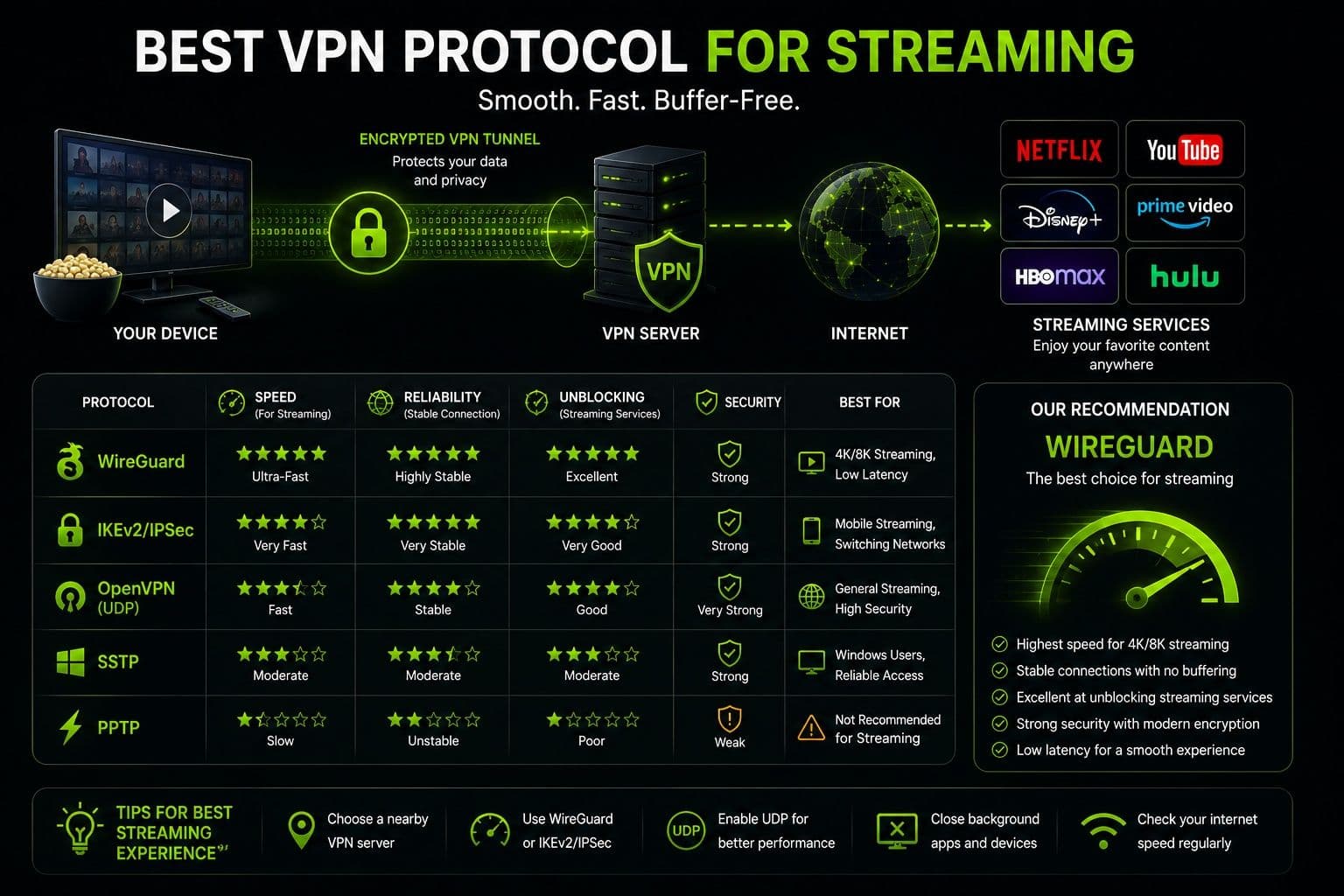
Streaming platforms benefit from protocols that combine high speed with reliable performance. A lightweight protocol minimizes buffering and helps maintain smooth playback, even for HD and 4K content.
WireGuard® is often the preferred choice because of its fast connection speeds and efficient encryption. It allows large amounts of data to be transferred without significantly affecting streaming quality.
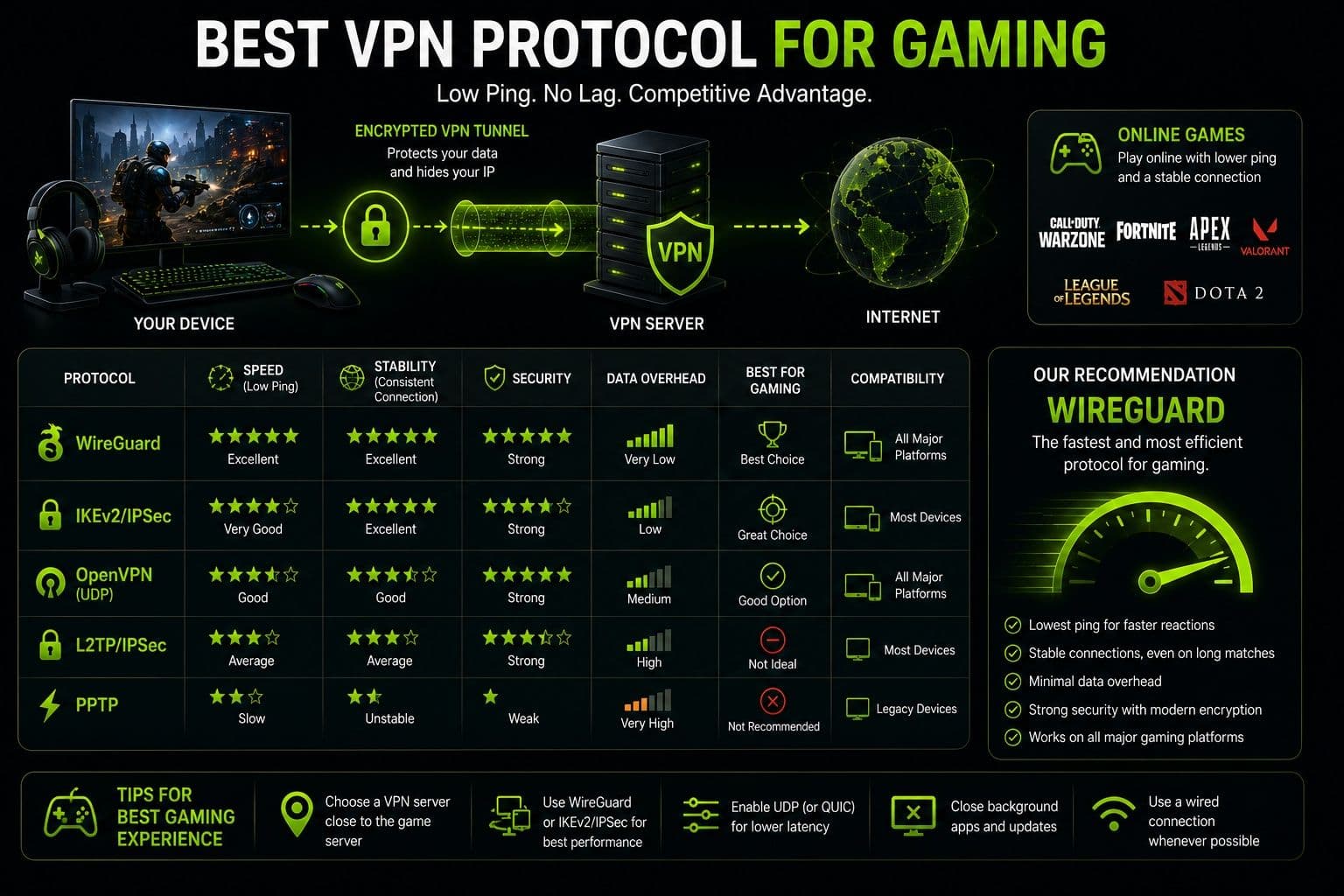
Best VPN Protocol for Gaming
Online gaming requires low latency and stable server connections. Even small delays can affect gameplay, particularly in competitive multiplayer games.
Protocols with optimized routing and low processing overhead provide the most consistent experience. WireGuard® is frequently recommended for gaming due to its quick response times, while nearby VPN servers can further reduce latency and improve connection stability.
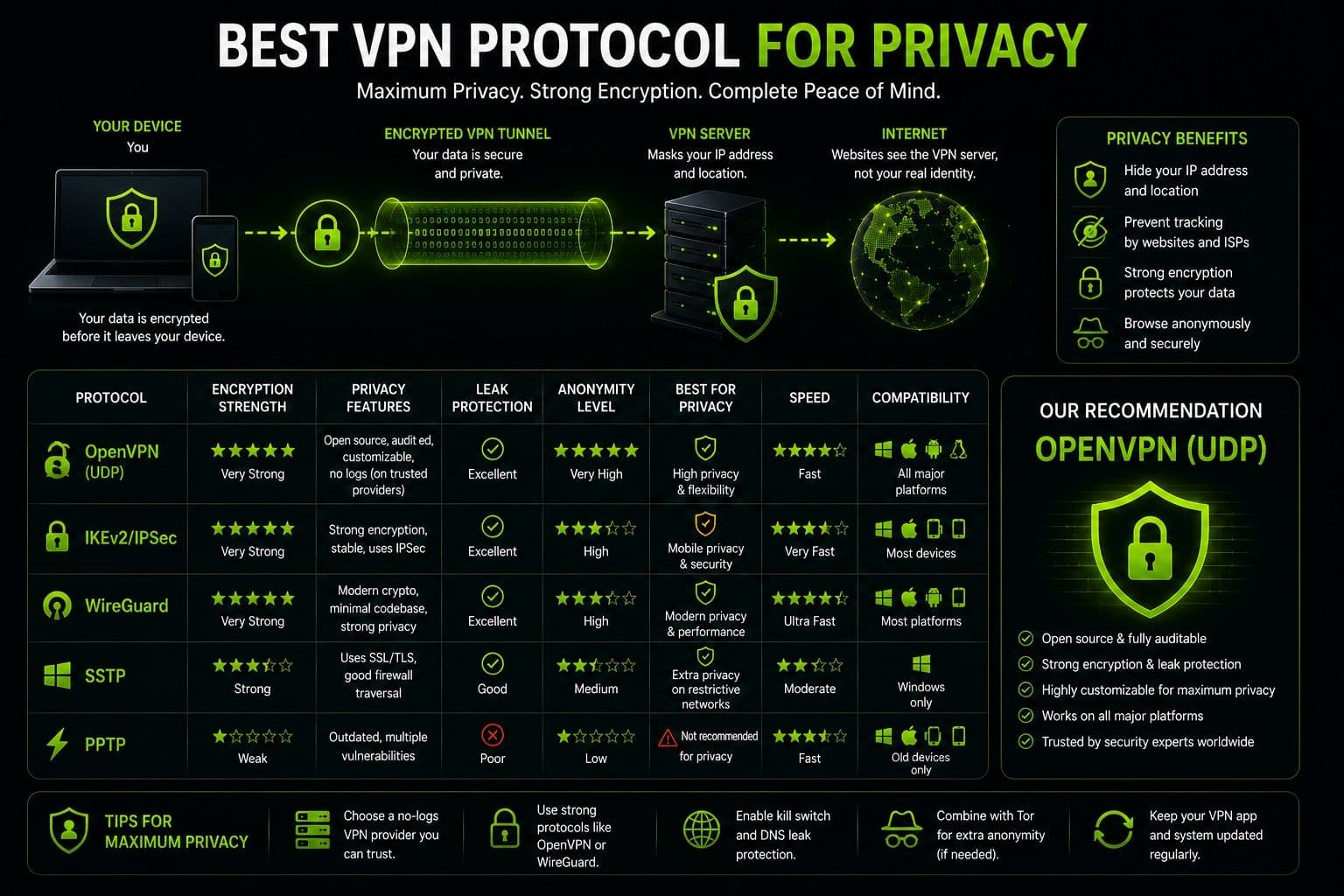
Best VPN Protocol for Privacy
When privacy is the highest priority, encryption strength becomes more important than maximum speed. Secure authentication methods and modern cryptographic algorithms help protect personal information from interception.
OpenVPN remains one of the most trusted choices for users handling confidential data because of its mature security architecture and extensive independent review. WireGuard® also provides excellent protection while maintaining significantly faster performance for everyday use.
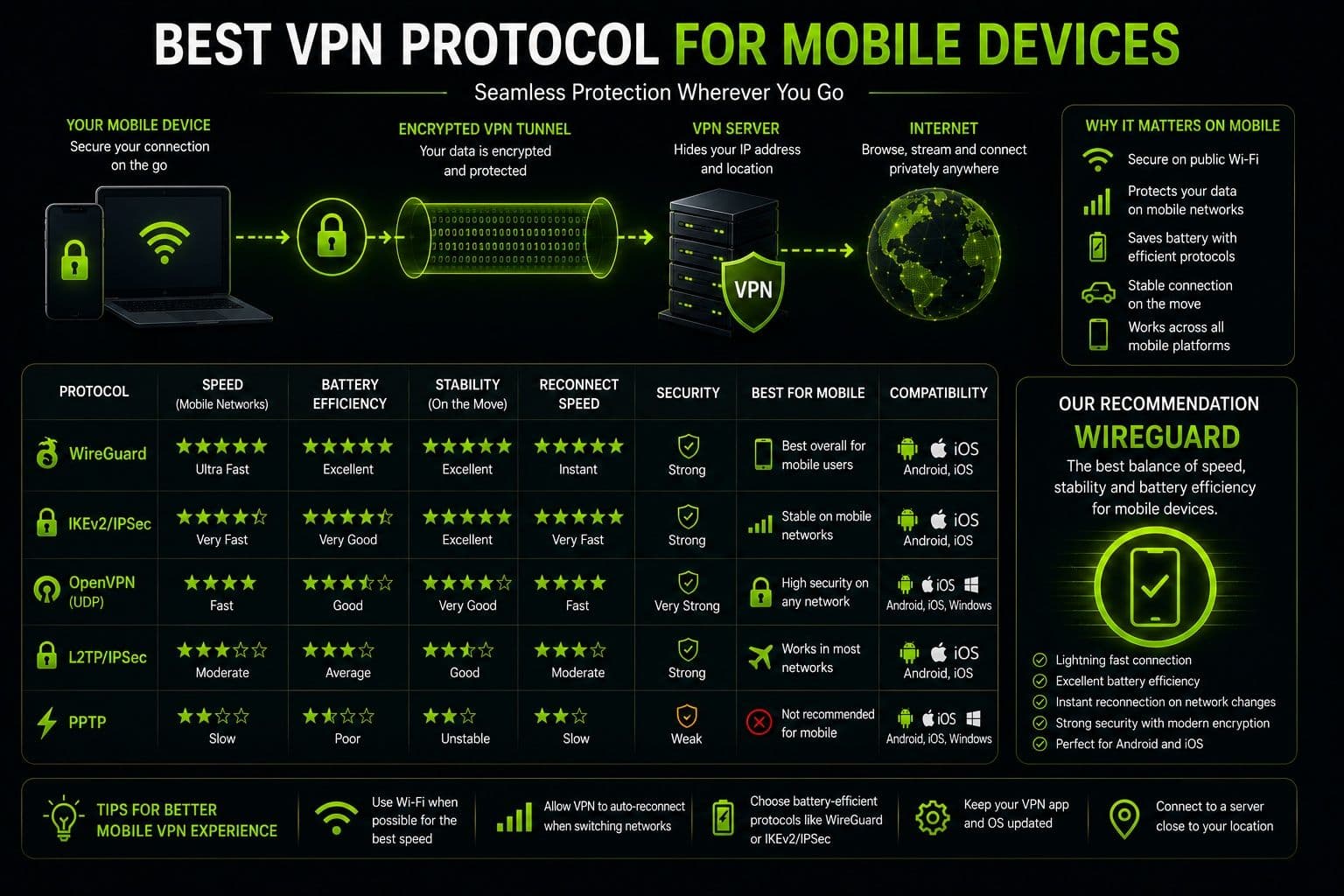
Best VPN Protocol for Mobile Devices
Mobile users often switch between Wi-Fi and cellular networks throughout the day. In these situations, a protocol that reconnects quickly without interrupting the VPN session offers the best experience.
IKEv2/IPSec is particularly well suited for smartphones because it automatically restores secure connections after network changes while remaining efficient with battery usage. Many modern VPN apps, including Guru VPN, also offer automatic protocol selection, allowing the application to choose the most suitable option based on your device, network conditions, and activity. This makes it easier to enjoy fast, stable, and secure connections without manually adjusting technical settings.
Common VPN Protocol Mistakes to Avoid
Selecting the right protocol can improve both security and performance, but a few common mistakes may reduce the effectiveness of your VPN connection.
Using an Outdated Protocol
Older protocols may still be available for compatibility reasons, but they are rarely the best choice for everyday use. For example, PPTP no longer provides the level of protection expected from modern VPN technology and has known security weaknesses. Legacy protocols may also experience compatibility issues with current operating systems and network environments.
Whenever possible, choose a VPN that supports modern protocols designed to meet today's security standards.
Choosing Speed Over Security
It's tempting to focus only on connection speed, especially for streaming or gaming, but performance should never come at the expense of security. The fastest protocol isn't always the right one for every situation.
If you're working remotely, accessing online banking, or handling sensitive information, stronger encryption should take priority. For everyday browsing or entertainment, a protocol that balances speed and protection usually delivers the best overall experience.
Manually Changing Settings Without Understanding Them
Many VPN applications allow users to manually select protocols and modify advanced settings. While these options provide flexibility, changing them without understanding their purpose can lead to unstable connections, reduced performance, or unnecessary troubleshooting.
Unless you have a specific reason to switch protocols, the automatic selection feature offered by many modern VPN providers is often the most reliable option.
Assuming Every VPN Uses the Same Protocols
Not all VPN services support the same technologies. Some providers only offer older protocols, while others include newer options such as WireGuard® alongside intelligent protocol selection.
Before choosing a VPN, it's worth checking which protocols are available, how frequently they're updated, and whether the provider continues to invest in modern security technologies.
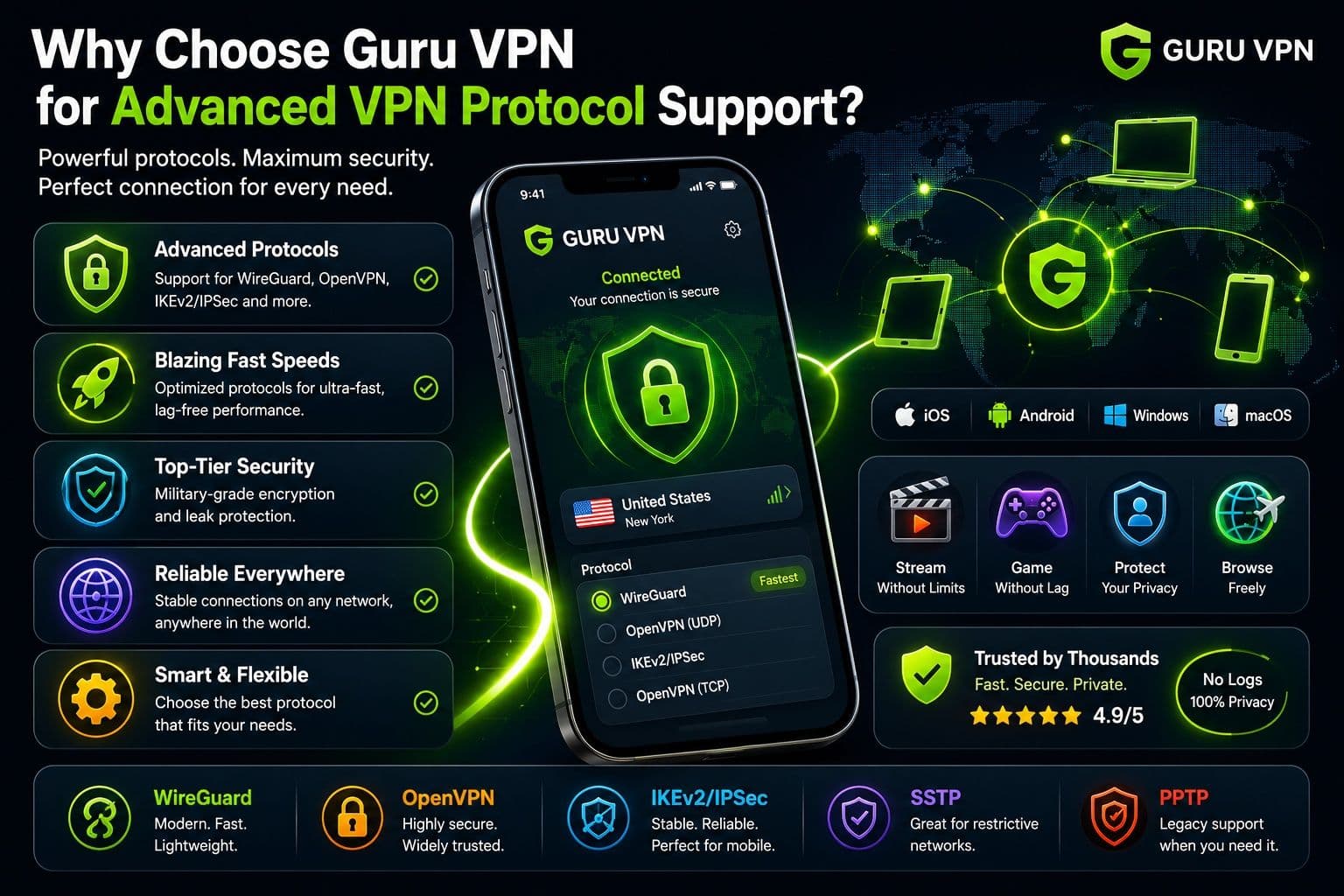
Why Choose Guru VPN for Advanced VPN Protocol Support
Choosing a VPN isn't just about finding fast servers — it's also about selecting a service that supports modern technologies capable of delivering secure, reliable, and efficient connections. Guru VPN combines advanced VPN protocols with optimized infrastructure to help users enjoy strong privacy and consistent performance across a wide range of devices and network conditions.
Key Features
| Feature | Benefit |
|---|---|
Support for modern VPN protocols | Delivers a balance of speed, security, and reliability |
WireGuard® technology | Fast connections with efficient encryption |
ChaCha20 encryption | Strong protection for everyday online activity |
Fast global servers | Smooth streaming, gaming, browsing, and downloads |
Optimized routing | Improves speed and connection stability |
Strong encryption | Protects internet traffic from interception |
Strict no-logs policy | Keeps browsing activity private |
Cross-platform compatibility | Available for desktop and mobile devices |
Unlimited bandwidth | Browse, stream, and download without data limits |
How Guru VPN Improves Connection Performance
Guru VPN is designed to remove much of the complexity involved in choosing the right protocol. Instead of requiring users to manually adjust technical settings, the application can automatically select the most appropriate protocol based on the current network and device. This helps maintain fast, stable connections while reducing the likelihood of configuration errors.
Optimized server routing further improves performance by directing traffic through efficient network paths, reducing latency and helping maintain reliable speeds even during busy periods. Built-in leak protection keeps your real IP address and DNS requests secure throughout every session.
For users with multiple devices, Guru VPN supports simultaneous connections under a single account, making it easy to stay protected on desktops, laptops, smartphones, and tablets. If you need a server in a specific region, you can browse the available locations before connecting.
Regular application updates ensure compatibility with the latest operating systems, while 24/7 customer support is available whenever assistance is needed. Combined with modern technologies such as WireGuard®, ChaCha20, and intelligent protocol selection, Guru VPN provides a secure and beginner-friendly VPN experience without requiring advanced technical knowledge.
How to Change VPN Protocol Settings
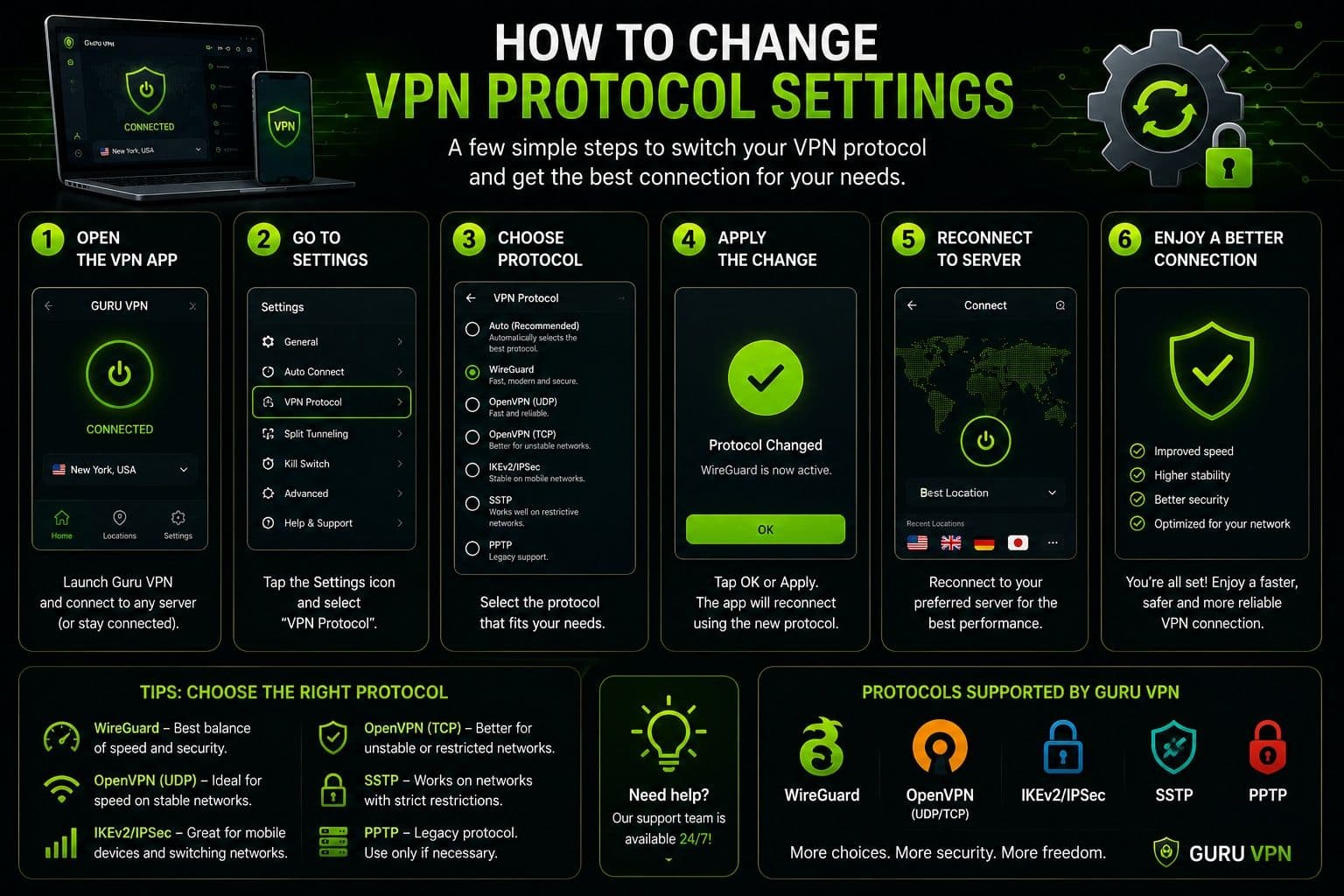
Most modern VPN applications allow you to switch protocols manually, although many also include an automatic mode that selects the most suitable option based on your network and device.
Changing Protocols on Desktop Devices
On Windows and macOS, protocol settings are usually found in the VPN application's Settings or Connection menu. From there, you can choose between the available protocols, such as WireGuard® or OpenVPN, save your changes, and reconnect to apply the new configuration.
If you notice slower speeds or connection instability after switching protocols, simply return to the previous option or enable automatic protocol selection.
Changing Protocols on Mobile Devices
On iPhone and Android, the process is similar. Open the VPN app, navigate to the settings menu, and select the preferred protocol if manual selection is available. Some mobile VPN apps automatically switch protocols when network conditions change, helping maintain a stable connection while moving between Wi-Fi and mobile data.
When Should You Change a VPN Protocol?
In most situations, there's no need to change protocols manually. However, switching may help if you experience unusually slow speeds, frequent connection drops, or restrictions on certain networks. Trying another protocol can improve compatibility, increase stability, or reduce latency depending on your device and internet connection. If your VPN offers an automatic mode, it's often the simplest and most effective choice for everyday use.
Frequently Asked Questions
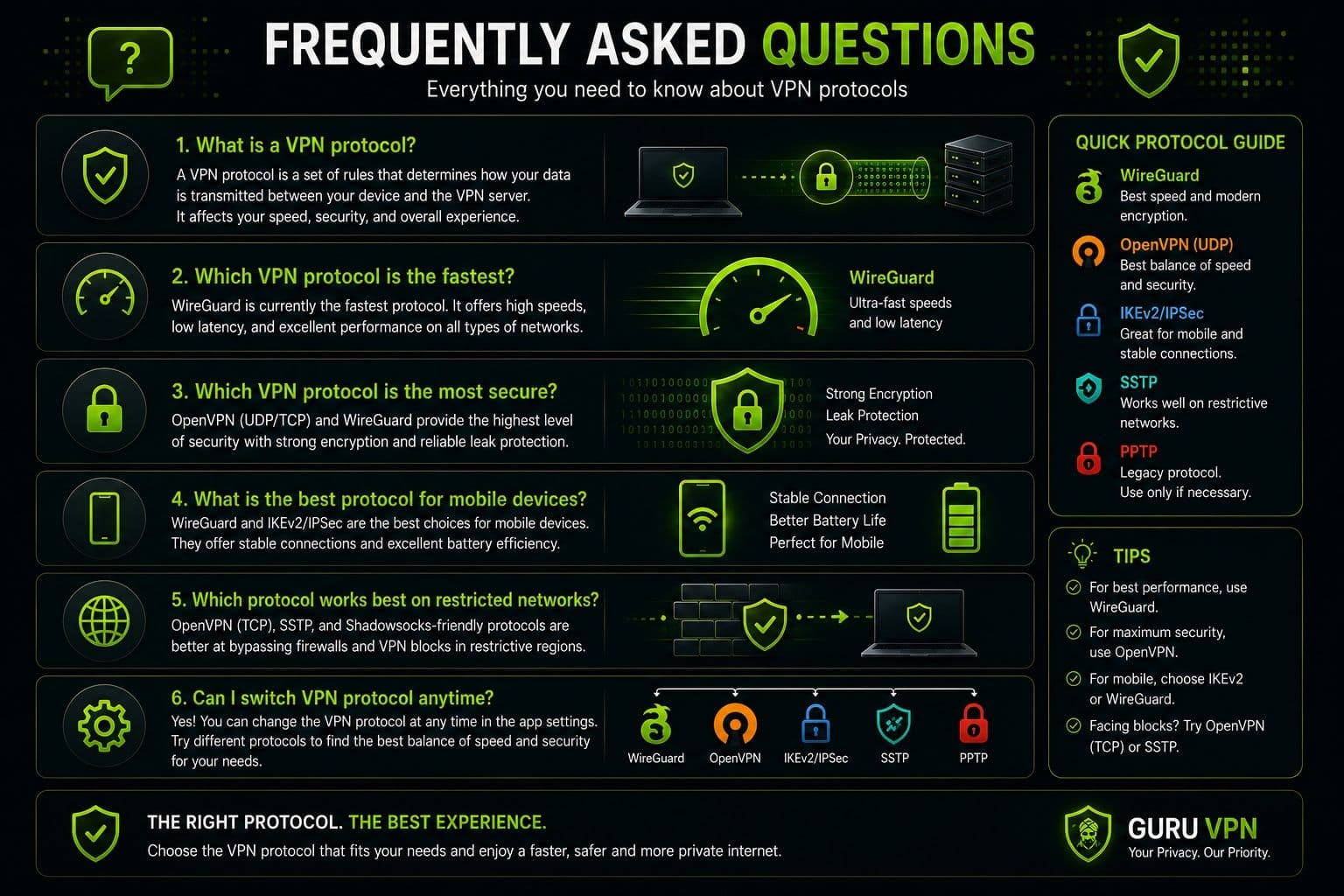
There isn't a single protocol that's best for everyone. The right choice depends on your priorities. If you want a balance of speed, security, and efficiency, WireGuard® is an excellent option. If your focus is maximum compatibility and a long-established security record, OpenVPN remains one of the strongest choices.
WireGuard® is generally considered the fastest modern VPN protocol. Its lightweight design allows it to deliver high speeds with low latency, making it well suited for streaming, gaming, video calls, and large downloads.
Both protocols offer excellent security, but they have different strengths. WireGuard® is typically faster and uses a smaller, more efficient codebase, while OpenVPN provides extensive configuration options and broad compatibility across different platforms. For most everyday users, either protocol offers strong protection.
For online gaming, a protocol that delivers low latency and stable performance is the best choice. WireGuard® is widely recommended because it minimizes delays while maintaining secure connections, especially when paired with a nearby VPN server.
Modern protocols such as WireGuard® and OpenVPN both provide a high level of security when implemented correctly. They use advanced encryption and authentication methods to protect internet traffic and personal information. Older protocols like PPTP should generally be avoided for sensitive online activities.
Yes. Most VPN applications allow users to choose a protocol in the settings menu. However, if you're unsure which option to select, automatic protocol selection is often the safest and most convenient solution because it adjusts to your network conditions without requiring manual configuration.
Yes. Guru VPN supports modern VPN technologies designed to provide fast, secure, and reliable connections across different devices and operating systems. It also includes automatic protocol selection to help users achieve the best balance of performance and security without having to adjust technical settings manually.
Choose the Right VPN Protocol for a Better Connection
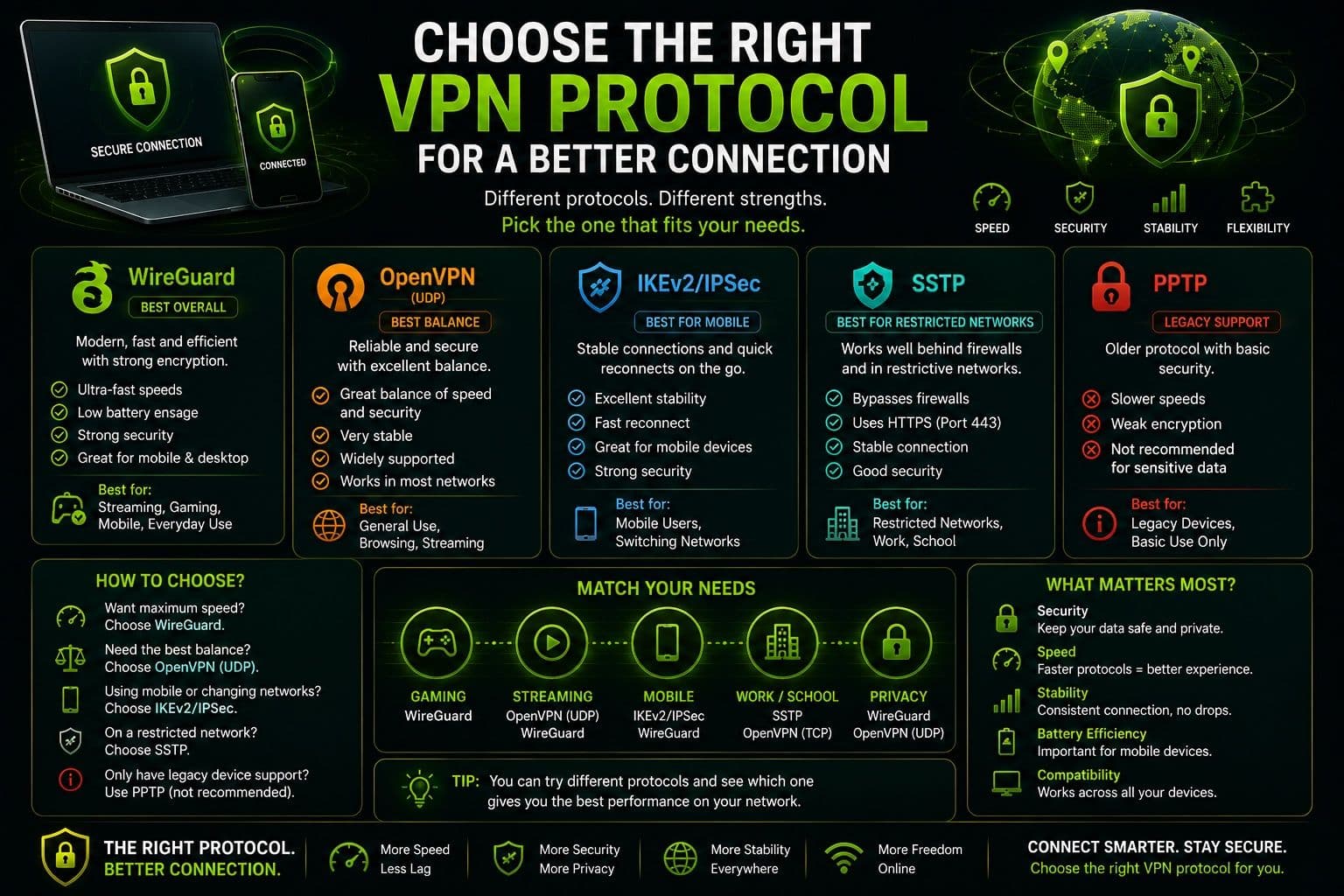
The protocol behind your VPN connection has a direct impact on how secure, fast, and reliable your online experience will be. While all modern protocols are designed to protect your internet traffic, they differ in the way they balance encryption, performance, compatibility, and connection stability. Understanding these differences makes it easier to choose the right option for your everyday activities.
There's no universal protocol that fits every situation. A lightweight protocol may deliver the best speeds for streaming and gaming, while another may prioritize stronger encryption for remote work or handling sensitive information. Mobile users may also benefit from protocols that reconnect quickly when switching between Wi-Fi and cellular networks.
Rather than manually testing every option, many users prefer VPN services that automatically select the most suitable protocol based on current network conditions. Guru VPN combines support for modern protocols with optimized routing and intelligent connection management to help deliver fast, stable, and secure performance across a wide range of devices. You can compare available plans.
Choosing a VPN that supports modern protocols helps ensure your connection remains protected today while staying compatible with new devices, operating systems, and evolving security standards.
Improve Your VPN Experience with the Right Protocol
VPN protocols are the foundation of every secure VPN connection. They determine how your data is encrypted, how efficiently it travels between your device and the VPN server, and how well your connection performs under different network conditions. Choosing the right protocol can improve browsing speeds, reduce latency, strengthen privacy, and provide a more reliable online experience.
As we've seen, modern protocols each offer their own advantages. Some are optimized for speed, others for maximum security, while several provide an excellent balance between the two. The ideal choice depends on how you use the internet and the level of protection you need.
Guru VPN brings these technologies together by supporting modern VPN protocols, optimized server infrastructure, intelligent protocol selection, and strong encryption in a user-friendly application. Whether you're streaming, working remotely, gaming, or simply browsing the web, you can enjoy secure and consistent performance without having to manage complex technical settings.
By choosing a VPN that supports modern protocols and regularly updates its technology, you'll be better prepared for today's online security challenges while enjoying faster, safer, and more stable internet connections every day.