
 BR
BR DE
DE ES
ES FR
FR RU
RU
Articles
Fake and Scam Websites: How to Spot Them and Stay Safe Online

Guru VPN experts
20.01.2026
Every device that goes online uses an IP address. It's basically your digital return label, telling where your connection is coming from so websites, apps, and services may send data back to you. Most people never think about it, but this little piece of information is quietly exposing more than you'd think.
Your IP might indicate, to an approximate extent, where you are located, who your internet provider is, the type of network, and patterns in how you use services online. Companies use it to track activity. Hackers scan it for weaknesses. Streaming platforms base their decisions on what you are allowed to watch on it. In some cases, targeted attacks on your home network may even be enabled.
In this article, it will be explained what someone can reasonably do with your IP address and how these risks apply to everyday users. It then breaks down each of the threats in plain language, with practical steps you can start using right away. By the end, you'll understand why controlling your IP is one of the best ways to protect your privacy, and why using a tool like GuruVPN is a great first step for anyone who truly cares about their online safety.
Your IP address does not show your name or your exact home address, but it still exposes information that can be used to identify you or target your network. Much of this data is collected automatically by websites, apps, advertisers, and anyone who interacts with your connection.
Here is what your IP typically reveals:
Your IP links your device to a specific region. Most websites can see your city or nearby area and sometimes your neighborhood. This is why online stores switch to your local currency and why you often see location based recommendations.
Your IP shows which ISP you use. This gives others an idea of the type of connection you have and whether you use a home network, corporate network, or a mobile provider.
An IP reveals if you are on a home Wi Fi network, a public hotspot, a university connection, or a business network. This helps attackers understand which security measures you may or may not have in place.
Your IP lets websites link your actions into a single session. Even without your name, they can build a profile that includes your interests, browsing habits, active hours, and frequently visited categories.
Attackers can scan an IP to detect open ports or vulnerable devices. Smart home gadgets, old routers, and security cameras are often the easiest targets.
Streaming platforms, eCommerce websites, and social networks use your IP to decide what content you can access. This explains regional restrictions or sudden blocks when traveling.
Some attackers look for IP ranges that belong to specific countries or providers. They target them with automated scans or malware campaigns that focus on that region.
Although an IP address cannot fully identify you on its own, it plays an important role in how others track, profile, or target your activity. The next sections break down the most common threats and show how easy it is for someone to misuse this information if it is left unprotected.
A DDoS attack happens when someone overwhelms your network with a large amount of unwanted traffic. The goal is to overload your connection until it becomes slow or completely unusable. This type of attack is very common among gamers, streamers, and anyone who participates in online activities that expose their real IP to strangers.
If someone knows your IP, they can direct automated tools to flood it with traffic. Your router cannot process such a volume of requests, so it stops responding. In severe cases, your entire home network goes offline until the attack stops or your provider resets your connection.
What this looks like in real life:
These symptoms often appear out of nowhere and repeat until the attacker loses interest.
Who is most at risk:
Many platforms unintentionally expose your IP during communication or data exchange, which makes you easier to target.
A few simple steps prevent most DDoS attempts:
1. Mask your real IP with a VPN. It changes your real IP with a secure one. Attacks hit the VPN server instead of your home network. The providers like GuruVPN absorb this traffic without affecting your device.
2. In case of an attack, restart your router. Quite often, a new session with the ISP assigns a new IP, breaking the pattern of the attack.
3. Switch off unnecessary services and open ports. Most routers have features enabled by default, making the work of an attacker much easier when trying to scan or overwhelm your network.
4. Do not share your IP via unsecured platforms. Public servers, game hosting, and file sharing will leak your real IP address if not protected.
A DDoS attack can completely disrupt your internet, but the solution is straightforward: hiding your real IP with a trusted VPN makes your network far less vulnerable and removes the most important piece of information from the attacker.
Each time you access a website or use an application, your IP address is how services pinpoint your connection. They then use this to connect the dots between your actions-even if you never register any accounts. This creates a detailed profile of your interests, habits, and browsing behavior.
Your IP serves as a relatively stable identifier. Even after you delete cookies or activate private mode, on many platforms, your region is detected and you are recognized as the same visitor from the same network. In this way, they may collect and combine information like:
Advertisers use this data to show targeted ads. Analytics tools use it to group you into demographic categories. Some platforms even sell this information to third parties.
Tracking may feel harmless at first, but the data it creates can be very sensitive. Over time, your browsing patterns reveal your work schedule, personal preferences, location habits, and even potential health or financial concerns. This information shapes how companies market to you and how they limit or prioritize your access to certain services.
Who relies on IP-based profiling:
These companies combine your IP data with other signals such as device information or browser fingerprints. As a result, they can track you across different sites even when you try to stay anonymous.
The good news is that you can break most tracking chains with a few practical steps:
1. Use a VPN to rotate your IP. A VPN replaces your real IP with another one. Websites see different connection points instead of a single consistent identity. This drastically reduces how much they can track or link to your device.
2. Block third party trackers and ads. Browser privacy tools reduce the amount of data collected from your sessions.
3. Separate your activities. Use different IPs for streaming, browsing, and work related tasks. A VPN makes this process simple.
4. Avoid logging in through multiple sites. Social media logins expose your activity to additional tracking networks.
IP based profiling is one of the most common forms of online monitoring. Hiding your IP removes the primary identifier that companies use to follow your behavior and predict your next steps.
Many online platforms adjust their prices based on the region detected through your IP address. This practice is common in travel services, digital subscriptions, software marketplaces, and even some eCommerce websites. The same product can cost more or less depending on where your connection is coming from.
Websites use your IP to identify your country, city, and sometimes even your neighborhood. This location data allows them to assign you to a specific pricing group. Companies often display higher prices in regions with higher average incomes or stronger purchasing power.
Here are some examples of what changes based on your IP:
Two users viewing the same page from different countries may see completely different totals.
Price discrimination helps businesses maximize revenue. If users in one region tend to pay more, the platform increases the base price for visitors from that location. The system is automated and runs continuously in the background.
This approach may be legal, but it is rarely transparent. Users often pay more simply because they are connected from a specific IP range.
Location based pricing affects:
The difference can sometimes be significant. In some cases, the cost may change by 20 to 60 percent based solely on your detected location.
Fortunately, you can check multiple price variations with a few simple actions:
1. Change your virtual location with a VPN. A VPN lets you view prices from different countries. This gives you a clear picture of regional differences and helps you choose the best offer.
2. Compare prices while logged out. Accounts may store regional preferences that override your IP.
3. Clear cookies before checking multiple regions. Some sites remember your previous location and adjust the price accordingly.
4. Review prices in several currencies. Some platforms round numbers differently depending on the region.
IP based pricing is a quiet but impactful way companies influence what you pay. Using a VPN gives you control over how platforms see your location and ensures that you are not locked into a higher price due to your region.
Once someone knows your IP address, they can run automated tools that search for weaknesses in your network. These tools scan open ports, outdated devices, and services that respond to external requests. The goal is to find an entry point that allows unauthorized access.
Scanning tools check your network for anything that can be exploited. The process is fast and fully automated. Attackers do not need to know who you are. They simply look for vulnerable IPs and run the same set of checks on thousands of targets.
Common targets include:
Once a weakness is found, the attacker can try brute forcing passwords or exploiting known vulnerabilities.
Modern scanning tools are widely available. Many of them require no advanced skills. Attackers only need an IP to begin the process, and every device connected to the internet has one.
This is why network scanning affects regular users just as often as businesses. Attackers are not hunting specific people. They are looking for any weak network that reacts to their probes.
A successful scan can reveal devices that are poorly configured. This opens the door to:
Even a small misconfiguration can create a security gap that grows over time.
You can significantly reduce your exposure by taking a few practical steps:
1. Hide your IP behind a VPN. A VPN blocks direct access to your network. Scanning tools see the VPN server instead of your home connection, which removes the attacker’s path to your devices.
2. Update your router and all connected devices. Old firmware often contains known vulnerabilities.
3. Disable unused services and ports. If you do not use remote access, file sharing, or UPnP, turn them off.
4. Use strong, unique passwords. Brute force attacks target common or default credentials.
5. Monitor your network for unknown devices. Most routers show a list of connected equipment. Anything unfamiliar should be investigated.
Network scanning is one of the most frequent ways attackers test your home network. Hiding your IP and keeping your devices updated makes these attempts ineffective and protects your most important entry points.
Your IP address often decides what content you can or cannot access. Many platforms use it to enforce regional rules, licensing agreements, or automated security checks. As a result, you may lose access to services or get blocked without any direct violation.
Websites check your IP to determine:
This is why some videos, games, apps, or websites appear unavailable when you travel or change networks.
Common situations:
In many cases, the block is automatic and difficult to dispute.
You can bypass most IP based restrictions with simple steps:
1. Switch your virtual location with a VPN. If a service is unavailable in one region, connect through another.
2. Use residential IP servers when possible. They lower the chance of automated blocking.
3. Rotate your IP regularly. This reduces the risk of getting caught in shared IP bans.
IP based blocking is not always malicious, but it can restrict your digital freedom. A VPN gives you flexibility and helps you access the services you already use without unnecessary barriers.
Although rare, having access to your IP address can help someone approximate your location and link it to your online identity. This risk mostly affects streamers, gamers, and people who frequently interact with large or public audiences. By analyzing IP activity, attackers can sometimes determine the city or neighborhood you connect from and use that as a starting point for harassment.
Swatting occurs when someone sends false emergency reports to your local authorities. The attacker uses bits of information collected online - such as approximate geolocation from your IP, usernames, or publicly available profiles - to create a credible scenario. While your IP alone does not reveal your exact address, it helps attackers assemble a map of your digital footprint.
Potential consequences:
Even though swatting and real-world harassment are uncommon, protecting your IP is the most effective way to reduce this risk. A VPN combined with careful online habits creates a strong barrier between your digital activity and your physical location.
When someone knows your IP address, they can probe your network for open ports. Open ports act as digital entry points that allow specific services to communicate with the internet. If one of these ports is linked to a vulnerable or outdated service, attackers can attempt to deliver malware directly to your device.
Attackers run automated tools that scan your IP for active ports. Once they find a port that responds, they check whether it uses outdated software. If a known vulnerability exists, they can launch targeted malware attacks. This often happens without any interaction from the victim.
Port based attacks can lead to silent infections. Malware may enter through routers, NAS devices, old printers, IP cameras, or outdated apps that communicate with the internet. Many users never notice the intrusion until their device behaves unpredictably or starts sending unusual traffic.
Common consequences:
Once malware gains a foothold, it can spread across the entire home network.
You can block most of these attempts with simple precautions:
1. Use a VPN to hide your network surface. A VPN stops direct port scans because attackers only see the VPN server, not your router.
2. Keep your router firmware and home devices updated. Old firmware is the most common weak point.
3. Turn off unused remote access tools. If a device does not need to be reachable from the internet, disable external access.
4. Run periodic malware scans. This helps detect infections before they escalate.
Port probing is one of the oldest forms of attack and still one of the most effective. By hiding your real IP and closing unused entry points, you remove the attacker’s ability to map and target your network.
Your internet service provider (ISP) sees everything that goes through your connection. They can log websites you visit, the time you spend online, and the services you use. In some countries, ISPs are required to store this data and may share it with authorities or sell it to third parties.
Using a VPN encrypts your traffic, so your ISP sees only that you’re connected to the VPN server, not the sites or services you access. This simple step hides your activity from prying eyes and reduces profiling.
Public Wi-Fi networks are convenient but inherently insecure. When you connect, your IP becomes visible to other users and potential attackers. Techniques like ARP spoofing or man-in-the-middle attacks allow criminals to intercept your data, inject malware, or steal credentials.
Always connect through a VPN on public Wi-Fi. A VPN encrypts all traffic between your device and the VPN server, making it impossible for anyone on the same network to read your data. Avoid logging into sensitive accounts without this protection.
An exposed IP address can quietly contribute to building a surprisingly detailed profile of a person. While an IP alone doesn’t reveal identity, it acts as a puzzle piece that links together various online traces. When combined with publicly available information - such as social media activity, website interactions, and even device fingerprints - it becomes part of a larger mosaic that can indicate behavioral patterns, approximate location, interests, and browsing habits.
Attackers can also scan for open ports associated with that IP, identifying potential vulnerabilities or inferring the types of devices connected to the network. This technical footprint, paired with social data, significantly increases the risk of targeted phishing, credential harvesting, and impersonation attempts.
Mask your real IP address using a VPN or proxy service, and consciously minimize your public digital footprint. Reducing the amount of personal information available online dramatically limits the value of any IP-based data an attacker might obtain.
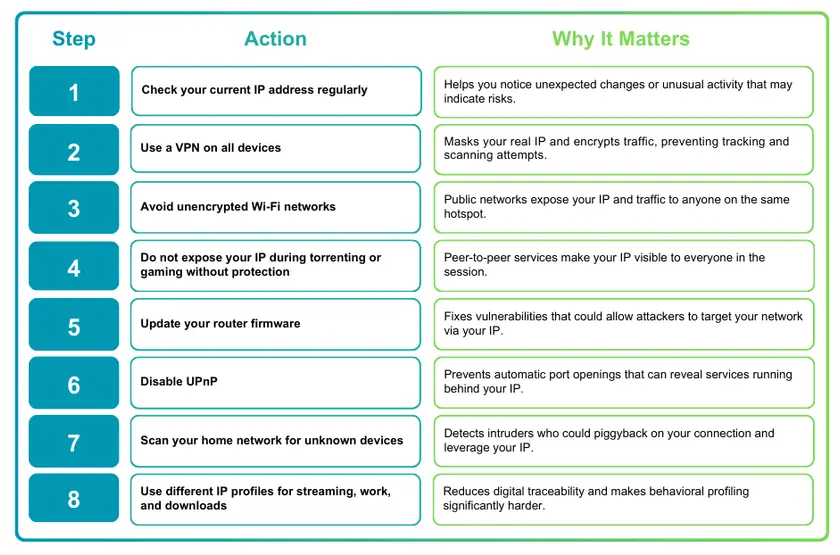
Your IP address may seem like a small technical detail, but it plays a central role in how the internet identifies and tracks you. It can reveal your approximate location, expose your devices to scanning, and help bad actors assemble a surprisingly detailed picture of your digital life. As the risks in this article show, your IP is often the first point of vulnerability that attackers try to exploit.
The good news is that these threats are manageable. With the right habits and a secure browsing setup, you can shut down most risks before they ever reach you. Regular checks, safe network practices, and strong privacy tools make a dramatic difference in how protected you are day to day.
Protect your IP instantly with GuruVPN - stay invisible, safe, and one step ahead.